


Firefox v131.0.3 on Linux Mint 21.3 boots with only blue lines of text and does not boot graphically anymore

I have been using Linux Mint 21+ since May of 2023. At that time I set all the Firefox preferences settings to what I've always set them to in the past, and have run Firefox with them ever since then. Now, about 3-4 weeks ago, I started Firefox and it came up with ONLY blue lines of text (not graphically). My Firefox homepage is "isp.netscape.com". I've waited until now to report the problem, since I was hoping that later Firefox updates would fix itself, but this did not occur with the 3-5 Firefox recent updates.
Originally, I posted the problem to the Linux Mint forums with the following title under SOFTWARE & APPLICATIONS: Firefox browser no longer graphical but only lines of blue text
Somebody there advised me to start Firefox in safe mode, which I did with this command in the terminal: firefox -safe-mode
and to my surprise, Firefox then came up graphically once again. However, going through the Firefox preferences and setting them one at a time, I came to what is causing the problem. Setting PRIVACY & SECURITY -> BROWSER PRIVACY -> HISTORY: "Remember History" to "Never Remember History" forces Firefox to reboot and when it comes up it came up with only blue lines of text, and not graphically.
One responder to my post on Linux Mint forums stated that it was also a problem with her on Windows 11. So, this is not a Linux Mint, or Windows 11 issue, but a Firefox issue. Mozilla made some change to Firefox back 4-5 weeks now that all of a sudden made Firefox come up in blue lines of text, and I changed nothing with Firefox since started with Linux Mint 21.3 1.5 years ago. I will add though, that ONLY my Firefox homepage (listed above) is the only page that is affected by this, every other website I visit comes up graphically.
What's UP?
Ron
Below I've listed all my Firefox preferences settings, in case you need to see them:
Set Firefox Preferences (May 22, 2023)
- General
   Startup
     Uncheck "Open previous windows and tabs"
     Check "Always check if firefox is your default browser"
   Tabs
     Uncheck "Ctrl-Tab cycles through tabs in recently used order"
     Check "Open links in tabs instead of new windows"
     Check "When you open a link, image or media in a new tab, switch to it
           immediately"
     Uncheck "Confirm before closing multiple tabs"
     Uncheck "Confirm before quitting with CTRL+Q"
   Language And Appearance
     Website Appearance
       Click Automatic
     Colors
       Do nothing
     Fonts
       Default Font: "Default (DeJaVu Serif)"
       Size: 16
     Zoom
       Default zoom: 100%
       Uncheck "Zoom text only"
     Language
       English (US)
       Check "Check your spelling as you type"
   Files And Applications
     Downloads
       Click "Save files to:" /media/Linux-BU-HD/Downloads
       Uncheck "Always ask you where to save files"
     Applications
       Change action to "Save File" for all listed under "Content Type"
       Click "Save files"
       Check "Play DRM-controlled content"
   Performance
     Check "Use recommended performance settings"
   Browsing
     Check "Use autoscrolling"
     Uncheck "Use smooth scrolling"    Network Settings
     Do nothing
- Home
   New Windows And Tabs
     Homepage & new windows: Custom URLs...
                             http://isp.netscape.com
     New tabs: Blank Page
   Firefox Home Content
     Uncheck "Web Search"
     Uncheck Shortcuts
     Uncheck "Recommended by Pocket"
     Uncheck "Recent activity"
     Uncheck "Snippets"
- Search
   Search Bar
     Click "Use the address bar for search and navigation"
   Default Search Engine
     Click Google
   Search Suggestions
     Uncheck "Provide search suggestions"
   Search Shortcuts
     NOTE: Click each item individually and then click remove, but not all
           items can be removed
- Privacy & Security
   Browser Privacy
     Click Standard
     Click Always to "Send websites a 'Do Not Track' signal that you don't
             want to be tracked"
   Cookies And Site Data
     Check "Delete cookies and site data when Firefox is closed"
   Logins And Passwords
     Uncheck "Ask to save logins and passwords for websites"
     Check "Show alerts about passwords for breached websites"
     Uncheck "Use a primary password"
   Forms And Autofill
     Uncheck "Autofill addresses"
     Uncheck "Autofill credit cards"
   History
     Fire Will: "Never remember history"
     NOTE: The above requires you to restart firefox
   Address Bar - Firefox Suggest
     Uncheck "Browsing history"
     Uncheck Bookmarks
     Uncheck "Open tabs"
     Uncheck Shortcuts
     Uncheck "Search engines
     Turn Off "Suggestions from the web"
     Turn Off "Suggestions from sponsors"
     Turn Off "Improve the firefox suggest experience"
   Permissions
     Check "Block pop-up windows"
     Check "Warn you when websites try to install add-ons"
   Firefox Data Collection And Use
     Uncheck "Allow Firefox to send technical & interaction data to Mozilla"
     Uncheck "Allow Firefox to install and run studies"
     Uncheck "Allow Firefox to send backlogged crash reports on your behalf"
   Security
     Deceptive Content And Dangerous Software Protection
       Check "Block dangerous and deceptive content"
       Check "Block dangerous downloads"
       Check "Warn you about unwanted and uncommon software"
     Certificates
       Check "Query OCSP responder servers to confirm the current validity
             of certificates"
     HTTPS-ONLY Mode
       Click "Don't enable HTTPS-ONLY mode"
- Sync
Do nothing
- More From Mozilla
   Do nothing
     Check "Always show scrollbars"
     Uncheck "Always use the cursor keys to navigate within pages"
     Uncheck "Search for text when you start typing"
     Uncheck "Enable picture-in-picture video controls"
     Uncheck "Control media via keyboard, headset or virtual interface"
     Uncheck "Recommend extensions as you browse"

Усі відповіді (2)
I have no issue with the site using my distro nor Mozilla version. see screenshot Try downloading Firefox from Mozilla, run firefox-bin from the folder and see if you have the same issue. https://www.mozilla.org/en-US/firefox/all/#product-desktop-release Also try your OS or another on a live usb stick.
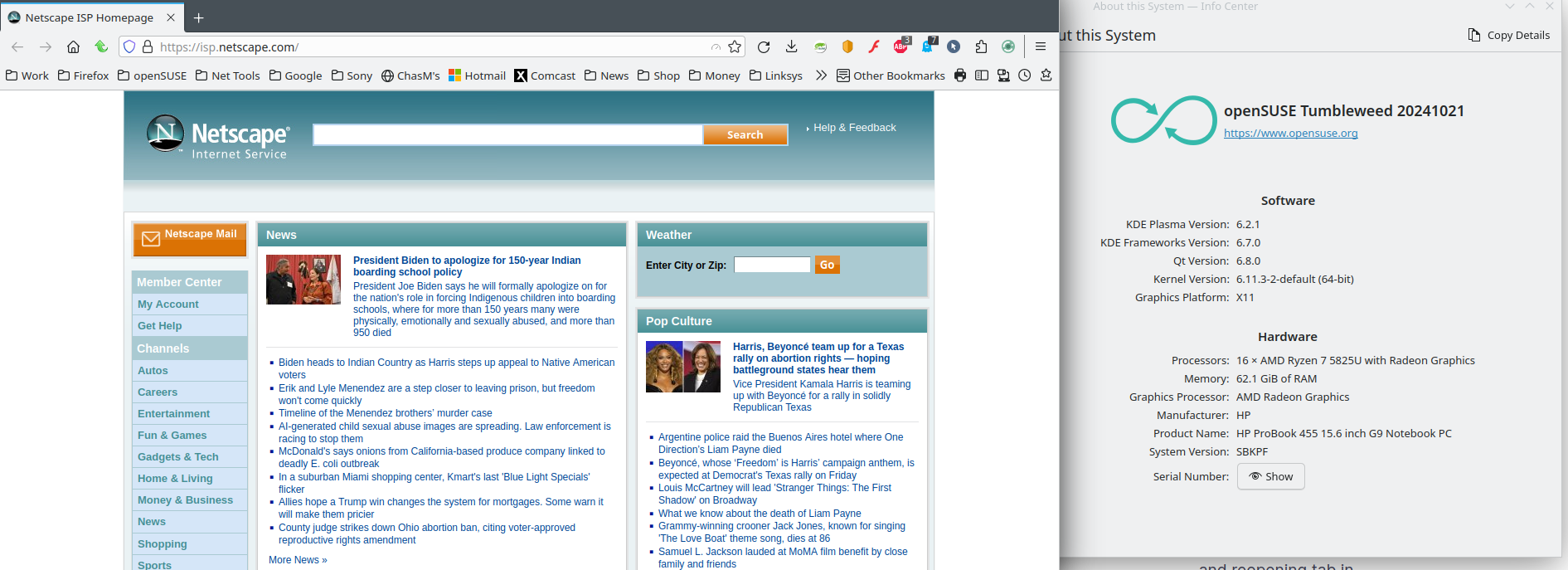
Змінено jonzn4SUSE
First, let me state I don't do anything on Linux (in this case Linux Mint 21.3) but run Firefox to browse the web and access my email account. So, I don't know a lot (or much at all) about doing things on Linux.
jonzn4SUSE,
I'm assuming you set your Firefox preferences to what I posted that I set mine to?
Next, I clicked on the link you posted for me to get the latest Firefox for Linux. I extracted the firefox-bin to my desktop and double-clicked it and nothing happened. I even tried double-clicking firefox-bin without extracting it to my desktop and it stated something to the affect "no application found". ?????
FYI: I'm a Mac user! I have a Mac Pro 2008 computer running both Mac OS X 10.6.8 & 10.11.6, but they are too old for Apple to support anymore, hence my need to also install Linux on my computer, since I can update it on an almost daily basis. Hence my ONLY need to run Firefox for web browsing and accessing my email (things I can no longer do on my Mac Pro computer). So, if you are going to have me do things, take what I've said into account, and be very specific with what you might ask me to do in the future. Also, you suggested that I do something with a USB stick. I do not own any USB stick. Also, take into consideration I'm 75 years old.
Ron