


Gmail Folders as Subdirectories are all displayed in root after upgrade to 115

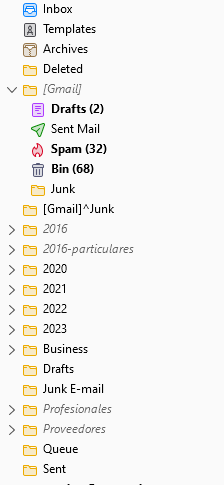
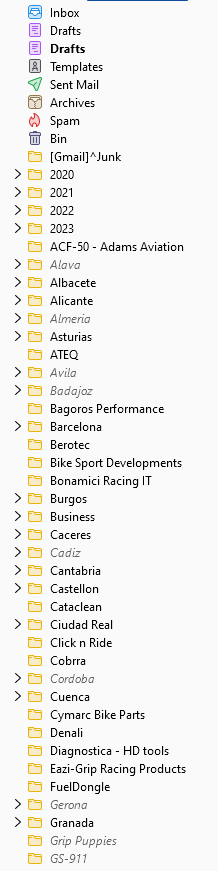
102.150.0: Folders have subdirectories as per image 1 115: Subdirectores are shown in the root as per image 2
For us this is unusable, so have to revert to 102.
Усі відповіді (5)
Is this an indication that 115 has fixed something and they are now showing "correctly" or nested subfolders are now not allowed?
Nested folders are generally allowed - if you make them they are honored.
However, the change was made because it was decided the original implementation of forcing gmail special folders into [Gmail] was a mistake.
ok, I understand about the special folders. But the nested folders are now all in the root, which I believe is unrelated to the change?
Do you see this also with version 115.5.2? Do any of https://mzl.la/47V8KOI match your issue?
Wow, lots of similar stuff in there...a relief to see I'm not the only one faced with this showstopper. Last "check" I did (unwanted automatic upgrade) was 115.5.1, I've not tested with 115.5.2, yet.