


iPad OS. Where can I find my sync tabs?

Hi. iPad OS is not the same iOS. There is no LIBRARY item in the menu list. So, I cannot find my list of sync tabs. At the same time I see the list of all my sync devices in the account menu. iPad OS 14.4, Firefox Daylight 34.2 (5301). The question is where can I find the list of sync tabs? Thank you
Усі відповіді (3)

I also have this problem on an iPad 8th generation (latest) using Firefox Daylight 35.0 (5448). Other devices can see the tabs currently opened opened on the iPad, but Firefox on the iPad has no way to view the tabs from the other devices.
Вибране рішення
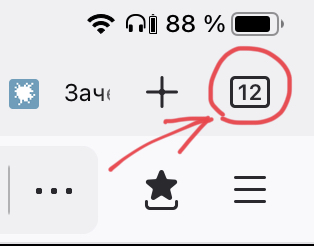
I found sync tabs. Press the square button on the top right corner that shows a number of tabs. And then choose tab “Synchronized”.
thankyou. Synced tabs is back! Too bad though that Firefox on every platform has a significantly different UI.