


How can I change the background color of the Firefox top menu bar on Windows 10?
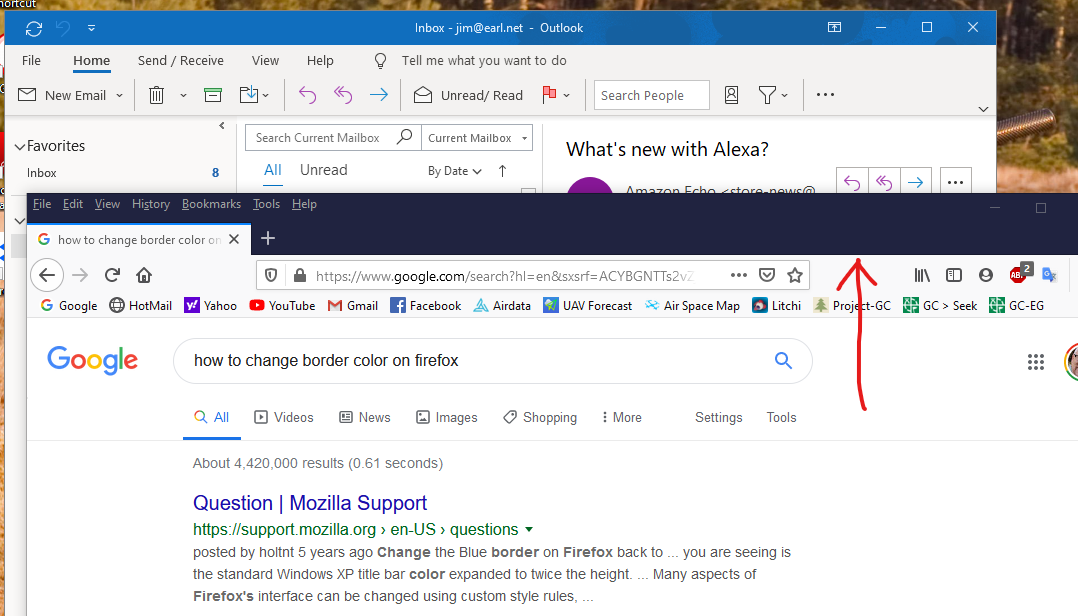
I have upgraded to Windows 10, and now the Firefox top menu bar background is dark purple and hard to see.
The webpages all look fine and proper. This is the background color behind the "File Edit View History Bookmarks Tools Help" bar.
All my other Windows programs are light blue. See attachment.
Thanks!
Обране рішення
hi, you could either set a particular color in the windows 10 settings under "personalisation" and have it apply to titlebars and window borders or adjust firefox to your liking with the help of https://color.firefox.com/
Читати цю відповідь у контексті 👍 0Усі відповіді (2)
Вибране рішення
hi, you could either set a particular color in the windows 10 settings under "personalisation" and have it apply to titlebars and window borders or adjust firefox to your liking with the help of https://color.firefox.com/
Thank you, Philipp! I really didn't want to install anything, but that works!