How can I delete obsolete icons from the Firefox startup screen?
I like the screenful of application icons when I load Firefox. But many of the icons are dead links. How can I delete the obsolete icons - there doesn't seem to be any visible method for deleting old icons.
Змінено James Burke
Усі відповіді (1)
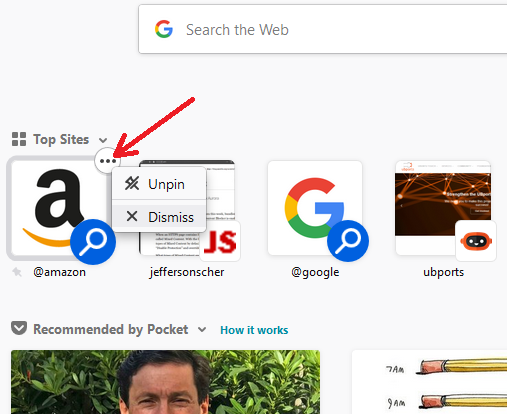
Hi JJJoseph, do you mean the "Top Sites" section of the built-in Firefox home page? When you hover over an icon, after a short delay, a little circle should appear at the upper right with a ••• button. Click that to find options for that tile.
"Unpin" unlocks that icon and it may move down the list or disappear, depending on how often you visit.
"Dismiss" adds the URL to a block list so that tile doesn't come back.
Example screenshot attached; for a regular website, the menu has more options.
Does that work for you?