Windows 10 reached EOS (end of support) on October 14, 2025. If you are on Windows 10, see this article.

Avatar for Username

Шукати в статтях підтримки

Остерігайтеся нападів зловмисників. Mozilla ніколи не просить вас зателефонувати, надіслати номер телефону у повідомленні або поділитися з кимось особистими даними. Будь ласка, повідомте про підозрілі дії за допомогою меню “Повідомити про зловживання”

Докладніше
Ця тема перенесена в архів. Якщо вам потрібна допомога, запитайте.
Вирішено Архівовано

Ctrl +D not working as it did

Richard49

I always used Ctrl +D to bookmark a page; Firefox would offer up an option for me to select where I wanted to bookmark be placed.

Now when I use Ctrl +D Firefox is automatically placing the bookmark for me (states 'Saved in Library') and I'm having to open up 'All Bookmarks', selecting the recently added bookmark and moving it to where I want it stored.

This is very annoying and I can't find a solution to correct it.

Maybe you know how to?

I always used Ctrl +D to bookmark a page; Firefox would offer up an option for me to select where I wanted to bookmark be placed. Now when I use Ctrl +D Firefox is automatically placing the bookmark for me (states 'Saved in Library') and I'm having to open up 'All Bookmarks', selecting the recently added bookmark and moving it to where I want it stored. This is very annoying and I can't find a solution to correct it. Maybe you know how to?

Усі відповіді (2)

Press <Control> D again. This should open a window with that bookmark's data inside. From here you can edit the data.

Вибране рішення

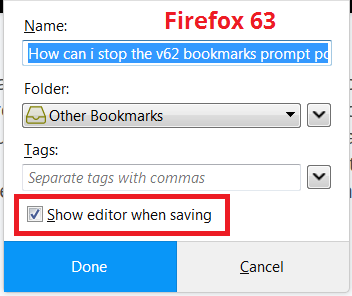
You probably need to turn on the "show the editor" setting. After adding a bookmark, the star in the address bar should turn blue. Click the star, then find the "show editor when saving" setting. Here is a screenshot from a couple versions back for reference:

Does that work?