


Windows 10 reached EOS (end of support) on October 14, 2025. For more information, see this article.

Шукати в статтях підтримки

Остерігайтеся нападів зловмисників. Mozilla ніколи не просить вас зателефонувати, надіслати номер телефону у повідомленні або поділитися з кимось особистими даними. Будь ласка, повідомте про підозрілі дії за допомогою меню “Повідомити про зловживання”

Докладніше

Ця тема перенесена в архів. Якщо вам потрібна допомога, запитайте.

Turning off the search functions when tyiping in adress bar

  • 3 відповіді
  • 1 має цю проблему
  • 5 переглядів
  • Остання відповідь від Happy112

more options

When I was typing in the adress bar, I accidentally clicked something where it brought up all of these logos of the different ways I could search (Google, Bing, Wikipedia, etc.). What was the command that made that appear and how do I turn that off?
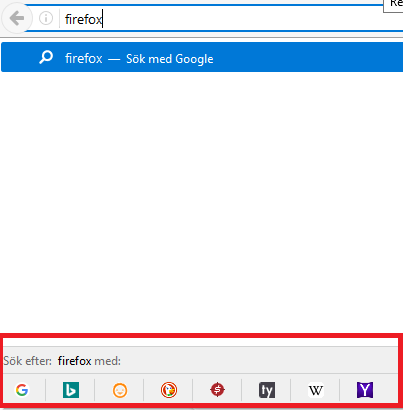
When I was typing in the adress bar, I accidentally clicked something where it brought up all of these logos of the different ways I could search (Google, Bing, Wikipedia, etc.). What was the command that made that appear and how do I turn that off?
Вкладені знімки екрана

Обране рішення

HI   !

You can disable that feature :

Type in the address bar   about:config   (press Enter) (promise to be careful, if asked) Type and look for the preference : browser.urlbar.oneOffSearches and set its value to   false

Читати цю відповідь у контексті 👍 2

Усі відповіді (3)

more options

Вибране рішення

HI   !

You can disable that feature :

Type in the address bar   about:config   (press Enter) (promise to be careful, if asked) Type and look for the preference : browser.urlbar.oneOffSearches and set its value to   false

more options

Thanks! While I use Firefox regularly, it never comes to my mind about the existence of the "about:config" feature.

more options

KalKent said

Thanks! While I use Firefox regularly, it never comes to my mind about the existence of the "about:config" feature.

Not everybody knows about it, and even then : you'd have to know which preference you need to look for ...... Glad you got rid of that nuisance, though  !