


I can't add multiday events to calendar anymore

When I create an event, the date automatically changes to one hour before the end date or one hour after the start date, depending on which one I try to change. I use the standard version of calendar (no add-ons) that came with Thunderbird installation.
Вибране рішення
Look at Bruce's screen shot. You see the small links following the times? If the tips of the links are touching the duration of the event is set to what you have in the options for the calendar which sounds like a hour. Click those links and make them open up like in the screen shot to have more flexibility on the duration time.
Усі відповіді (4)
Do you mean you cannot change the end date for the event? See my screenshot below.
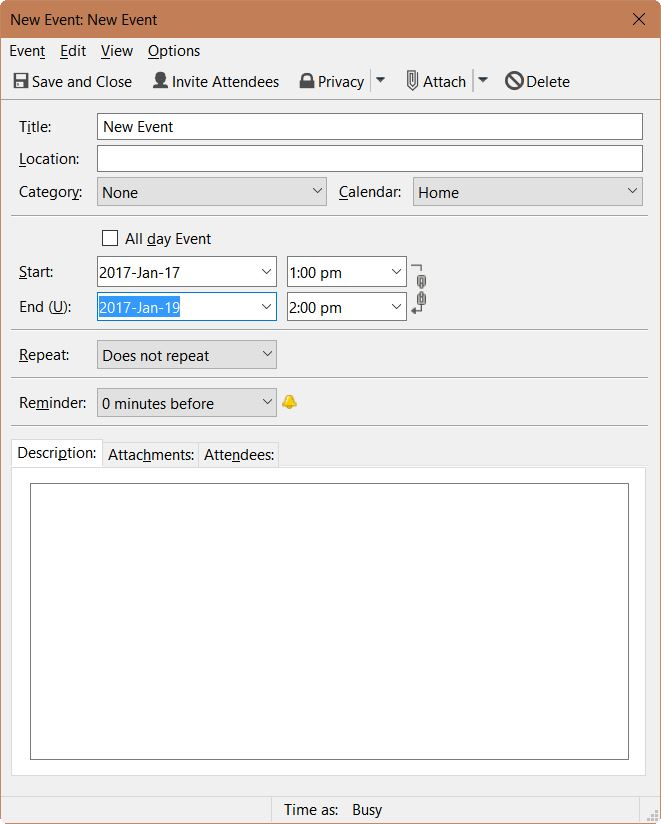
Hi, No, I can change the dates but when changing the end date, the start date automatically adapts to one hour before the end date, and when changing the start date, the end date automatically adapts to one hour after the start date. So I can only register events that last one hour.
Вибране рішення
Look at Bruce's screen shot. You see the small links following the times? If the tips of the links are touching the duration of the event is set to what you have in the options for the calendar which sounds like a hour. Click those links and make them open up like in the screen shot to have more flexibility on the duration time.
Hi, yes that solved it. Thanks :)
This question has been locked because the original author has deleted their account. While you can no longer post new replies, the existing content remains available for reference.