


firefox is not saving history what to do to save history?

firefox is not saving history even when remember history is selected and im not using any cleaning tools. Only history visible is in recent closed tabs. So what to do?
Seçilen çözüm
Selecting "Use custom settings for history" doesn't make changes to history settings, it merely makes it possible to inspect the history settings and modify individual items.
Isn't there any history visible in the Library (History > Show All History)?
You can check for problems with the places.sqlite database file in the Firefox profile folder.
- http://kb.mozillazine.org/Bookmarks_history_and_toolbar_buttons_not_working_-_Firefox
- https://support.mozilla.org/kb/Bookmarks+not+saved#w_fix-the-bookmarks-file
Tüm Yanıtlar (7)
Hi
Please try setting the history to Use Custom settings for history and verify if the following are checked as per the image.
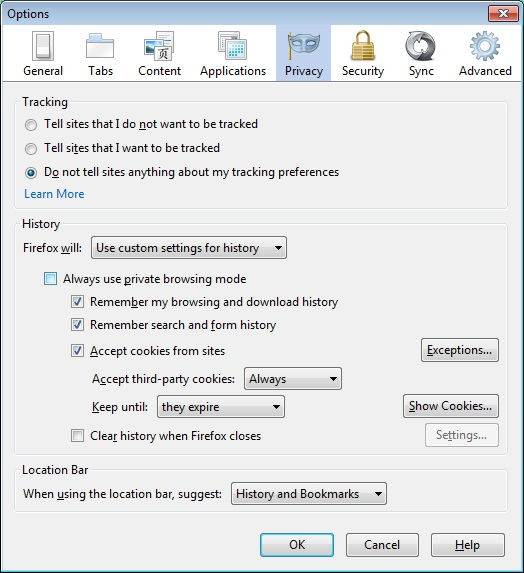
Hello,
Firefox tab-options-privacy-history choose from the given options.
Thanks
Make sure that you do not run Firefox in (permanent) Private Browsing mode (Never remember history).
- Tools > Options > Privacy > Firefox will: "Use custom settings for history"
- Deselect: [ ] "Always use private browsing mode"
In case you are using "Clear history when Firefox closes":
- do not clear the Browsing History
- Tools > Options > Privacy > Firefox will: "Use custom settings for history": [X] "Clear history when Firefox closes" > Settings
- https://support.mozilla.org/kb/Clear+Recent+History
Note that clearing "Site Preferences" clears all exceptions for cookies, images, pop-up windows, software installation, and passwords.
yep all of them are checked
yep all of them are checked
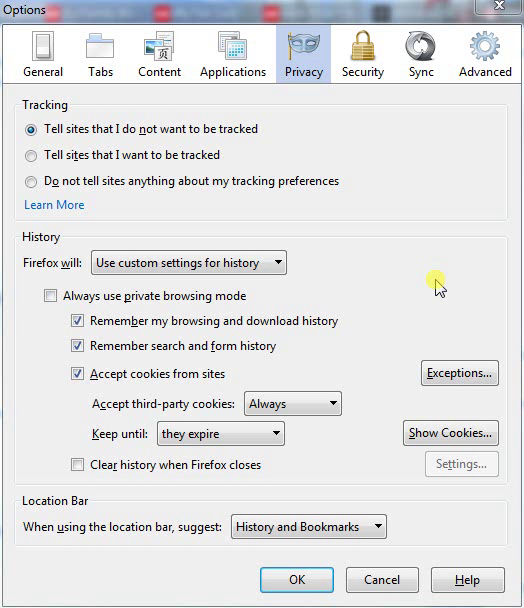
change from 'use custom settings for history' to 'remember history'
Seçilen çözüm
Selecting "Use custom settings for history" doesn't make changes to history settings, it merely makes it possible to inspect the history settings and modify individual items.
Isn't there any history visible in the Library (History > Show All History)?
You can check for problems with the places.sqlite database file in the Firefox profile folder.
cor-el tarafından tarihinde düzenlendi