


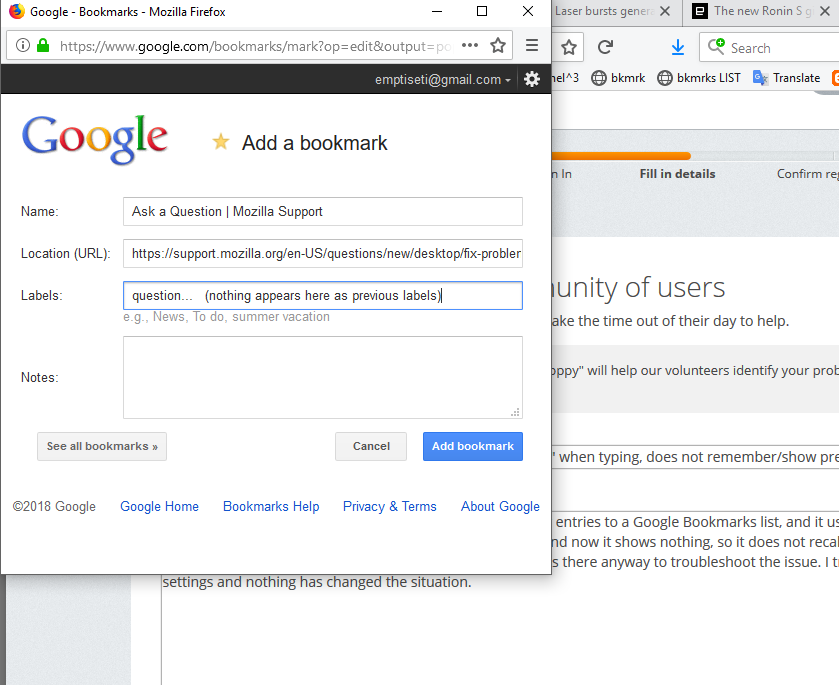
Google bookmarks link pop-up "add-new Google Bookmark" when typing, does not remember/show previous entries as before.

I use a (bookmarklets?) link in my firefox toolbar to add new entries to a Google Bookmarks list, and it used to show various previous entries or a remembered history when typing a new entry and now it shows nothing, so it does not recall what is already there on the site, and appears to be a Firefox issue, from what I can tell. Is there anyway to troubleshoot the issue. I tried changing various history settings and nothing has changed the situation.
Thanks for any suggestions.
Tüm Yanıtlar (3)
(could not upload image first attempt, here is a screenshot of the issue)
Do you have any google toolbars or addon installed?
No, just a bookmarklet, with url properties....
javascript:(function(){var%20a=window,b=document,c=encodeURIComponent,d=a.open("https://www.google.com/bookmarks/mark?op=edit&output=popup&bkmk="+c(b.location)+"&title="+c(b.title),"bkmk_popup","left="+((a.screenX||a.screenLeft)+10)+",top="+((a.screenY||a.screenTop)+10)+",height=510px,width=550px,resizable=1,alwaysRaised=1");a.setTimeout(function(){d.focus()},300)})();