Extension
Let me install the extension


Let me install the extension
please tell me how to fix problem
Both History and Bookmarks in Firefox are not accessible as of today. What has happened to them, and how can I get them back?
i cant reach https://myaccount.esbnetworks.ie/ site. Can some one help me
Since I lost my old Firefox app...that I had for ever it seems..I had to download thw new version and now everytime I plug my S24 Ultra in to charge Firefox pops up with … (อ่านเพิ่มเติม)
Since I lost my old Firefox app...that I had for ever it seems..I had to download thw new version and now everytime I plug my S24 Ultra in to charge Firefox pops up with YouTube as the page...this never did this before & I cannot find in any other setting...I was told to contact you to find out Thank You Stephanielynn
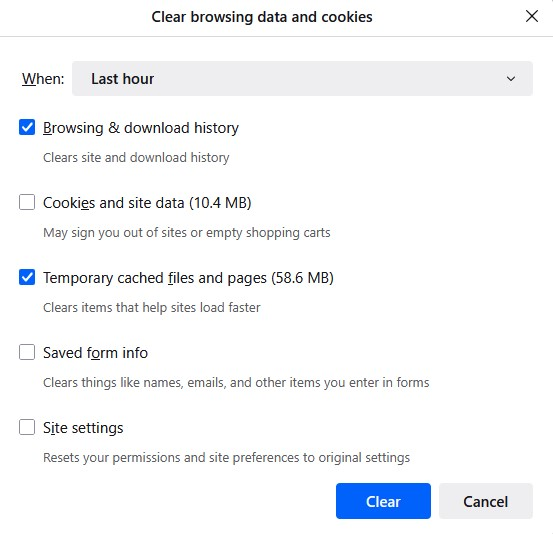
Ok so I usually choose these option to remember history and from time to time delete Browsing & download history and Temporary cached files and pages. https://asset… (อ่านเพิ่มเติม)
Ok so I usually choose these option to remember history and from time to time delete Browsing & download history and Temporary cached files and pages.
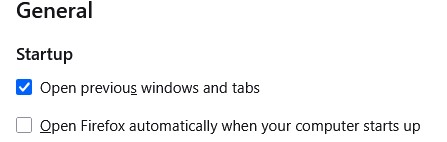
Note: I have "Open previous window and tabs" ticked in general settings which also has a restore previous session option in the history menu. This brings back previous session with tabs etc as is when I close FF. https://assets-prod.sumo.prod.webservices.mozgcp.net/media/uploads/images/2025-06-28-08-45-51-cf2daf.png
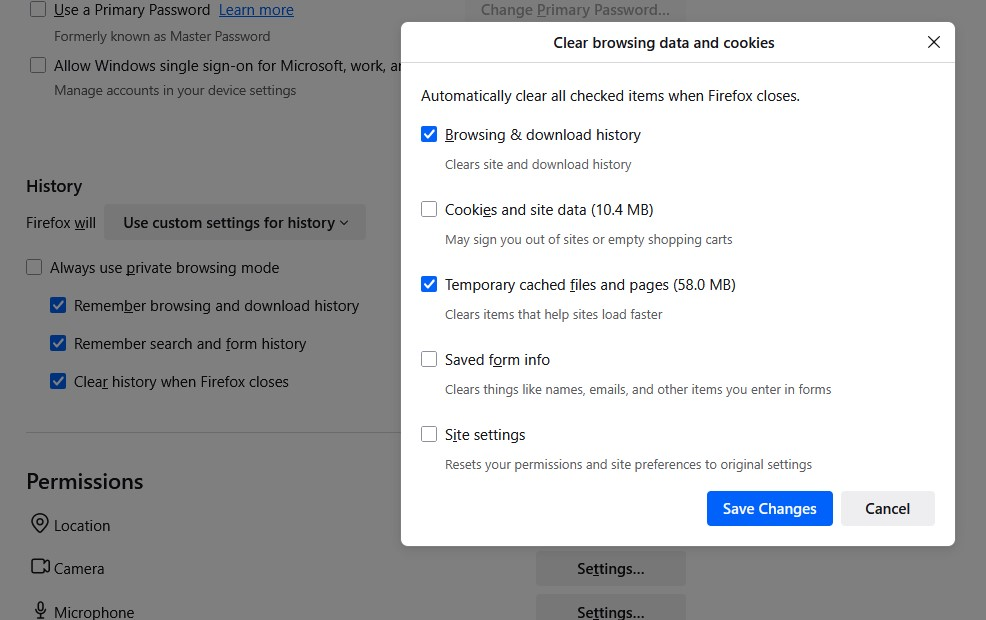
I thought I could automate this on exit but don't think its working right. So I change the option to "use custom settings for history" and tick all three options:
Remember browsing and download history Remember search and form history Clear history when Firefox closes For "Clear history when Firefox closes" I ticked Browsing & download history and Temporary cached files and pages. https://assets-prod.sumo.prod.webservices.mozgcp.net/media/uploads/images/2025-06-28-08-45-43-b10213.png
The issue is the restore session option is missing and FF opens with all previous tabs gone. I am frankly not even sure what else is missing such as cookies, site data etc. Is this meant to work like so?
Make a search where I can ask my question with out having to be intimately with ALL options available.
I've just set up Firefox and I don't know how to use it as a browser can you please advise on how I can do this I appreciate you it's just a situation
Tell me where is the REFRESH button on Firefox,
I am running an iMac that is about eight years old.This afternoon my Firefox browser was taken over by a "warning" from "MacOS security center" that I should go to THEIR … (อ่านเพิ่มเติม)
I am running an iMac that is about eight years old.This afternoon my Firefox browser was taken over by a "warning" from "MacOS security center" that I should go to THEIR macOS support site to get my system unfrozen. The number they give is 1-877-xxx-xxxx. I cannot get this intruder to go away, even by restarting the computer.
Why no zero tab retention option like in Focus?
Since 141 update I have constant problems with youtube. Page does not load at all or loads only partially. Icons on sidebar are broken, youtube logo is black. I tried dis… (อ่านเพิ่มเติม)
Since 141 update I have constant problems with youtube. Page does not load at all or loads only partially. Icons on sidebar are broken, youtube logo is black. I tried disabling ublock and greasemonkey but it did not help. Refreshing page multiple times and using ctrl+f5 sometimes helps but issue returns often, every few videos/visits. Clearing cookies helps but only for few hours and then issue returns.
Is it related to WebGPU support that was supposed to be added in 141? Can I disable it somehow?
How do I start Firefox Mobile Browser for Android in Troubleshoot Modem? Are there any other options to start Firefox Mobile Browser for Android with all extensions disab… (อ่านเพิ่มเติม)
How do I start Firefox Mobile Browser for Android in Troubleshoot Modem? Are there any other options to start Firefox Mobile Browser for Android with all extensions disabled?
Thank You.
I want to use Firefox as navigator
How do I find my history
Prior to the 6/16/25 release, hitting the back button on the three button control on a page with no previous pages would open the home page without closing the current ta… (อ่านเพิ่มเติม)
Prior to the 6/16/25 release, hitting the back button on the three button control on a page with no previous pages would open the home page without closing the current tab. After the update, it closes the tab before opening the home page. This was useful for quickly opening multiple tabs, as well as preventing accidentaly closing a tab. Please revert this change, or make it a setting.
How can I add Directv to Firefox so that I can access it with my browser?
Does Firefox support Java Script
When using the new version of Firefox, I found that bookmarks only appeared in new tabs. Once I opened other web pages, there were no bookmarks above the screen, which ma… (อ่านเพิ่มเติม)
When using the new version of Firefox, I found that bookmarks only appeared in new tabs. Once I opened other web pages, there were no bookmarks above the screen, which made me feel inconvenient. Previously, the new tabs could also be customized, but now they can only be blank or the default pages of Firefox. So, can the new version of Firefox solve these problems? Or which of the older versions of Firefox can still meet my requirements?
Hello. When navigating YouTube on the main page, if you simply Hover the mouse over "Previous page (Alt+Left)", then SOMETIMES strange music or some strange video plays. … (อ่านเพิ่มเติม)
Hello. When navigating YouTube on the main page, if you simply Hover the mouse over "Previous page (Alt+Left)", then SOMETIMES strange music or some strange video plays. Important: there is no video of this unknown video, just the sound plays. Other browser tabs are closed, only the YouTube tab is open. I use Firefox ESR, since I have Windows 7, I use the latest version of Firefox ESR. The extensions that are installed are Ublock origin and uvpn. I don't know if it could have been infected by an unknown virus? I scanned with ESET, installed Comodo, but the problem was not solved. I would really like you to sort this out. Please don't ignore me. I want to understand what's going on. I am open to new questions on this topic that will help resolve this situation.