


Windows 10 reached EOS (end of support) on October 14, 2025. If you are on Windows 10, see this article.

Search Support

Avoid support scams. We will never ask you to call or text a phone number or share personal information. Please report suspicious activity using the “Report Abuse” option.

ఇంకా తెలుసుకోండి
Open

How can I whitelist email senders using message filters?

rsberger1

I understand that Thunderbird recommends managing spam by trusting senders in the Personal Address Book and/or Collected Addresses. For that to work, I would have to put the many companies who send me messages that I needn't reply to into the Personal Address Book. But I prefer to only put people I know into the Personal Address Book. So I looked for an alternative method of managing selected senders, and thought I had found one, but it's not working.

The alternative I thought I'd found was to use Message Filters. I created a filter I called "Whitelist", and in the Filter Rules dialog I said to apply the filter when it is run manually, or when getting new mail, and to apply the filter after spam classification (although when this didn't work, I also tried running the filter before spam classification). I said to apply the filter when the "from" address matches a sender that I wanted to whitelist. And I said to set the spam status for such messages to "Not Spam", and to move them to my inbox.

Nevertheless, emails from the sender I specified continued to be put into my spam folder.

Am I doing something wrong? If filter rules cannot be used to override automatic spam handling, why does the filter UI allow you to set the spam status to "Not Spam"?
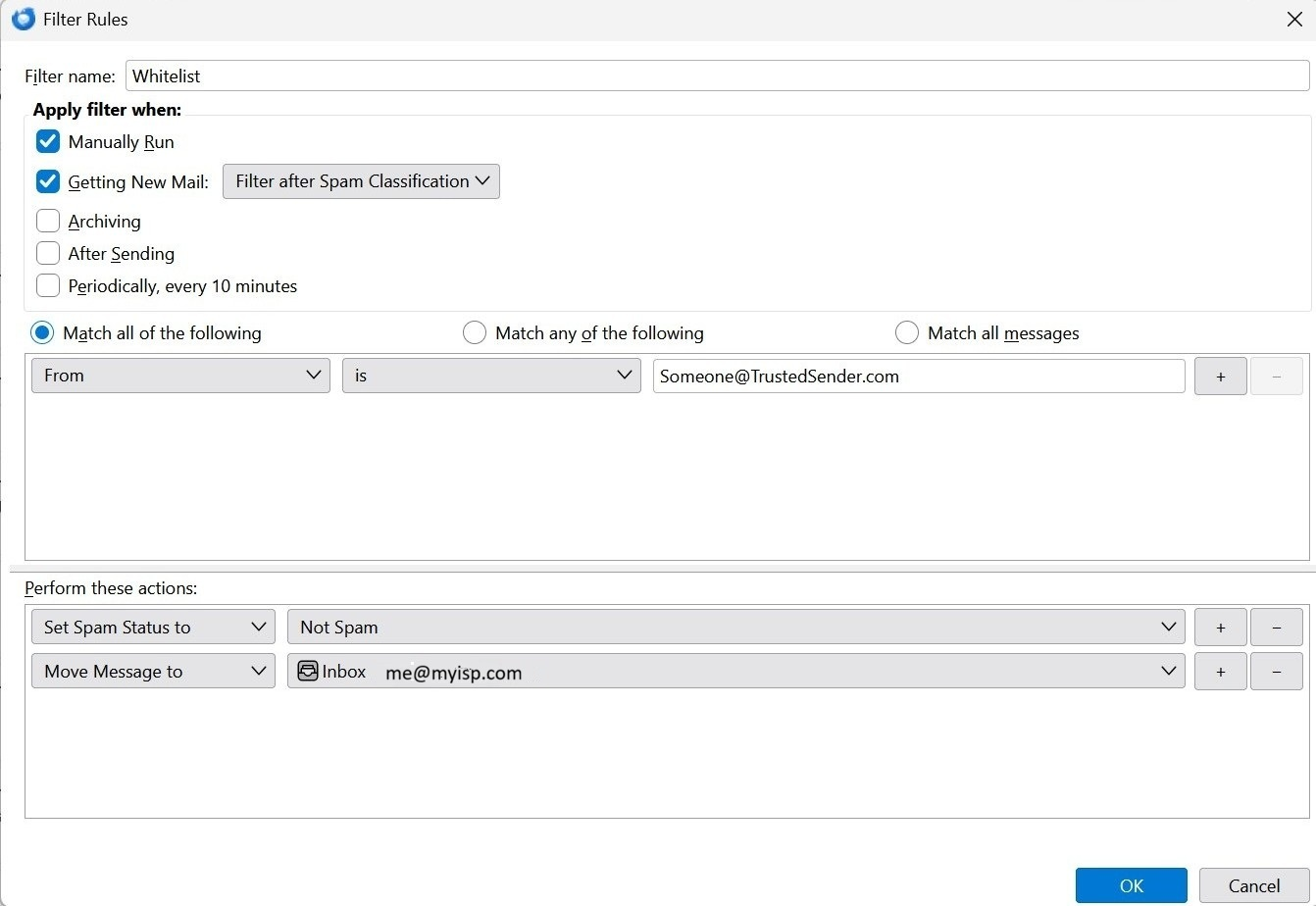
I understand that Thunderbird recommends managing spam by trusting senders in the Personal Address Book and/or Collected Addresses. For that to work, I would have to put the many companies who send me messages that I needn't reply to into the Personal Address Book. But I prefer to only put people I know into the Personal Address Book. So I looked for an alternative method of managing selected senders, and thought I had found one, but it's not working. The alternative I thought I'd found was to use Message Filters. I created a filter I called "Whitelist", and in the Filter Rules dialog I said to apply the filter when it is run manually, or when getting new mail, and to apply the filter after spam classification (although when this didn't work, I also tried running the filter before spam classification). I said to apply the filter when the "from" address matches a sender that I wanted to whitelist. And I said to set the spam status for such messages to "Not Spam", and to move them to my inbox. Nevertheless, emails from the sender I specified continued to be put into my spam folder. Am I doing something wrong? If filter rules cannot be used to override automatic spam handling, why does the filter UI allow you to set the spam status to "Not Spam"?
జోడించిన స్క్రీన్షాట్లు

ప్రత్యుత్తరాలన్నీ (3)

Just a suggestion: Try changing 'is' to 'contains'

Thanks for the suggestion, but I have already tried using 'contains' instead of 'is'.

Another possibility: If this is an IMAP account, your email provider may have already put the message in the spam folder. That would bypass the filter.

ఒక ప్రశ్న అడగండి

You must log in to your account to reply to posts. Please start a new question, if you do not have an account yet.