


Windows 10 reached EOS (end of support) on October 14, 2025. If you are on Windows 10, see this article.

Search Support

Avoid support scams. We will never ask you to call or text a phone number or share personal information. Please report suspicious activity using the “Report Abuse” option.

ఇంకా తెలుసుకోండి
Open

More lines in Title of Thunderbird appointments

g.essl

Hi, I found an entry in the "thunderbirdmail.de" forum from 2005, where they discuss the option of using userChrome.css for changing the number of lines in the title of an calender appointment.

My problem is, that if the text of the title is really long, thunderbird will not enlarge the title window (more lines), so I can see the whole text (as in Outlook - from where I just changed to Thunderbird a few weeks ago).

The entry into the userCrome.css (as suggested in the forum)

.calendar-color-box .event-name-label {

  white-space:  break-spaces !important;

}

is not working (even I changed the "toolkit.legacyUserProfileCustomizations.stylesheets" to "true").

Can you help me with that issue?

Best reagrds

Gerd Attached screenshots
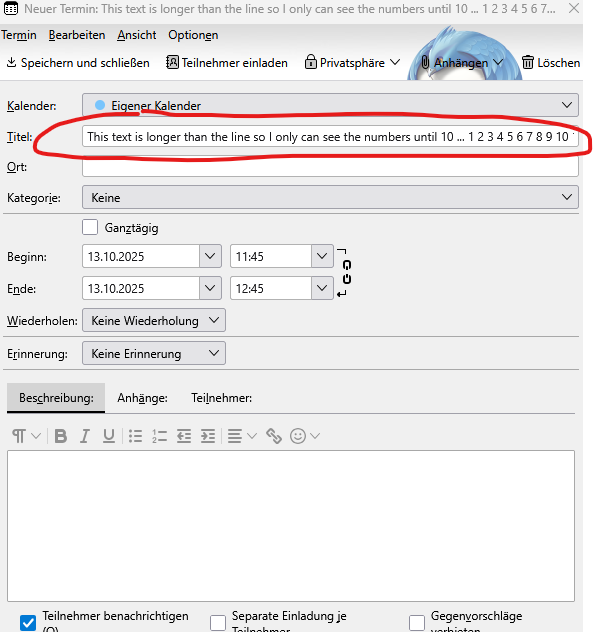
Hi, I found an entry in the "thunderbirdmail.de" forum from 2005, where they discuss the option of using userChrome.css for changing the number of lines in the title of an calender appointment. My problem is, that if the text of the title is really long, thunderbird will not enlarge the title window (more lines), so I can see the whole text (as in Outlook - from where I just changed to Thunderbird a few weeks ago). The entry into the userCrome.css (as suggested in the forum) .calendar-color-box .event-name-label { white-space: break-spaces !important; } is not working (even I changed the "toolkit.legacyUserProfileCustomizations.stylesheets" to "true"). Can you help me with that issue? Best reagrds Gerd Attached screenshots
జోడించిన స్క్రీన్షాట్లు

ప్రత్యుత్తరాలన్నీ (1)

Hi Gerd, I didn't find a working CSS code myself. If you don't get a solution here in SUMO I advise you to return to the German forum "Thunderbird Mail DE" https://www.thunderbird-mail.de/forum/ and post your question. Probably you'll get an answer from the very active forum member ggbsde who is a developer of several Thunderbird add-ons.

ఒక ప్రశ్న అడగండి

You must log in to your account to reply to posts. Please start a new question, if you do not have an account yet.