


My Gmail Imap is in Local Folders and I want to move it to the internet-connected portion of Thunderbird but don't know how to do it properly.

AI tells me I can't just drag my Gmail.com (IMAP) from local Folders to the internet-connected folders section, which contains my Verizon.com account hosted by AOL. How can move my Gmail (IMAP) account safely?

ఎంపిక చేసిన పరిష్కారం
Remember: you do this in account settings, not in the folder pane.
ప్రత్యుత్తరాలన్నీ (11)

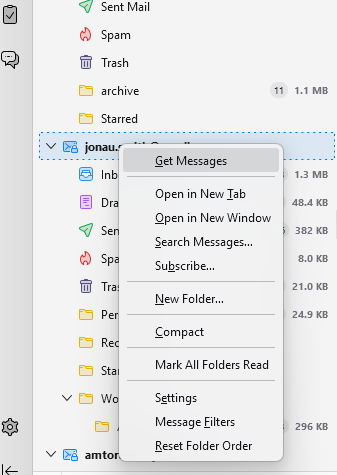
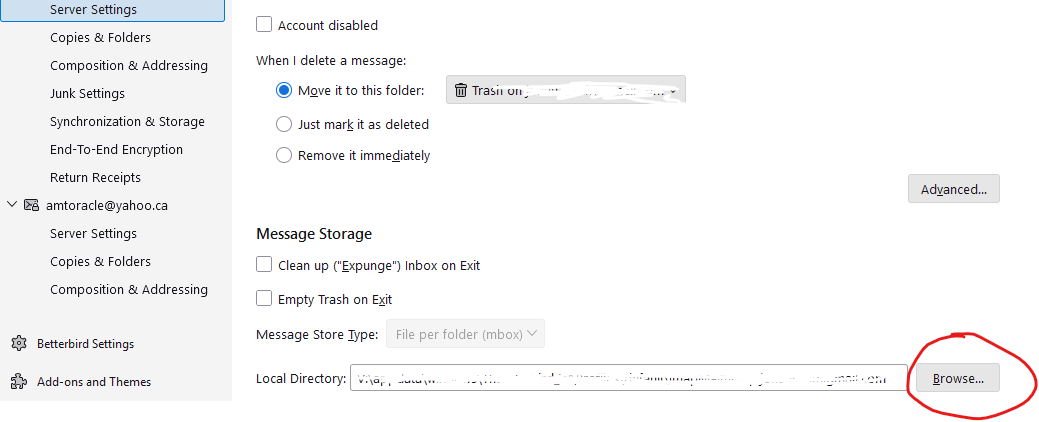
Put your mouse cursor on your gmail and then right click and then choose settings. Once you're in settings, choose "Server Settings". Scroll down to "Local Directory" and then click on Browse and choose your new directory.
న Michel T చే మార్చబడినది
Are you sure that your gmail account is not set up as a POP account?
https://support.mozilla.org/en-US/kb/switch-pop-imap-account
Rick; It is Imap. It was originally in the section above Local Folders, but appeared below when I changed the Imap gmail version following gmail directions to also receive another email account. There is also a POP gmail version showing in Local Accounts that has nothing in it. Robert
A screen image would help.
If the account in question is an IMAP account, then it is not in local folders and you won't move it from local folders. You will just change the order of accounts in the folder pane. Go to account settings and click and drag the accounts to be in the order that you want. The accounts in the folder pane will use that order.
Are your POP and IMAP accounts in Thunderbird associated with the same gmail account? That can cause problems or at least confusion. Maybe yours are associated with different gmail accounts.
Gmail accounts were originally POP. I set up a new imap account and copied all my emails into it. Now the gmail pop is empty and all the emails show in the gmail Imap account and I'm receiving new emails there.
+ New Message > £3 RobertWSIusser@verizon.net_ > E3 Acct@visualtraveltours.totn Q Local Folders > D RobertWSIusser@gmail.com v l>6 RobertWSIusser@gmaiLcom (IMAP) © Inbox CD
- ® Drafts O
<
Were you able to re-order the accounts?
I didn't try. I was told that would risk loosing my email records in gmail imap. Gmap pop currently has no records because I moved them all.
Who told you that? It is just changing the order in which accounts appear in your folder pane. It does not touch folders or messages. Did your source give an explanation?
Yes, he said moving from off-line to on-line might mess up the Thunderbird internal software, But neither he nor I are an expert like you, so I'll go ahead. I assume I just drag the top line, Gmail,com, from Local to the position I want it in New Messages.
I am not aware of such a problem in going off-line or on-line. In any case, this operation does not involve going off-line or on-line.
ఎంపిక చేసిన పరిష్కారం
Remember: you do this in account settings, not in the folder pane.