COMMENT AJOUTER L'OUTIL "INSERER " - HOW TO ADD THE “INSERT” TOOL

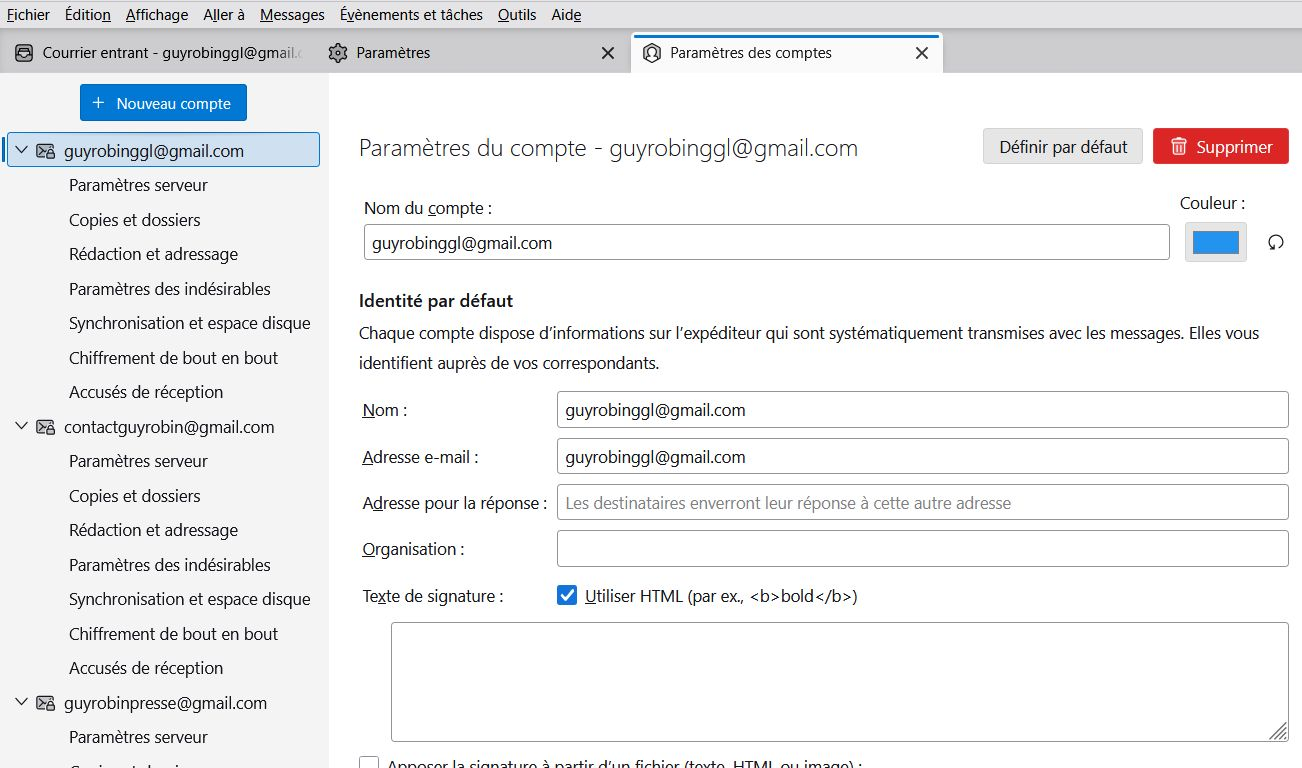
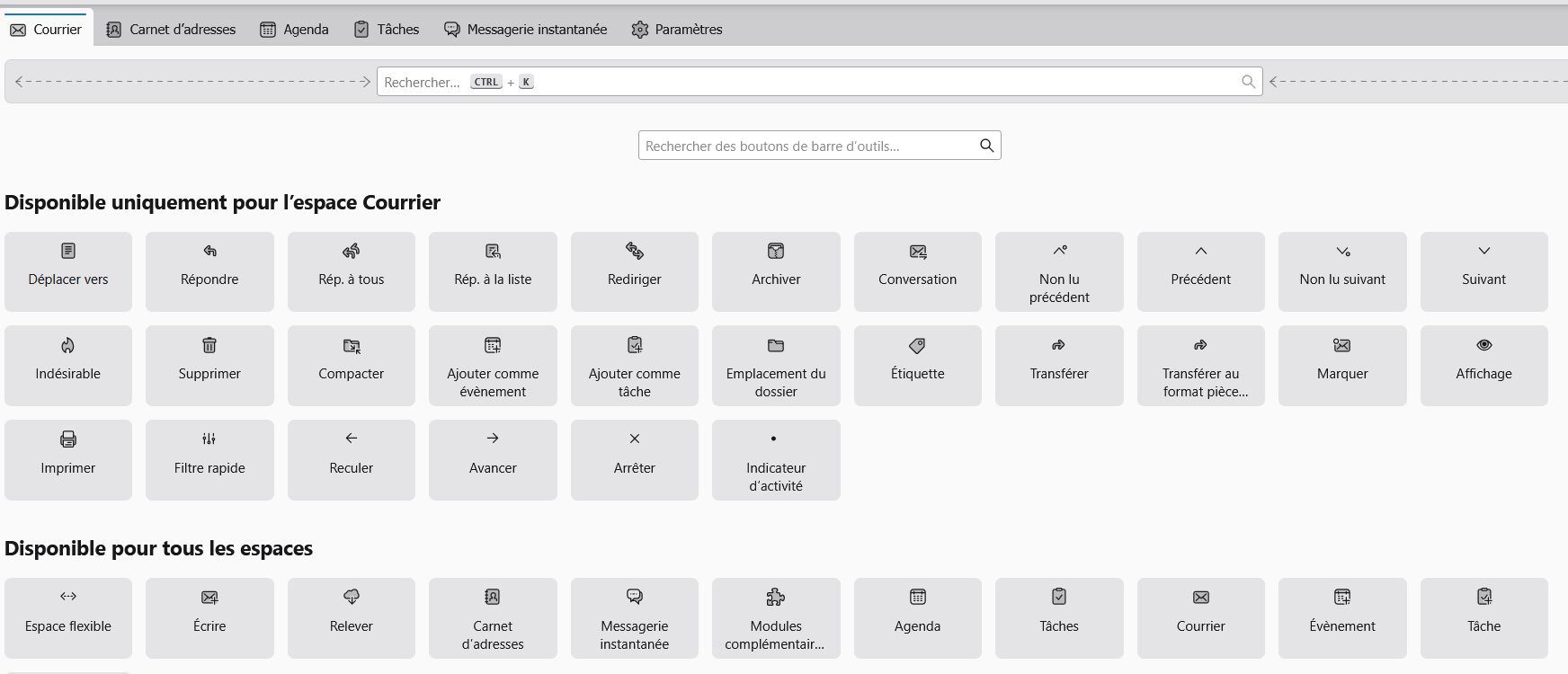
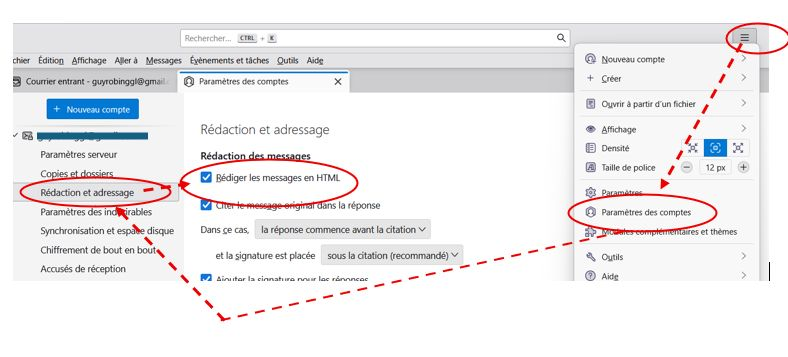
Bonjour M. David et grand merci pour votre soutien. Je suis désolé de vous solliciter autant ! Pardonnez-moi mais je commence à être vieux (83 ans et demi …). Je commence mieux à comprendre votre proposition pour la commande « insérer » (on verra l’autre problème plus tard). J’ai cliqué sur la commande « nouveau message » en même temps que sur la commande « MAJ » (je pense que c’est celle qui permet de saisir une majuscule) mais cela ne m’a rien donné. En revanche, j’ai cliqué sur « paramètres des comptes » et j’ai cliqué sur « HTML » (voir image ci-jointe appelée « HTML »), mais cela ne change rien car je ne vois toujours pas comment ajouter la commande « insérer » dans la barre d’outils. D’ailleurs je n’ai pas vu la mention « composition et adressage ». Par contre j’ai essayé d’ajouter d’autres commandes dans la barre d’outils en cliquant sur « affichage » « barre d’outils » « personnaliser », mais je n’ai pas vu la commande « insérer » (voir image ci-jointe « barre outils »). Si vous avez le temps de continuer à m’aider, je vous en remercie bien sincèrement.
Hello Mr. David and many thanks for your support. I'm sorry to ask you so much! Forgive me but I'm starting to get old (83 and a half years old...). I'm starting to better understand your proposal for the "insert" command (we'll see the other problem later). I clicked on the “new message” command at the same time as the “SHIFT” command (I think it’s the one that allows you to enter a capital letter) but that didn’t give me anything. However, I clicked on “account settings” and I clicked on “HTML” (see attached image called “HTML”), but that doesn’t change anything because I still don’t see how to add the “insert” command to the toolbar. Besides, I didn’t see the mention “composition and addressing”. On the other hand, I tried to add other commands to the toolbar by clicking on “display” “toolbar” “customize”, but I did not see the “insert” command (see attached image “toolbar”). If you have the time to continue to help me, I sincerely thank you.
ఎంపిక చేసిన పరిష్కారం
GENIAL ! Bravo !! et merci infiniment !!! C’est la première fois que je rencontre ce problème alors que je pratique THUNDERBIRD depuis de très nombreuses années. C’est aussi la première fois que je consulte la communauté de THUNDERBIRD, et j’en suis très satisfait. Cette fois c’est résolu et grand merci à tous les deux (à juste 12 minutes d’intervalle …). Ci-joint une image, en petit cadeau chacun 😉
AWESOME ! Well done !! and thank you very much!!! This is the first time I have encountered this problem even though I have been using THUNDERBIRD for many years. This is also the first time I have consulted the THUNDERBIRD community, and I am very satisfied with it. This time it’s resolved and many thanks to both of you (just 12 minutes apart…). Attached is an image, as a small gift for each 😉
ఈ సందర్భంలో ఈ సమాధానం చదవండి 👍 0ప్రత్యుత్తరాలన్నీ (10)
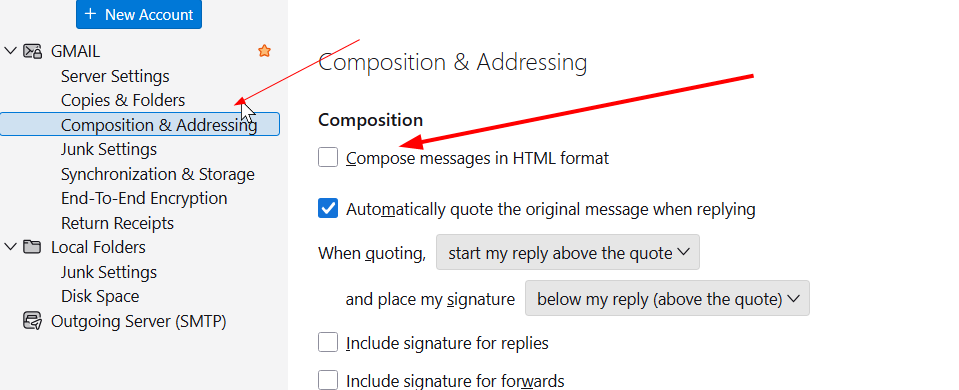
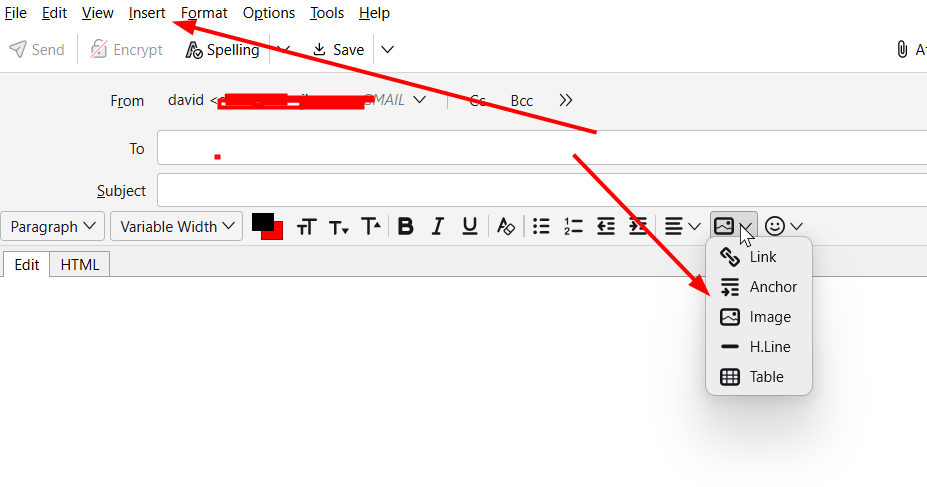
Again, you serve our community here better by staying with one thread, not starting a new one for each reply. On your issue, I think I understand now. You are wanting the INSERT button on the unified toolbar, but that is not where it needs to be. Please see the two attached screenshots: - one shows the panel for 'account settings' and 'composition & addressing.' On that screen is a text box to check for HTML. Do that. Doing this sets the appropriate menus in the compose panel to show the insert button. - the second screenshot shows the composition panel. The two arrows show two places where you can click when you want to insert an image. Let me know. I want this to work for you. david
Encore mille « merci », moi aussi je serais content, non seulement de parvenir à la solution de mon problème, mais également avoir le plaisir de vous le faire savoir. C’est amusant, mais notre relation devient très sympathique. Regardez l’image ci-jointe. Elle vous montre que j’ai fait exactement comme vous me le montrez, mais cela ne change rien car je ne vois toujours pas la commande « insérer » arriver dansmla barre d’outils. Votre deuxième image montre ce que je faisais autrefois grâce à la présence de la commande « insérer » que je n’arrive pas à retrouver.
Another thousand “thanks”, I too would be happy, not only to find the solution to my problem, but also to have the pleasure of letting you know. It’s fun, but our relationship becomes very friendly. Look at the attached image. It shows you that I did exactly as you showed me, but that doesn't change anything because I still don't see the "insert" command arrive in the toolbar. Your second image shows what I used to do thanks to the presence of the “insert” command which I cannot find.
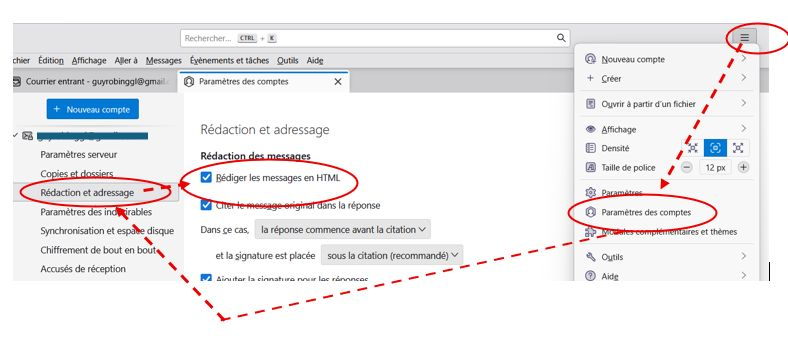
Encore mille « merci », moi aussi je serais content, non seulement de parvenir à la solution de mon problème, mais également avoir le plaisir de vous le faire savoir. C’est amusant, mais notre relation devient très sympathique. Regardez l’image ci-jointe. Elle vous montre que j’ai fait exactement comme vous me le montrez, mais cela ne change rien car je ne vois toujours pas la commande « insérer » arriver dansmla barre d’outils. Votre deuxième image montre ce que je faisais autrefois grâce à la présence de la commande « insérer » que je n’arrive pas à retrouver.
Another thousand “thanks”, I too would be happy, not only to find the solution to my problem, but also to have the pleasure of letting you know. It’s fun, but our relationship becomes very friendly. Look at the attached image. It shows you that I did exactly as you showed me, but that doesn't change anything because I still don't see the "insert" command arrive in the toolbar. Your second image shows what I used to do thanks to the presence of the “insert” command which I cannot find.
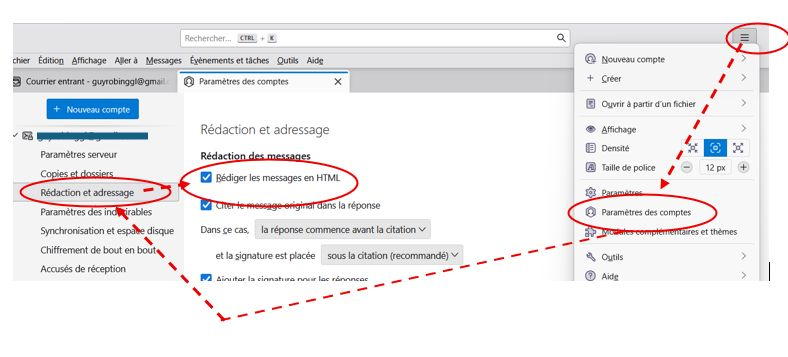
Another thousand “thanks”, I too would be happy, not only to find the solution to my problem, but also to have the pleasure of letting you know. It’s fun, but our relationship becomes very friendly. Look at the attached image. It shows you that I did exactly as you showed me, but that doesn't change anything because I still don't see the "insert" command arrive in the toolbar. Your second image shows what I used to do thanks to the presence of the “insert” command which I cannot find.
Well, I enjoy the discussion, but I do what to see you succeed. Since I see you have ticked the box to compose in HTML, I expect you to see the insert option on menu in the composition pane. Please create a screenshot of the screen you see after pressing the 'New Message' button. That will prove informative. Thank you
Franchement, j’avoue que moi aussi je ne comprends pas ce qui se passe ! Cela fait 58 ans que je suis entré dans le métier d’informaticien, et je n’ai jamais vu de problème de ce genre, c’et pour cela que j’interroge le groupe de Thunderbird. Je me demande si ce n’est pas mon nouveau PC (ACER) qui reproduit mal l’application « THUNDERBIRD » ? Vous pouvez voir sur l’image jointe que la commande « insérer » ne figure toujours pas dans la barre d’outils …Peut-être va-t-il falloir que j’annule Thunderbird et que je le réinstalle complètement ??? Encore merci pour votre soutien.
Frankly, I admit that I too don’t understand what’s going on! It's been 58 years since I entered the IT profession, and I have never seen a problem like this, which is why I am questioning the Thunderbird group. I wonder if it’s not my new PC (ACER) that reproduces the “THUNDERBIRD” application poorly? You can see in the attached image that the "insert" command is still not in the toolbar...Maybe I will have to cancel Thunderbird and reinstall it completely??? Thank you again for your support.
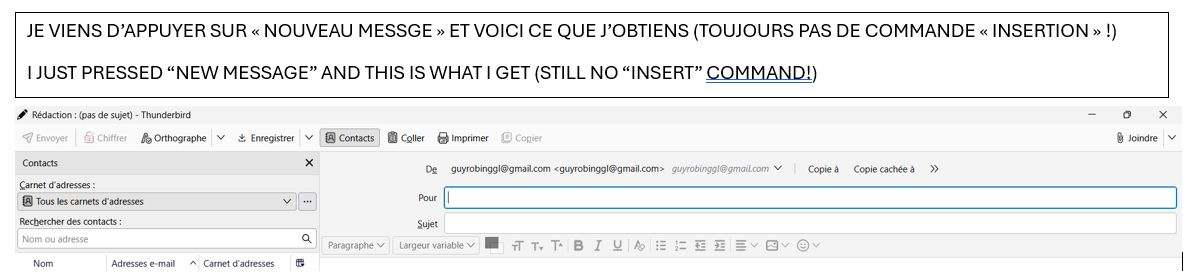
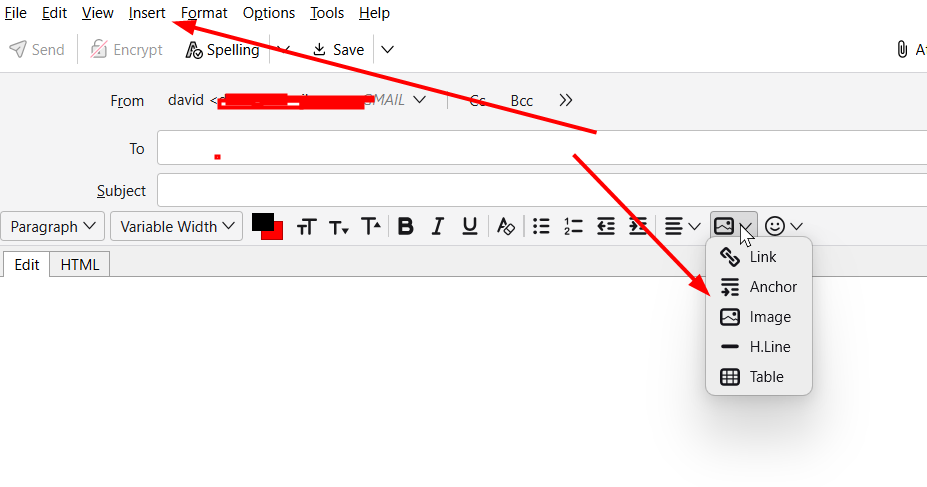
I think I see your problem. First, you DO have the insert feature on the HTML toolbar (see attached screenshot). What the screenshot is also showing is the insert entry at top. That is on the menu bar. Thunderbird, for some reason I will never understand, decided several years ago to hide the menu bar. I have complained several times, but it may never be fixed. Anyway, to show the menu bar, do this: - click the 'new message' button to enter composition screen - now, press the alt key to show the toolbar - next, click view>toolbars and tick 'menu bar'
That will do it. I'm sure. I think we are entitled to a few glasses of wine. :) david
న david చే మార్చబడినది

Bonjour Guy, je suis utilisateur de macOS, ainsi je ne peux pas faire une illustration (copie d'écran) pour vous montrer ce qu'il faut faire sous Windows pour afficher la barre de menu dans une fenêtre de composition. Mais ce qui est décrit dans cet article https://support.mozilla.org/fr/kb/ou-sont-passes-menus-fichier-edition-affichage-thunderbird#thunderbird:win11:tb147 pour faire apparaitre - provisoirement ou de façon permanente - la barre de menu de la fenêtre principale de Thunderbird est aussi valable dans une fenêtre de composition HTML de Thunderbird: la fenêtre de rédaction doit être au premier plan (ou dans le focus sur votre écran), vous appuyez sur la touche Alt ce qui fait apparaitre une fenêtre popup dans la quelle vous cochez "Barre de menus". Une fois cette barre de menus affichée vous verrez aussi le bouton "Insérer"
ఎంపిక చేసిన పరిష్కారం
GENIAL ! Bravo !! et merci infiniment !!! C’est la première fois que je rencontre ce problème alors que je pratique THUNDERBIRD depuis de très nombreuses années. C’est aussi la première fois que je consulte la communauté de THUNDERBIRD, et j’en suis très satisfait. Cette fois c’est résolu et grand merci à tous les deux (à juste 12 minutes d’intervalle …). Ci-joint une image, en petit cadeau chacun 😉
AWESOME ! Well done !! and thank you very much!!! This is the first time I have encountered this problem even though I have been using THUNDERBIRD for many years. This is also the first time I have consulted the THUNDERBIRD community, and I am very satisfied with it. This time it’s resolved and many thanks to both of you (just 12 minutes apart…). Attached is an image, as a small gift for each 😉