


Problème "Local Folder"

Bonjour, J'ai Thunderbird depuis très longtemps et j'ai toujours pris l'habitude de stocker tous mes mails dans le répertoire "Dossiers locaux" qui se trouvait toujours sur un HDD différent de celui ou était installé Thunderbird. A chaque nouvelle installation de Thunderbird, je renseignais le chemin ou était stocké "Dossiers Locaux" et hop en 30s, j'avais tous mes messages archivés depuis des années. Je viens de changer de version de Ubuntu (24.04.3 LTS) et la nouveau Thunderbird (140.7.1 esr), donc comme d'habitude je renseigne le chemin de mon répertoire local "Dossiers Locaux" mais rien ne remonte dans Thunderbird ? J'ai essayé (bidouillé) plein de petits trucs sans succès et je ne m'en sort pas ! Pouvez-vous svp me renseigner ?
ప్రత్యుత్తరాలన్నీ (7)

Il pourrait s'agir du bug https://bugzilla.mozilla.org/show_bug.cgi?id=1972264 " Using UNC path for specific account only blocked - unless mail.allowed_unc_hosts configured"
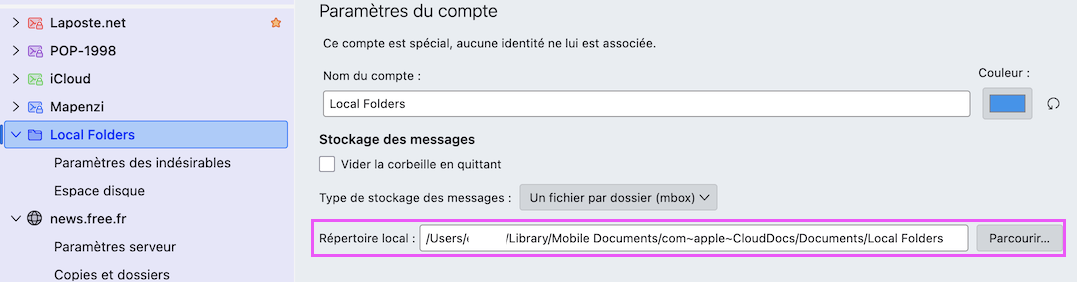
If you still have your local folders elsewhere than the default, you should be able to click to 'account settings', then click Local Folders in left sidebar, and click the 'local directory' entry at bottom of right side of screen and select the other location. That will probably force thundebird to do a restart.
Bonjour David,
Oui j'ai déjà fait ça comme j'ai l'habitude de le faire quand il y a des changements de machine ou de versions. Là, ça ne fonctionne pas ! Ce "Local Folders" je l'ai créé il y a plusieurs années et contient tous mes mails sauvegardés rangés par dossier. Jusqu'ici ça à toujours fonctionné ! Soit c'est un bug ou il y a quelle chose à modifier quelque part que je ne connais pas malheureusement ...
david said
ou should be able to click to 'account settings', then click Local Folders in left sidebar, and click the 'local directory' entry at bottom of right side of screen and select the other location.
David, I speak French and as I understand thierry when he says "je renseignais le chemin ou était stocké "Dossiers Locaux" it is exactly what you propose him to do now again. He says that he always did it and it worked, but now it doesn't work any longer.
This issue could be the same as the one discussed in this discussion https://support.mozilla.org/en-US/questions/1512216 but the bug which cause the problem has been fixed in the Thunderbird release version. Could it be that this bug still exists in v140.7 esr?
Dans le lien de la réponse, l'autre personne dit: Hi Wayne, I mapped the network drive and changed the setting for the local folders directory to the mapped path and it appears problem has been solved. Thank you!
Pour moi, c'est du Chinois ... c'est quoi mappé un lecteur réseau ?