


Cannot Disable “Ask ChatGPT” Text-Selection Popup — No Related Preferences in about:config

Hello,
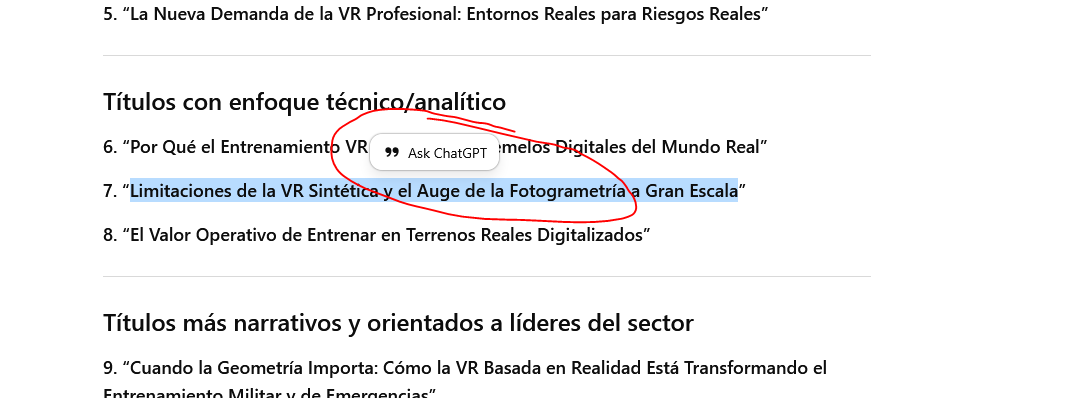
I am experiencing an unwanted UI behavior in Firefox. When I select text on any webpage, Firefox displays a floating “Ask ChatGPT” bubble above the selected text. This happens regardless of the site. I want to disable this feature, but Firefox provides no setting or preference to do so.
This is not caused by any extension. I verified this by checking about:addons, and I only have the following extensions installed:
DuckDuckGo Privacy Essentials
Firefox Translations
Gibiru for Firefox
None of them inject any ChatGPT functionality.
I then opened about:config to disable the feature, but the usual preferences do not exist on my system. Keys such as:
ui.textSelectEnabled
browser.selection.menu.enabled
browser.ml.chat.enabled
browser.ml.chat.openai.enabled
browser.ml.enabled
are missing, and Firefox only shows the “add new preference” (+) icon. That means Firefox did not expose any toggles for this behavior.
I am including a screenshot showing the unwanted “Ask ChatGPT” popup that appears when selecting text.
I need instructions on how to permanently disable this text-selection popup, or confirmation on whether this is part of a controlled rollout or experiment that cannot be disabled on my version of Firefox.
Thank you.
ఎంపిక చేసిన పరిష్కారం
Thank you so much for your time and response. I have been able to find a solution using the Stylus extension in Firefox. I have created a new style and added the code shown on the attached image. I hope this solution works for other users that dislike this stupid AI bubble. Cheers!
ఈ సందర్భంలో ఈ సమాధానం చదవండి 👍 2ప్రత్యుత్తరాలన్నీ (7)

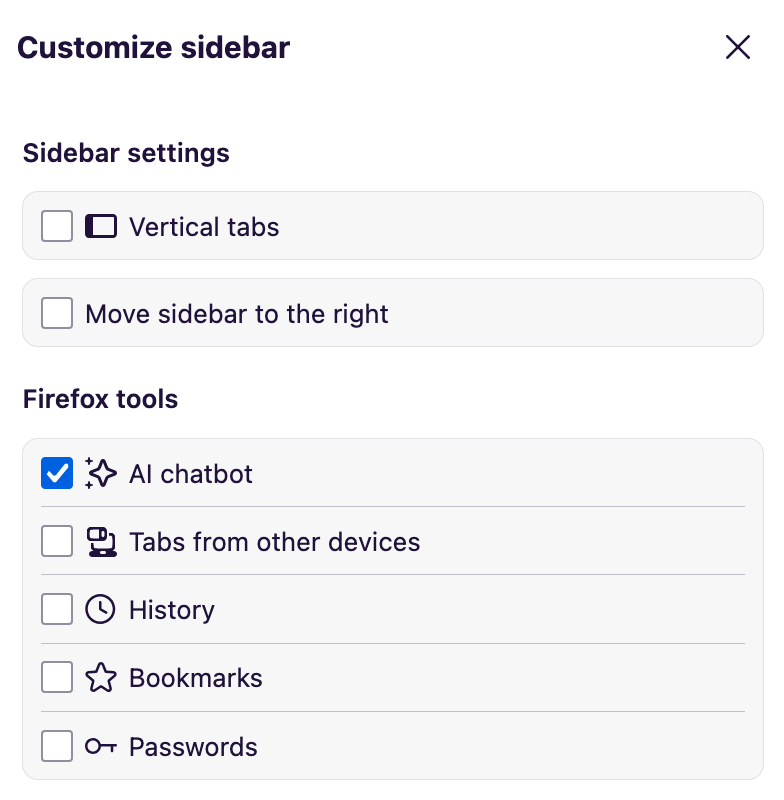
When you expand the Firefox sidebar, there should be a settings icon that you can click on. This will open a panel labeled "Customize sidebar" where the selected AI chatbot can be enabled or disabled. (Screenshot 1)
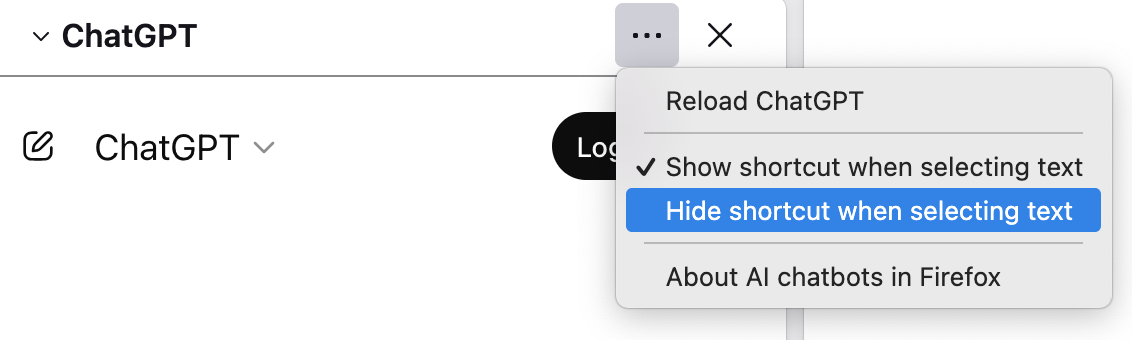
You can also open the AI chatbot's panel, click on the three dot menu, and select "Hide shortcut when selecting text". (Screenshot 2)
Hello
Use the sidebar to access tools and vertical tabs. https://support.mozilla.org/en-US/kb/use-sidebar-access-tools-and-vertical-tabs
Access AI chatbots in Firefox. https://support.mozilla.org/en-US/kb/ai-chatbot
For information purposes. https://support.mozilla.org/en-US/questions/1530899#answer-1780737, these preferences, browser.ml.chat.enabled, and, browser.ml.chat.menu, are present.
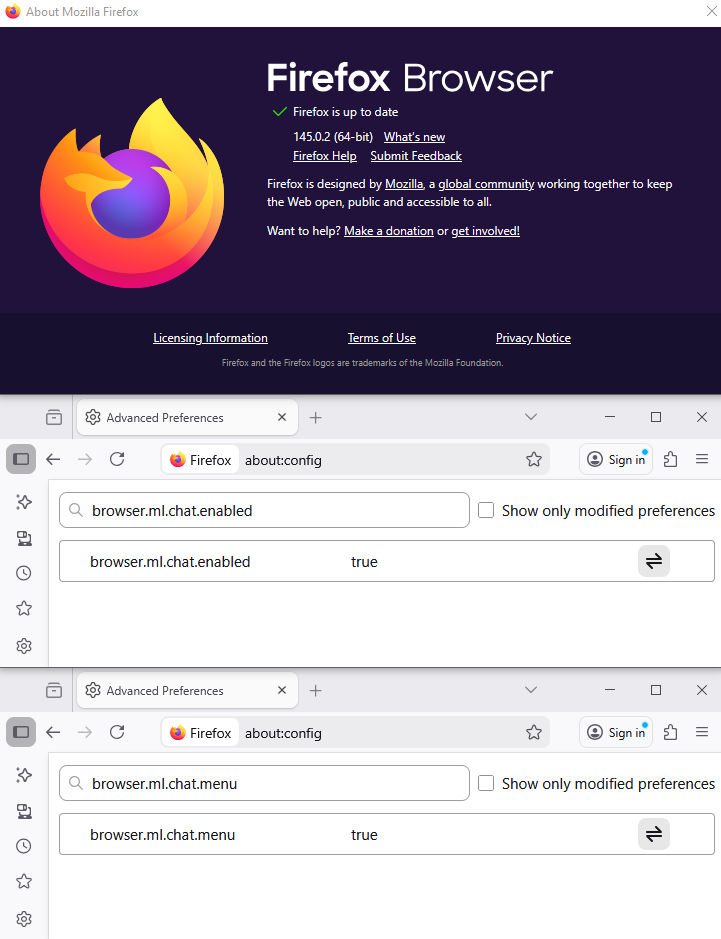
Thank you for the reply Mark. I have followed your instructions abut the AI bubble will not go away.
Hello
For information purposes. Open about:config, then, search for browser.ml.chat.shortcuts and test.
ఎంపిక చేసిన పరిష్కారం
Thank you so much for your time and response. I have been able to find a solution using the Stylus extension in Firefox. I have created a new style and added the code shown on the attached image. I hope this solution works for other users that dislike this stupid AI bubble. Cheers!
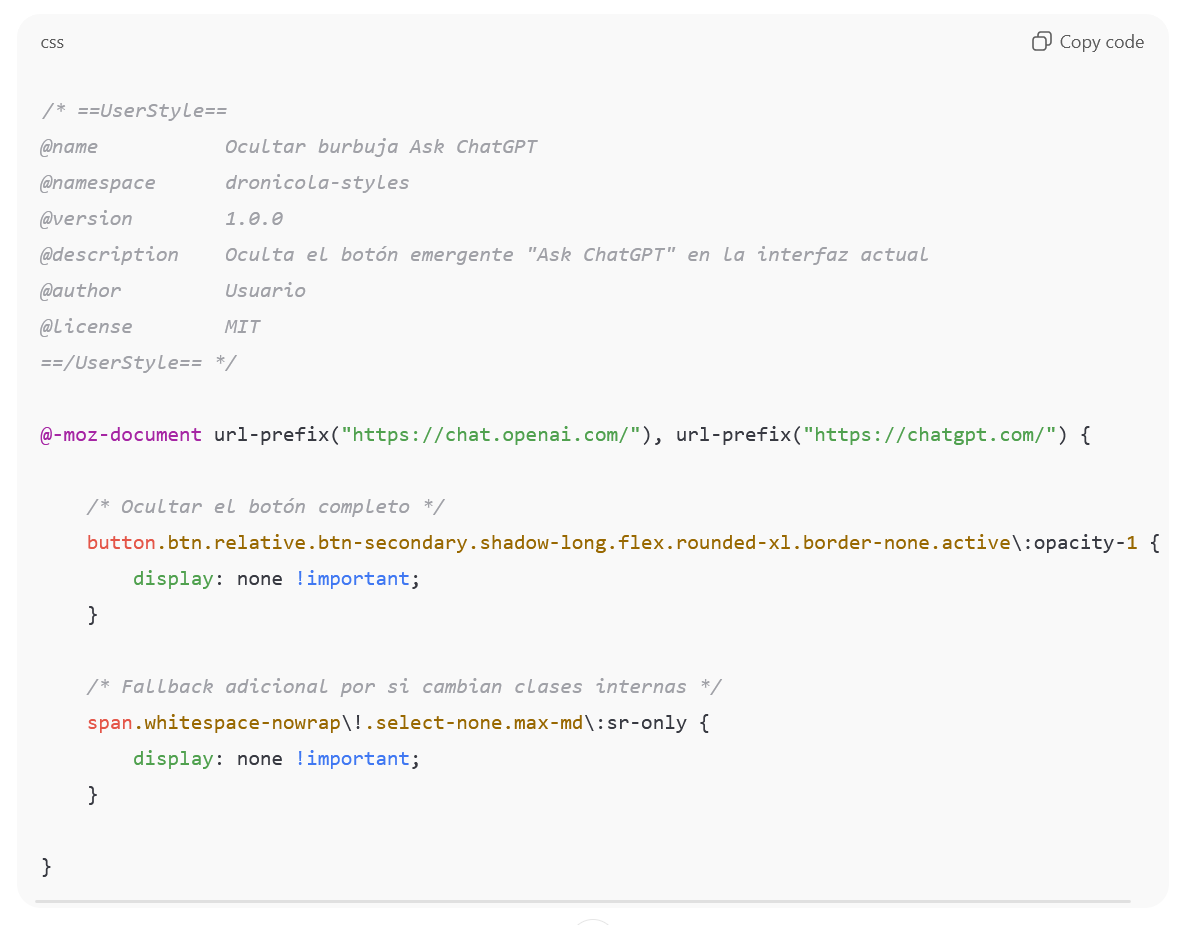
@rubenbe75 thank you :-) i'm using FireMonkey and the userCSS requires slightly different wrapping:
/*
UserCSS
@name chatgpt: disable Ask ChatGPT @match *://chatgpt.com/* @match *://chat.openai.com/* @version 1.0.0 @description Oculta el botón emergente "Ask ChatGPT" en la interfaz actual @description https://support.mozilla.org/en-US/questions/1551299#answer-1783131 @author Usuario @license MIT
/UserCSS
- /
/* Ocultar el botón completo */ button.btn.relative.btn-secondary.shadow-long.flex.rounded-xl.border-none.active\:opacity-1 {
display: none !important;
}
/* Fallback adicional por si cambian clases internas */ span.whitespace-nowrap\!.select-none.max-md\:sr-only {
display: none !important;
}
Hello
AI controls https://connect.mozilla.org/t5/discussions/try-out-ai-controls-in-firefox-nightly/td-p/117177
AI controls are coming to Firefox https://blog.mozilla.org/en/firefox/ai-controls
Block generative AI features with Firefox AI controls https://support.mozilla.org/en-US/kb/firefox-ai-controls