


Search engines are missing their pictograms
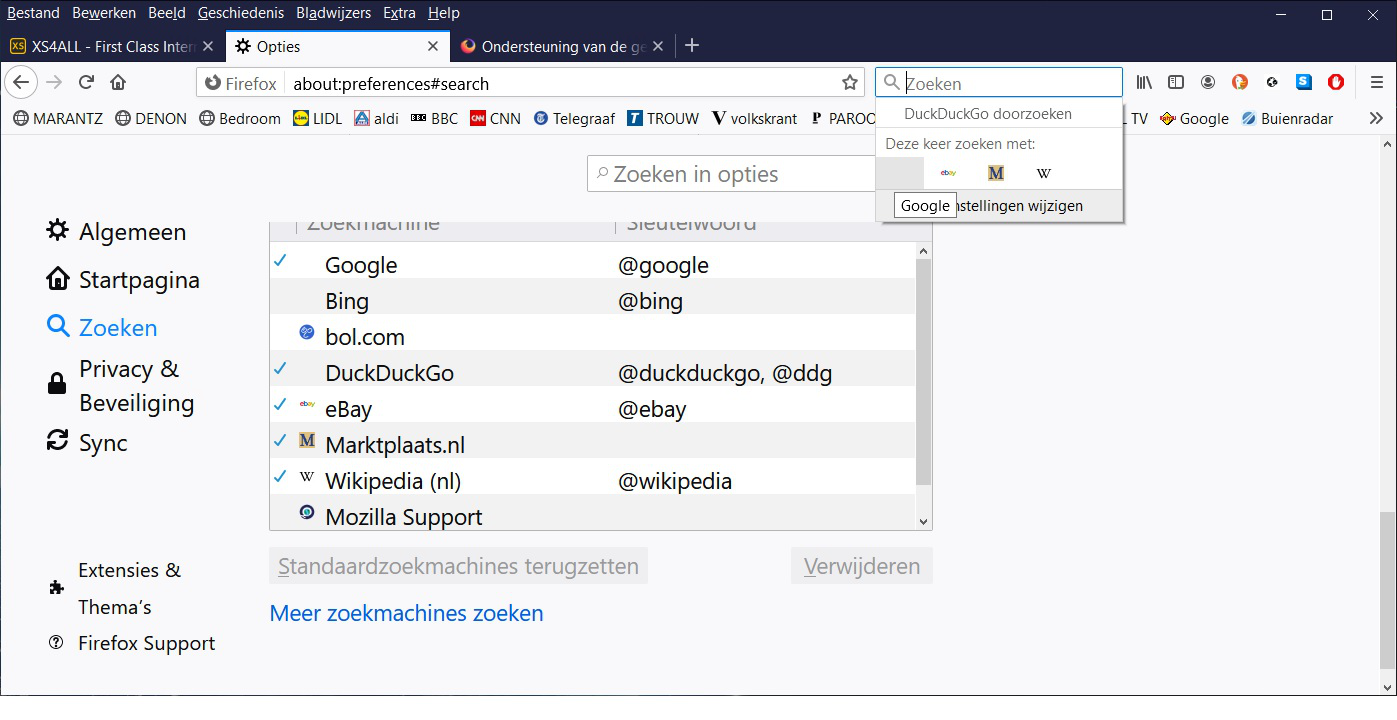
Mij searchengines Google and DuckDuckgo are missing the pictograms, How can I get them back? See screenshot. Thanks J. Wierenga
ఎంపిక చేసిన పరిష్కారం
You can try to remove those two search engines (DDG, Bing) and the click "Restore Default".
You can try to clear the startup caches via the "Help -> Troubleshooting Information" (about:support) page.
ప్రత్యుత్తరాలన్నీ (5)
You can rename/remove search.json.mozlz4 in the Firefox profile folder with Firefox closed to rebuild the search engines registry.
You can use the button on the "Help -> Troubleshooting Information" (about:support) page to go to the current Firefox profile folder or use the about:profiles page.
- Help -> Troubleshooting Information -> Profile Folder/Directory:
Windows: Open Folder; Linux: Open Directory; Mac: Show in Finder - https://support.mozilla.org/en-US/kb/profiles-where-firefox-stores-user-data
Firefox will rebuild search.json.mozlz4 from the builtin search engines.
Unfortunatly it did't work, but thanks for awnser.
ఎంపిక చేసిన పరిష్కారం
You can try to remove those two search engines (DDG, Bing) and the click "Restore Default".
You can try to clear the startup caches via the "Help -> Troubleshooting Information" (about:support) page.
Clear the startup caches did it! Thankyou
You're welcome and thanks for reporting that clearing the startup cache worked as this can help others.