


Duplicate "Save as Adobe PDF" menu items in Print > PDF
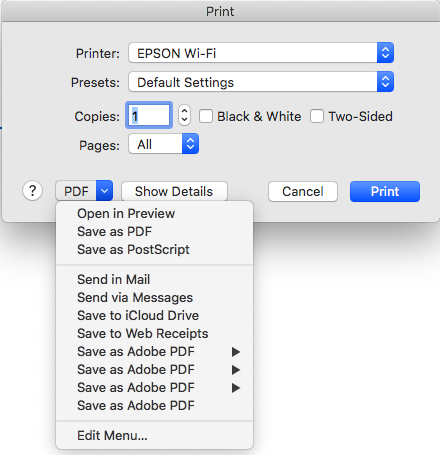
I have Adobe Acrobat PRO DC installed. Under Print > PDF there are multiple menu items saying "Save as Adobe PDF". How do I edit this menu ('edit Menu' has no entries) so that it only has 1 option to select not 4 saying the same thing?
I have fully reinstalled Acrobat and Firefox, after uninstalling with App Cleaner and Uninstaller... the 4 entries remain.
I am using Firefox 78.3.0esr on MacOS 10.15.6 and the latest version on Acrobat PRO
Thanks
JS
ప్రత్యుత్తరాలన్నీ (3)
The right-pointing triangles appearing on three of them imply they are menu headings. If you try to expand those, are there different choices?
Says the same 'Save as Adobe PDF' -- I'm assuming it is some Apple Automation...

I found the solution to this in the end. It is nothing to do with Firefox, as the Print > PDF menu is connected to the print system for all applications.
For some reason, Adobe Acrobat DC had repetitively added to the folder 'Library/PDF Services'... I deleted the contents of that folder, leaving one copy of the 'Save as Adobe PDF'.
All good now.
JS
న jonnyspeed చే మార్చబడినది