

Táto téma bola archivovaná.
Ak potrebujete pomôcť, založte prosím novú otázku.

Archivované
i want to turn off search suggestions but your help page is not accurate.

I want to turn off the search suggestions but the information on your help pages is not accurate. I do not get "search suggestions" from the right click drop down box.
How do I switch it off?
Thanks...
I want to turn off the search suggestions but the information on your help pages is not accurate. I do not get "search suggestions" from the right click drop down box.
How do I switch it off?
Thanks...
Všetky odpovede (2)
Please do the following:
- Click the orange Firefox button, go to Options | Options | Privacy.
- In the menu at the bottom, use the dropdown menu to change the search options to "Nothing". See screenshot.
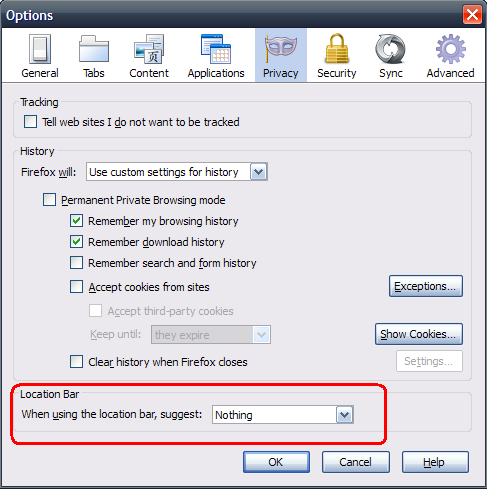
Which bar are you referring to?
The instruction from Xircal is for the location bar, but the search bar on the Navigation Toolbar or search boxes on some web pages (e.g. Google) also can give suggestions.