


Automatically deleting emails from server when downloaded into Thunderbird

When email downloads from my internet server to thunderbird how do I indicate that the message is to be deleted from the server. ie I dont want the message to be in two places . At the moment after reading the email and saving it to a folder I have to log into my internet provider and delete the email.
Všetky odpovede (4)
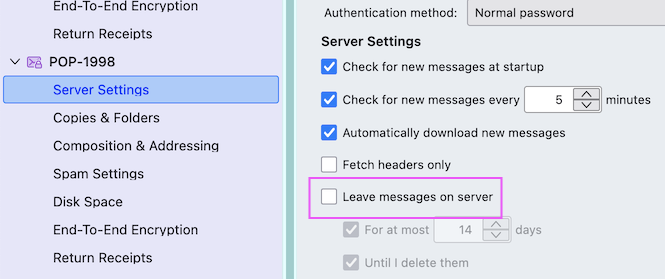
I presume that your email account is set up with the POP protocol. Click on the App button ≡ in the upper right corner > Account settings > Server Settings > Server Settings and uncheck ▢ "Leave messages on server" (see image)
My Thunderbird is set up with the map protocol. I presume from you message I need to change it to the Pop protocol. How do I do that? thanks
No, you needn't switch to the POP protocol. Using the IMAP protocol means that when you delete a message in an email client such as Thunderbird, it will automatically be deleted from the server, too. Changes like deleting a message you make in Thunderbird are replicated on the IMAP server and all devices which are connected to the server. https://support.mozilla.org/en-US/kb/difference-between-imap-and-pop3
Upravil(a) Mapenzi dňa
Many Thanks for your help. Much appreciated. Regards Brian Rummins