Windows 10 reached EOS (end of support) on October 14, 2025. If you are on Windows 10, see this article.

Vyhľadajte odpoveď

Vyhnite sa podvodom s podporou. Nikdy vás nebudeme žiadať, aby ste zavolali alebo poslali SMS na telefónne číslo alebo zdieľali osobné informácie. Nahláste prosím podozrivú aktivitu použitím voľby “Nahlásiť zneužitie”.

Ďalšie informácie

Tb saves msg to wrong folder.

  • 4 odpovede
  • 0 má tento problém
  • Posledná odpoveď od mike-a
  • Otvorené

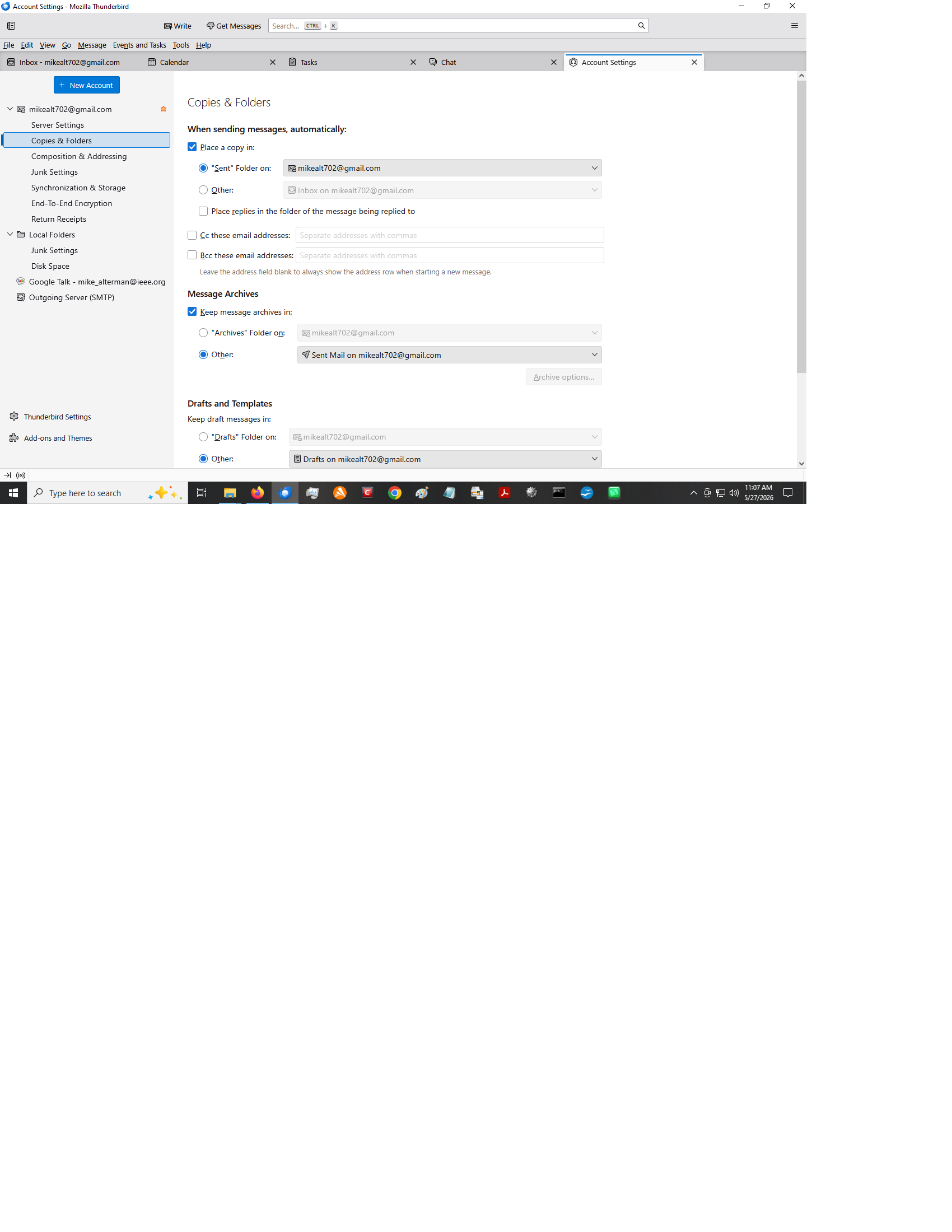
Whenever i send a message , it is saved to the 'inbox' previously it would be saved "sent mail". I have verified that TB is configured to save to sent mail but the msg is saved anyway to inbox.

Can some one explain how to get back to saving sent messages to sent mail folder.

In all honesty I find it frustrating to keep moving msgs manually.

Whenever i send a message , it is saved to the 'inbox' previously it would be saved "sent mail". I have verified that TB is configured to save to sent mail but the msg is saved anyway to inbox. Can some one explain how to get back to saving sent messages to sent mail folder. In all honesty I find it frustrating to keep moving msgs manually.

Všetky odpovede (4)

A Google search provides this answer...

(https://www.google.com/search?q=change+where+thunderbird+saves+sent+messages&rlz=1C2VDKB_enGB1120GB1120&num=10&newwindow=1&sca_esv=f1fb8f2ab13df819&sxsrf=ANbL-n4dDWRVyIk875ujzquXiuBkP5UCaA%3A1779651138271&source=hp&ei=QlITaraNDZuvhbIP1e3FmAc&iflsig=AFdpzrgAAAAAahNgUkVxCkfIyq9ze8R0gKH5MAo1vSlQ&ved=0ahUKEwi2tquP1dKUAxWbV0EAHdV2EXMQ4dUDCCU&uact=5&oq=change+where+thunderbird+saves+sent+messages&gs_lp=Egdnd3Mtd2l6IixjaGFuZ2Ugd2hlcmUgdGh1bmRlcmJpcmQgc2F2ZXMgc2VudCBtZXNzYWdlczIFECEYoAEyBRAhGKABMgUQIRifBTIFECEYnwUyBRAhGJ8FMgUQIRifBTIFECEYnwUyBRAhGJ8FMgUQIRifBTIFECEYnwVI239Qig1Y9XtwAXgAkAEAmAF3oAGFHKoBBDQwLjS4AQPIAQD4AQGYAi2gAugdqAIKwgIHECMY6gIYJ8ICDRAjGJ4GGPAFGOoCGCfCAg0QLhjHARivARjqAhgnwgIQEC4YgAQYigUYxwEYrwEYJ8ICBBAjGCfCAhAQIxjJAhjwBRiABBiKBRgnwgILEAAYgAQYigUYkQLCAg0QABiABBiKBRhDGLEDwgIKEAAYgAQYigUYQ8ICExAuGIAEGIoFGEMYsQMYxwEY0QPCAgsQLhiDARixAxiABMICChAjGIAEGIoFGCfCAggQLhiABBixA8ICCxAAGIAEGIoFGLEDwgIOEAAYgAQYigUYsQMYgwHCAggQABiABBixA8ICDhAuGIAEGLEDGMcBGNEDwgILEAAYgAQYsQMYgwHCAgUQABiABMICChAAGIAEGBQYhwLCAg4QLhivARjHARjJAxiABMICBhAAGBYYHsICCxAAGIAEGIoFGIYDwgIFEAAY7wXCAggQABiABBiiBMICCBAAGIkFGKIEwgIHECEYChigAZgDD_EFQgPzLKv99aGSBwQ0MS40oAe5qwKyBwQ0MC40uAfZHcIHCTEuMjMuMTguM8gHmwGACAE&sclient=gws-wiz)

Follow these quick steps:

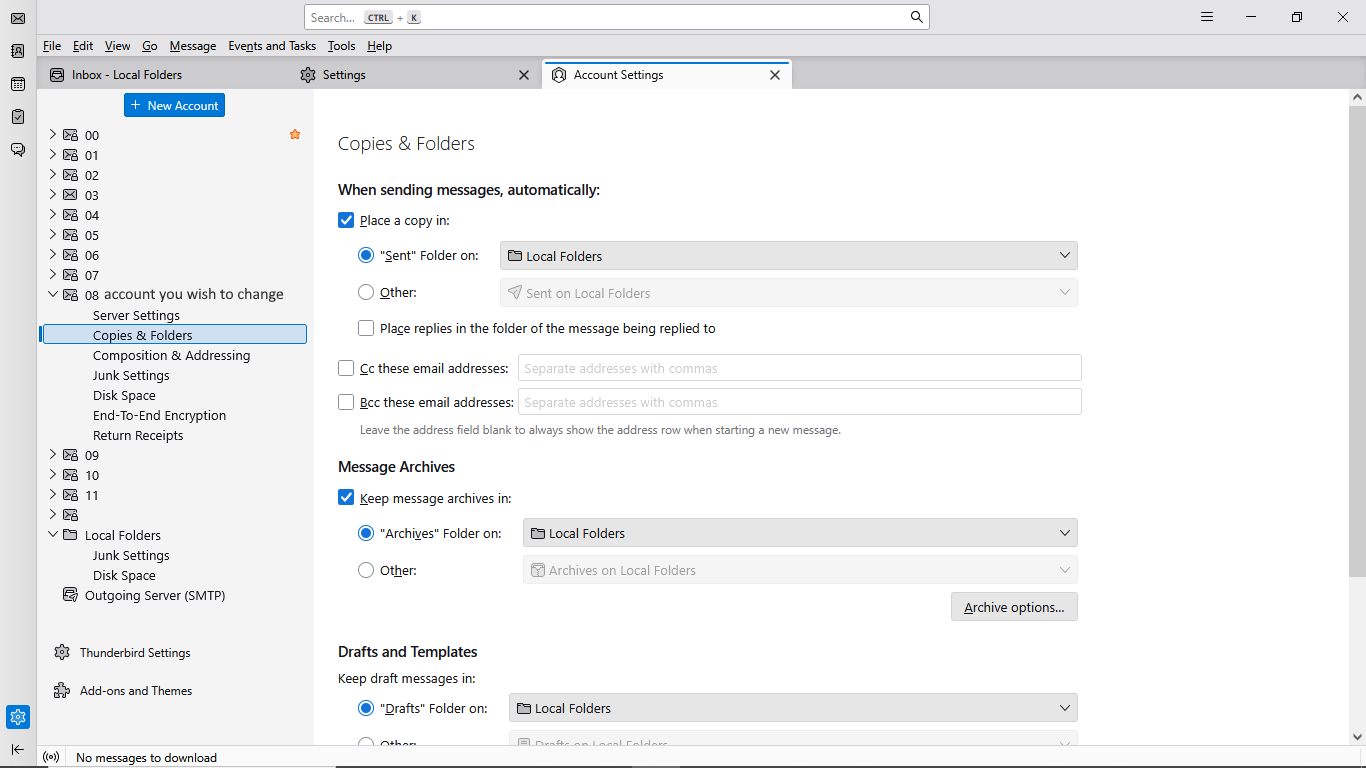
Click the menu icon (three horizontal lines) in the top-right corner of Thunderbird and select Account Settings.

In the left-hand panel, click on Copies & Folders directly under the specific email account you want to change.

On the right side, find the When sending messages, automatically: section.

Locate Place a copy in and choose your preferred destination:

Your settings should look like this (mine)... See attached pic 😉

Hope that helps. 😊
Did this fix your problem, Mike?

I admit that my eyes played some tricks on me - the check box for copies and folders was set to other instead of sent not sure how that happened but...

Unfortunately, i just sent a msg and it was placed in my 'inbox'. I have tried to search thru about:config but didn't see anything that looks like it would help.

Any suggestions etc would be appreciated. Mike

Položiť otázku

Ak chcete odpovedať na príspevky, musíte sa prihlásiť do svojho účtu. Ak ešte nemáte účet, položte novú otázku.