


How do I stop video and/or audio from playing automatically?

Fire fox is automatically playing videos/sound or both if I click on a tab that has that or also in facebook, etc. How do I stop this? I want to be able to click play when I want to hear/see something.
Všetky odpovede (11)

Dawn, hope this helps you. It works for me.
Vybrané riešenie
I just went to the link and followed the instructions. It is working for me when I click a tab that I have a youtube video on! It doesn't stop the sound or video for a story when I click on it in fb, but I can just mute my speaker if I need to do that. I couldn't find a reel to scroll past. lol Thanks!
Hello
To complement, Allow or block media autoplay in Firefox
For information
1 - Go to configuration editor https://support.mozilla.org/en-US/kb/about-config-editor-firefox 2 - Enter a search term autoplay
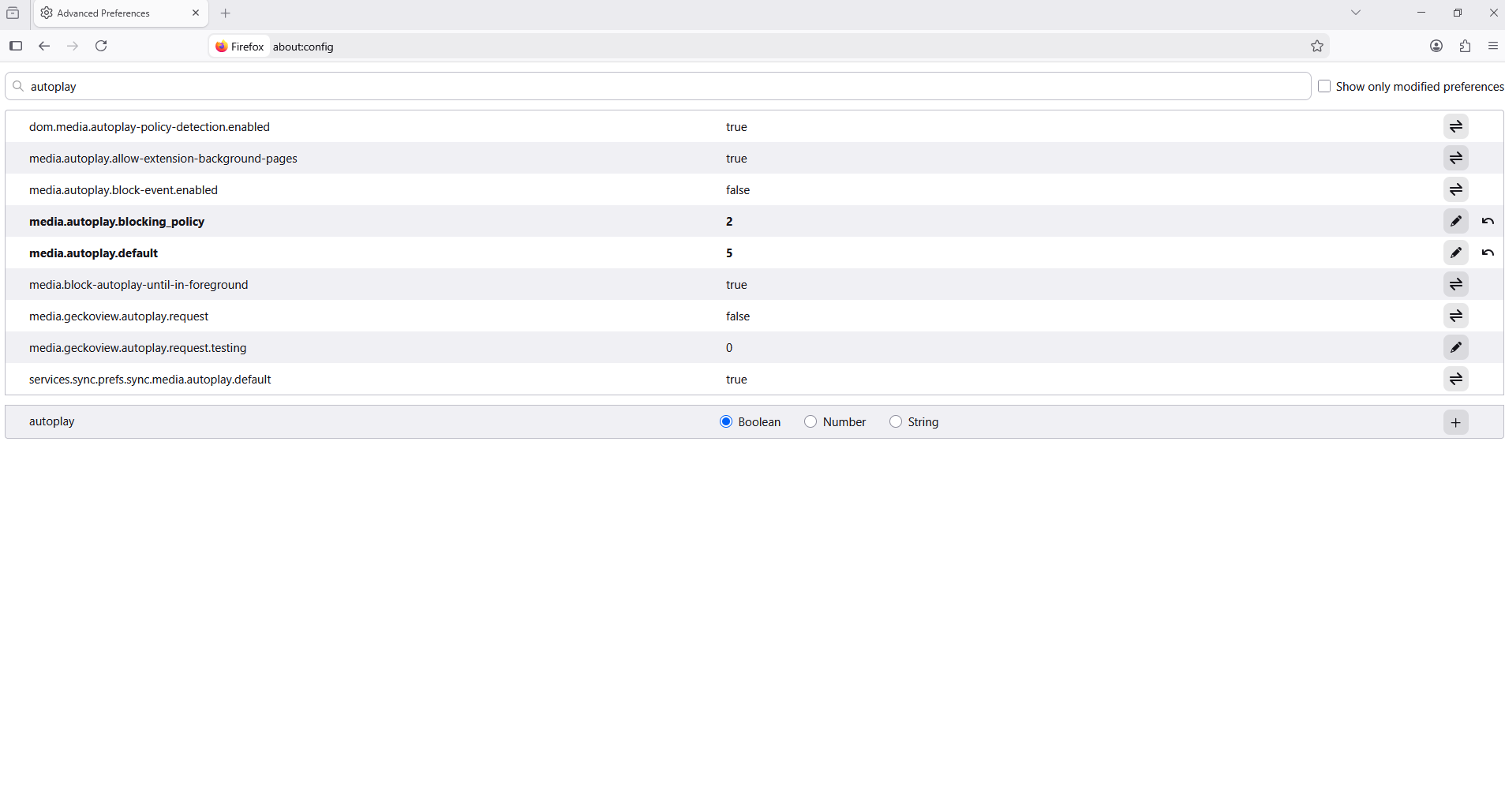
media.autoplay.default 1 this correspond to the situation Block Audio media.autoplay.default 5 this correspond to the situation Block Audio and Video media.autoplay.default 0 this correspond to the situation Allow Audio and Video
About, media.autoplay.blocking_policy, you can test 2

Version 150.0.1 in Win11 Entered about:config in address bar set media.autoplay.default to 5 Media still autoplays All extensions are disabled. Closing & reopening Firefox did not help
Upravil(a) John Bartley dňa
Hello
Allow me to ask this question, have you tested media.autoplay.blocking_policy
Anyone has a clue ?
All suggestions posted here doesn't work. Facebook is either completely rogue or Firefox doesn't respect my setting "Block audio and video".
This doesn't work either : https://support.mozilla.org/en-US/kb/block-autoplay
EDIT : seems like I have some success with : media.autoplay.blocking_policy=2 allow-muted=False media.autoplay.default=5
Upravil(a) PMC dňa
Hello
A similar question https://support.mozilla.org/en-US/questions/1580396
What is, allow-muted=False?
Thank you so much for your time, but this is not the problem I am having.
I just realized that these responses were for an older question I asked. I have a newer one and thought they were for that as I was confused. Sorry about that!
About allow-muted=false, I just realized I didn't post the full config. It is : media.autoplay.allow-muted = false
But that setting seem a vestige of the past and I think it doesn't exist anymore. I just did a test and removed it and it still works (audio/video is blocked).
The setting that seem to do the trick is : media.autoplay.blocking_policy=2
Of course it has to be combined with the ui button Autoplay : "Block audio and video"

Agent virtuel said
About, media.autoplay.blocking_policy, you can test 2
Thank you for this, that setting works excellent on sites that trigger video plays when scrolling or modal popups (e.g. Instagram).