


authentication method in ≡ > Account Settings > Server Settings does not give OAuth2 as a choice

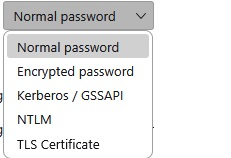
A few days ago I started getting a failed sign in for one of my emails. The solution seems to be that my authentication method in ≡ > Account Settings > Server Settings does not give OAuth2 as a choice. Screenshot shows what is available. All other email authentication methods have that as a choice. Is this a problem with the email program or T'bird? T'bird is 140.8.1esr (64-bit) O/S is Win11 Thanks for your help
Všetky odpovede (4)

Who is your email provider? I believe Thunderbird queries the server to see what authentication methods are available.
Thank you Lin, I'll query GMX. I didn't understand the process that takes place. Will give an update when it comes from them.
I did a little internet searching, and I don't see any sign that GMX uses OAuth2, which would explain why it's not an available option for you. I did find these generic email settings that you can try. You may need to confirm this info with their tech support:
Incoming (IMAP) Server: imap.gmx.com Port: 993 Encrytion: SSL or encryption
Outgoing (SMTP) Server: mail.gmx.com Port: 587 Encryption: STARTTLS
Outgoing (SMTP) Server: mail.gmx.com Port: 465 Encryption: SSL/TLS
Please note: You can only use a TLS protocol if your email program uses TLS versions 1.2 or 1.3. For security reasons, we no longer support the older TLS versions 1.0 and 1.1.
Info: If a connection via port 993 is not possible, you can try port 143. Please note that this connection is not encrypted by default. You can achieve encryption via port 143 by activating STARTTLS in your email program (e.g. Thunderbird, Outlook or Apple Mail) and using a valid SSL/TLS certificate.
====
I got this from:
Thanks again Lin, I ended up using the 143 port STARTTLS settings. As I use this email program for non-personal and most of what I get are political pleas for donations, l don't need encryption. I appreciate how easy this was to deal with due to your good work. Thanks muchly, 😊🫂