


Bookmarks/Icons

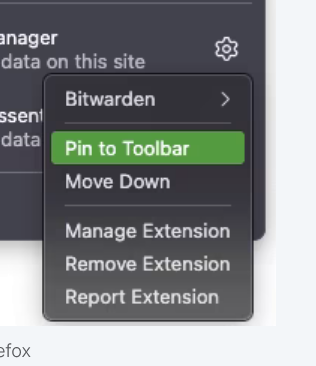
Windows 10 After restarting computer, the bookmarks were missing (I somehow managed to get them back), the Instapaper and Bitwarden icons are missing from the menu bar and video's will not play (but will on play on MSN). While trying to figure this out, the Puzzle/Add-ons icon is also now missing. The instruction in the photo do match what I see when clicking on the Puzzle.
Všetky odpovede (1)
The instruction in the photo do NOT match what I see when clicking on the Puzzle, which is now missing. The icon is also not shown in the Customize Toolbar page but does appear in the toolbar while the page is open.
This 'solution' from Mozilla Connect from 6-24 did not work for me...I found the fix: in the panel of "Manage Extensions" I click on the green button (indicating the extension is enabled) to disable it, then click on it again to enable it, only now, the extension icon reappears on my toolbar!