


Thunderbird has renamed my All Mail folder to Archives

I must have hit the wrong key using a message and all of a sudden Thunderbird has renamed my All Mail folder to Archives. I have spent a large number of hours trying to self-help, but alas, I am at my wits end. At this point in time I have two folders named Archives, one with all my messages and one that is empty. I even uninstalled and downloaded Thunderbird onto my Windows 11 desktop PC. Anyone care to help an old IT software developer? My objective it to somehow get back to having only one All Mail folder
Thanks, Brad
Všetky odpovede (6)
As they used to say back in the day "Anybody got their ears on?" I was hoping for some kind of reply. Brad
You are quite correct and I've been trying to get this sorted out. Gmail store everything inthe 'All Mail' folder. You only see emails in other folders because gmail understands it's not an ideal way to see emails. So they created 'labels' as a means of putting a type of tag on an email, so it has a virtual view in any 'label'. Thunderbird has no knowledge of 'labels', it uses folders, so it just downloads to the imap folder eg: Inbox.
So in Thunderbird, the 'All Mail' folder contains a complete duplicate of everything, incoming, outgoing, archived etc. If you accidentally delete anything from the 'All Mail' folder any copies of the deleted message will be deleted from whatever other folder also has those emails. The 'All Mail' is used by gmail when you choose to 'archive' emails - gmail basically just remove all labels.
In other words it's dangerous to assume the 'All Mail' is also only the 'Archived' mail.
Personally, I would not subscribe to see the 'All Mail' folder because if it gets corrupted for any reason eg: by an Anti-Virus product trying to 'fix' something, you have a high risk of losing everything.
This is link to the 'bug reports that are currently being looked at by the developers.
https://bugzilla.mozilla.org/show_bug.cgi?id=1998456 https://bugzilla.mozilla.org/show_bug.cgi?id=2001557
I sort of follow. So I think you're saying there is nothing I can do here - correct?
I now have unchecked "Keep message archives in:" I cannot find a way to delete the second (empty) Archives folder on Thunderbird.
Brad
Brad Young said
I sort of follow. So I think you're saying there is nothing I can do here - correct?
For now - we're stuck. Hopefully they will get on with this. There was a 'brainwave' by developers who though it would be really neat if all accounts had identical names for specific folders. Inbox, Drafts, Templates, Sent, Archives, Spam, Deleted.
In reality this has many problems and can cause a lot of confusion and in the case of 'All Mail' entirely misleading. I'm one of those who check archived emails every six months or so and choose the get rid of old stuff. If it's important then I would not have archived it. If people really thought it was just Archives and they decided to clear a load of emails then they could be in for a shock.
I now have unchecked "Keep message archives in:" I cannot find a way to delete the second (empty) Archives folder on Thunderbird. Brad
If this 'Archives' folder is not a server default folder - you created it - then you could try to 'unsubscibe' from seeing it and then logon to the server webmail account via a browser and delete it.
OR if it's one you created, you could use it instead of the 'All Mail' "Keep message archives in:" and choose 'Other' and 'Archives' folder on account' Then at least you can archive emails in a separate folder. Much easier to see what you choose to be archived.
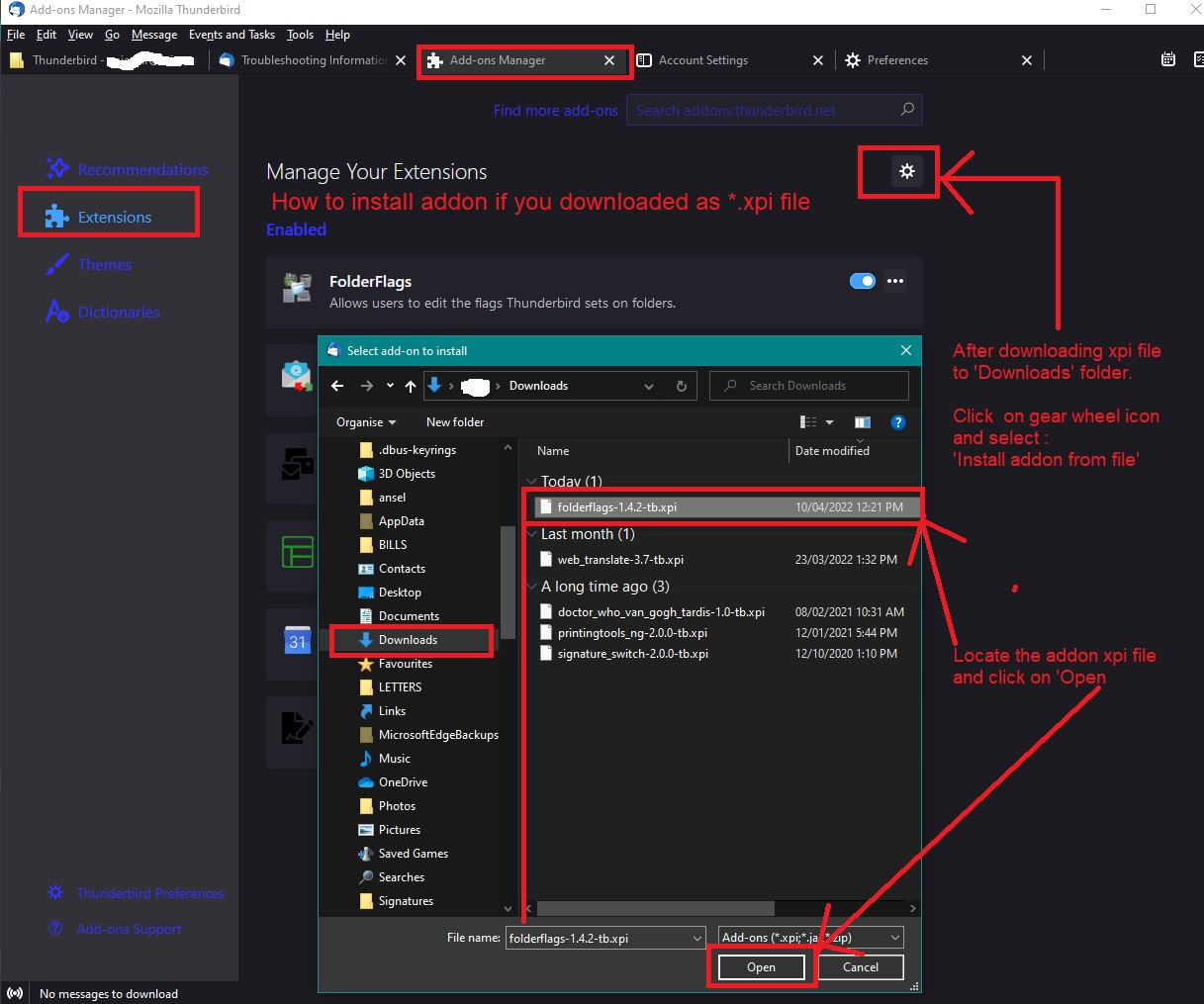
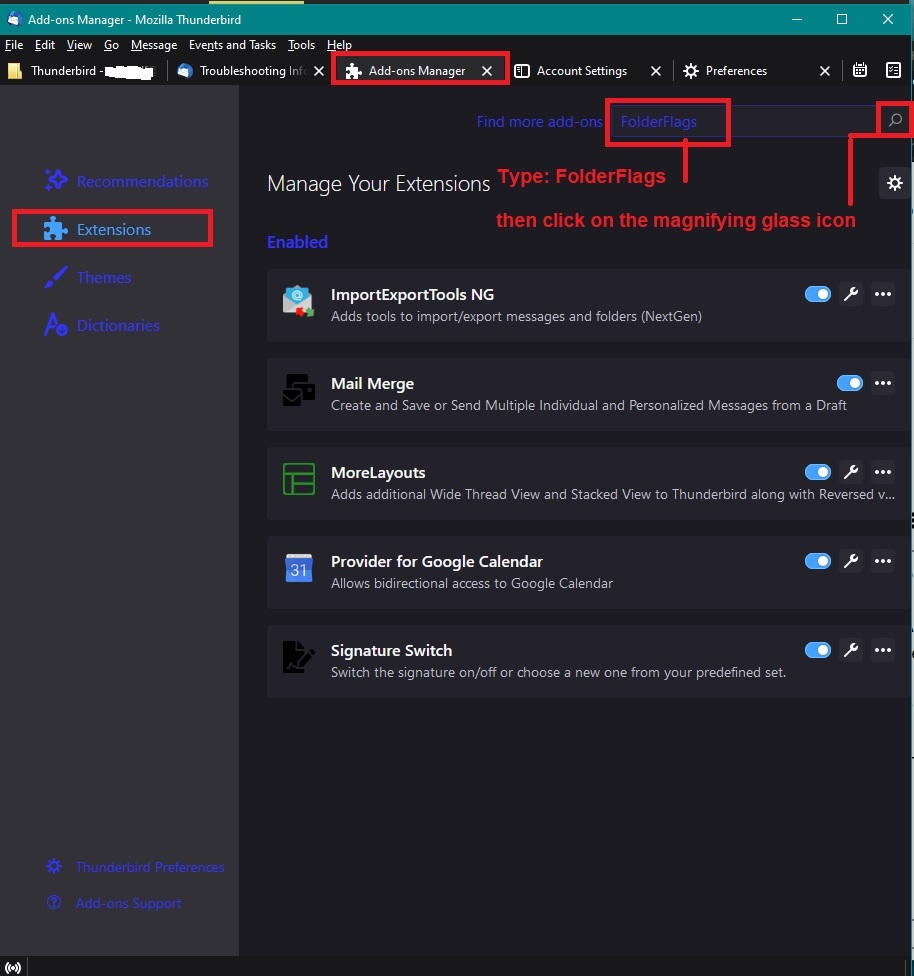
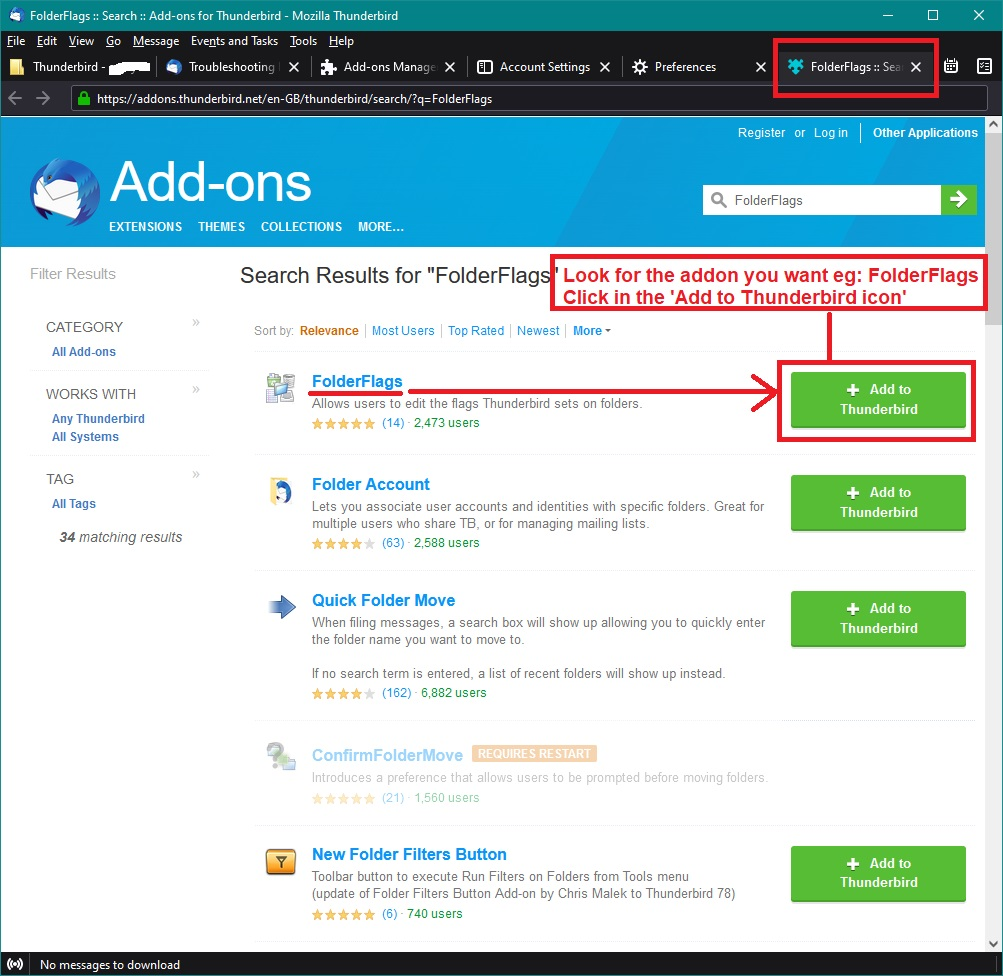
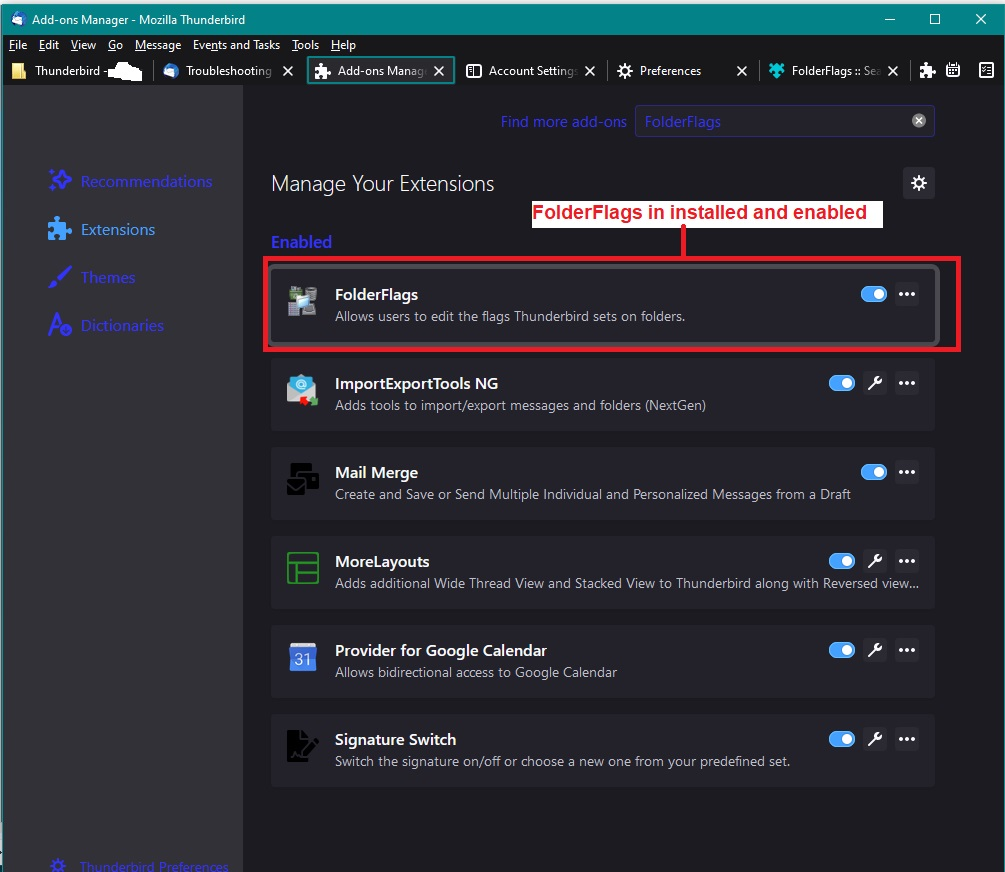
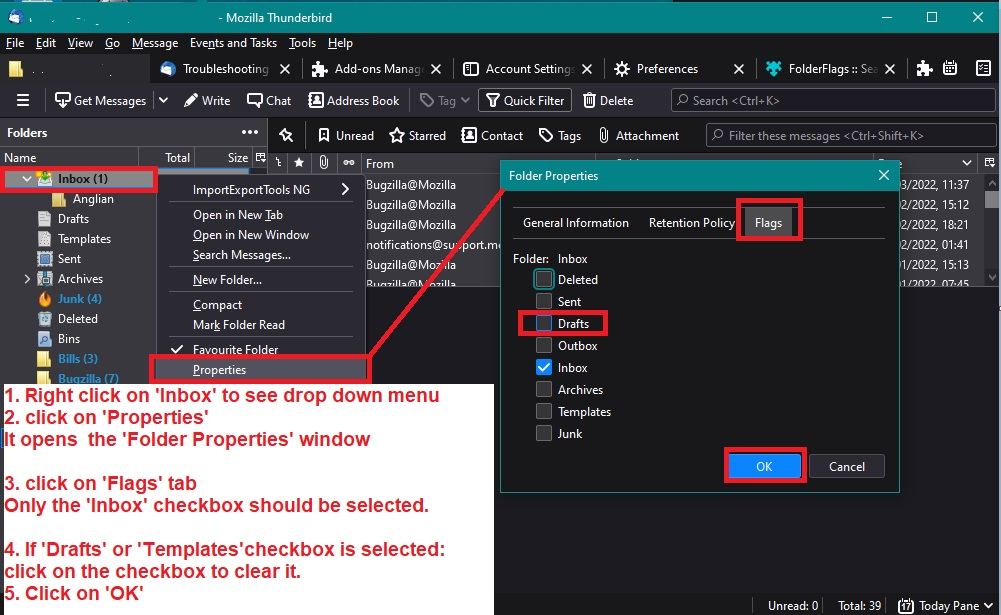
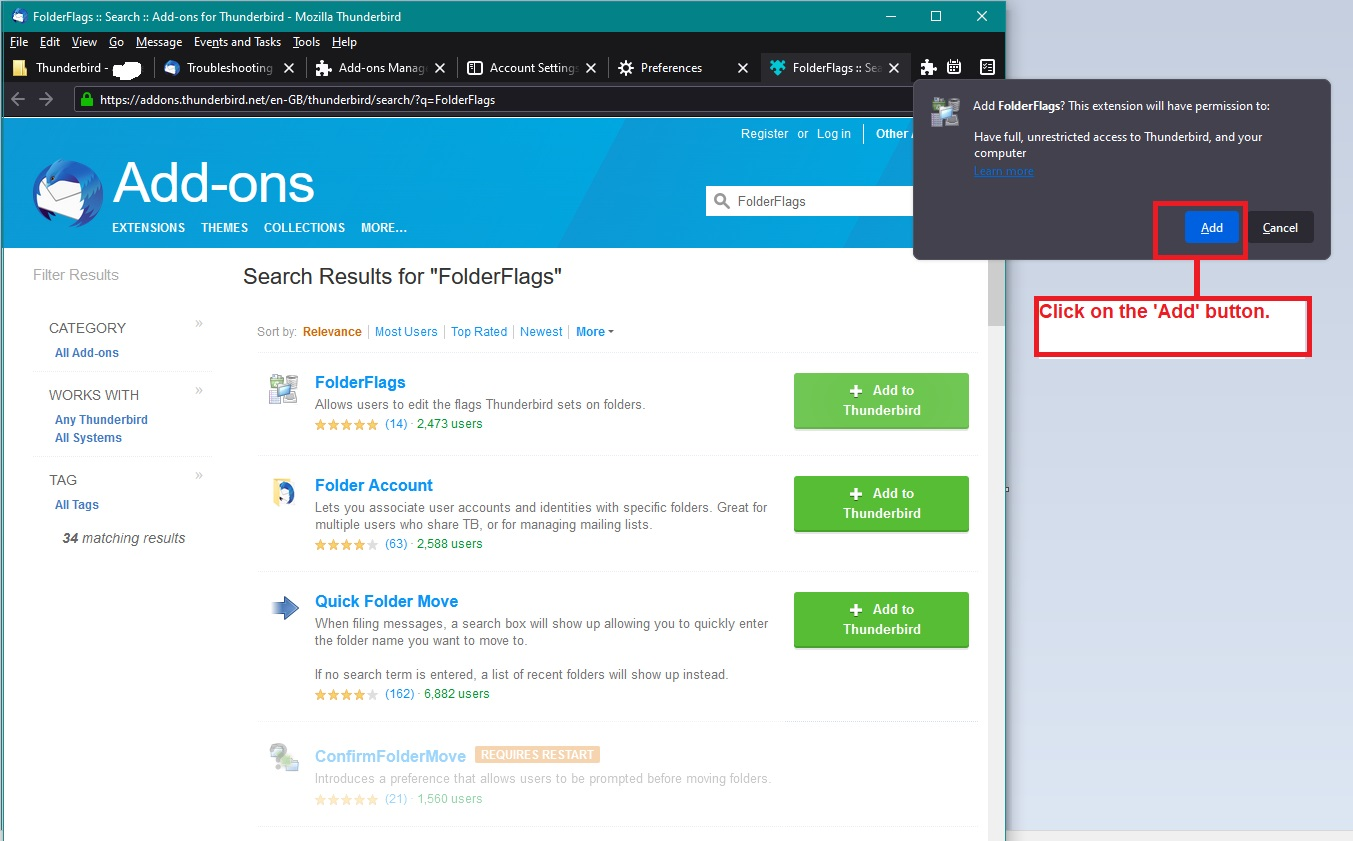
You cannot delete any folder that has a flag set - Inbox, Drafts, Templates, Sent, Archives, Spam, Deleted. You have to remove the 'flag' first and turn it back to a normal folder then you can delete it. There is an addon extension called 'folderFlags' which can be used.
Some additional images below as a guide The first image is to help if you downloaded from the link above to your downloads folder and then need to get it into Thunderbird. The other images help if you look for the addon via Thunderbird Menu app icon > Addons & themes The last image is after it's installed and you want to remove the 'Archives' flag.
The example mentions Inbox - but in your case 'Right clickon the 'Archives' folder and select 'Properties' then select the 'flags' tab, uncheck the 'Archives' checkbox. and click on 'OK'
For me, it's not just the 'All Mail' being named as 'Archives'. My gmail 'Sent Mail' folder is now called 'Sent', my gmail 'Bin' is renamed as 'Deleted' and my personally created folder called 'OldStore' got renamed as 'Archives' just because I set it up as my choice where to store archived mail.
Please note the original server name is still used when connecting to server, those renaming bits are only from a visual point of view. eg: right click on 'Sent' folder and select 'Properties' It will show the original server name in 'Location' which in my case it's 'Sent Mail' example: imap://name%40gmail.com@imap.gmail.com/Sent Mail
Wow, that is a lot for me to digest. I shall endeavor to parse these words of wisdom and get back with you on my findings. Thank you very much. If I don't talk to you soon, I hope you and yours have a very Happy Holidays. Brad