


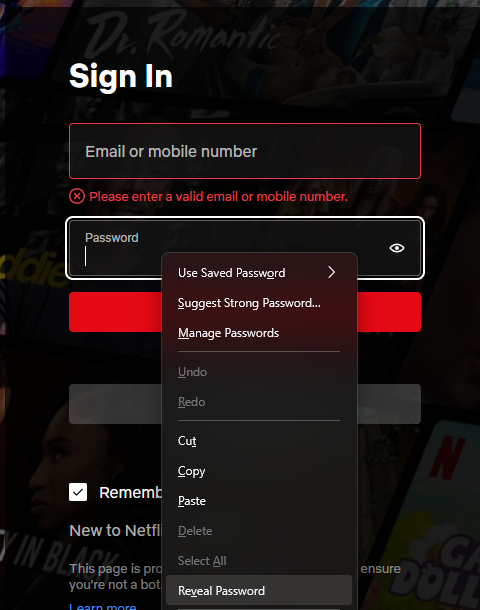
I need to disable "Reveal password" on right click

For whatever reason, saved passwords are visible on right click even if you have a Primary Password created. This defeats the purpose of a Primary Password entirely, so I have to figure out how to disable it.
I've tried group policy and about:config edits but the settings have all changed and no longer work from previous how-tos on the internet.
Všetky odpovede (6)

Hi!
I've just tried the feature. Why do you think this defeats the purpose of a primary password? No password is auto-filled until the primary password is given. After you give the password, you can access all of your passwords, so you can also reveal them. What do you expect to happen instead?
Regards, Balázs
Expected behavior:
1) Upon launching the browser you enter Primary Password, this gives you access to use passwords but not see them.
2) if you want to see what a password is you must enter Primary Password again. This is how the "passwords / about:logins" menu works. The Primary Password must be entered again to see passwords on this page.
In 2023, this used to be covered by about:config || layout.forms.reveal-password-context-menu.enabled
This setting no longer exists.
Upravil(a) ghenxx dňa
Well, it doesn't work that way, once the password is entered, you don't have to enter it until the session lasts. Feel free to open an idea at https://ideas.mozilla.org.
It used to work that way, that's why I'm asking if there's some other way that it is supposed to work now. The feature is still in the latest version of Policy Templates too, just not working. This isn't an idea thing, its either a bug or a help request depending on if its broken or I'm just missing something.
In that case, you can also open a bug at Bugzilla. Just read the guide beforehand: https://support.mozilla.org/hu/kb/contributors-guide-writing-good-bug
Ok I will do that if it turns out that this is a bug and I'm not just missing the new location for this feature.