


Javascript components causing frequent crashes in V145.0
The latest crash:
b1ad0fde-1882-41ce-9b80-4fd3e2c5ac20 java.lang.OutOfMemoryError: Failed to allocate a 134217744 byte allocation with 50331584 free bytes and 120MB until OOM, target footprint 125474336, growth limit 201326592
* New Sentry Instance: https://sentry.io/organizations/mozilla/issues/?project=6375561&query=e9bad27f848049fca9e39dc6b2d0abd5
* Socorro: https://crash-stats.mozilla.org/report/index/bp-22da7755-1702-4479-8d06-ab0d60251118
java.lang.OutOfMemoryError: Failed to allocate a 134217744 byte allocation with 50331584 free bytes and 120MB until OOM, target footprint 125474336, growth limit 201326592 at java.util.Arrays.copyOf(Arrays.java:3578) at java.io.ByteArrayOutputStream.grow(ByteArrayOutputStream.java:120) at java.io.ByteArrayOutputStream.ensureCapacity(ByteArrayOutputStream.java:95) at java.io.ByteArrayOutputStream.write(ByteArrayOutputStream.java:156) at kotlin.io.ByteStreamsKt.copyTo(IOStreams.kt:19) at kotlin.io.ByteStreamsKt.readBytes(IOStreams.kt:21) at mozilla.appservices.httpconfig.FetchBackend.sendRequest$lambda$3(FetchBackend.kt:6) at mozilla.appservices.httpconfig.FetchBackend.sendRequest(FetchBackend.kt:274) at mozilla.appservices.viaduct.uniffiCallbackInterfaceBackend$sendRequest$callback$makeCall$1.invokeSuspend(viaduct.kt:49) at mozilla.appservices.viaduct.uniffiCallbackInterfaceBackend$sendRequest$callback$makeCall$1.invoke(viaduct.kt:2) at mozilla.appservices.viaduct.uniffiCallbackInterfaceBackend$sendRequest$callback$makeCall$1.invoke(viaduct.kt:1) at mozilla.appservices.viaduct.uniffiCallbackInterfaceBackend$sendRequest$callback$$inlined$uniffiTraitInterfaceCallAsyncWithError$1.invokeSuspend(viaduct.kt:39) at kotlin.coroutines.jvm.internal.BaseContinuationImpl.resumeWith(ContinuationImpl.kt:9) at kotlinx.coroutines.DispatchedTask.run(DispatchedTask.kt:122) at kotlinx.coroutines.scheduling.CoroutineScheduler$Worker.run(CoroutineScheduler.kt:127) Suppressed: kotlinx.coroutines.internal.DiagnosticCoroutineContextException: [StandaloneCoroutine{Cancelling}@2104835, Dispatchers.Default]
HELP!!!!
Upravil(a) Cajundweeb dňa
Vybrané riešenie
Tushar, When I'm surfing in Firefox, it works fine for a few moments, then suddenly starts to freeze up, then abruptly closes. I had checked the crash reports and it's been showing errors with Javascript and memory issues. Here's an example of the crashes I've been seeing in the crash reports:
fc2c6695-5e71-4d58-b043-c1b8b241d7fc java.lang.OutOfMemoryError: Failed to allocate a 56 byte allocation with 878696 free bytes and 858KB until OOM, target footprint 201326592, growth limit 201326592; giving up on allocation because <1% of heap free after GC.
* New Sentry Instance: https://sentry.io/organizations/mozilla/issues/?project=6375561&query=7f9a066ab8d14ea99a2eb8c5ccde82c0
* Socorro: https://crash-stats.mozilla.org/report/index/bp-239b5627-de67-4322-88bb-8a7b60251110
java.lang.OutOfMemoryError: Failed to allocate a 56 byte allocation with 878696 free bytes and 858KB until OOM, target footprint 201326592, growth limit 201326592; giving up on allocation because <1% of heap free after GC. at android.os.Parcel.nativeReadString16(Native Method) at android.os.Parcel.readString16NoHelper(Parcel.java:3177) at android.os.Parcel$ReadWriteHelper.readString16(Parcel.java:510) at android.os.Parcel.readString16(Parcel.java:3156) at android.os.Parcel.readString(Parcel.java:3146) at android.view.accessibility.IAccessibilityInteractionConnection$Stub.onTransact(IAccessibilityInteractionConnection.java:181) at android.os.Binder.execTransactInternal(Binder.java:1380) at android.os.Binder.execTransact(Binder.java:1311)
9880263c-83ad-4ae4-b012-610de1bbd260
<native crash>
* Socorro: https://crash-stats.mozilla.org/report/index/bp-2782f1c0-b1d3-46d6-a603-cdfb40251110
<native crash>
Hope this information is of use in diagnosing the problem.
Všetky odpovede (6)

Vybrané riešenie
Tushar, When I'm surfing in Firefox, it works fine for a few moments, then suddenly starts to freeze up, then abruptly closes. I had checked the crash reports and it's been showing errors with Javascript and memory issues. Here's an example of the crashes I've been seeing in the crash reports:
fc2c6695-5e71-4d58-b043-c1b8b241d7fc java.lang.OutOfMemoryError: Failed to allocate a 56 byte allocation with 878696 free bytes and 858KB until OOM, target footprint 201326592, growth limit 201326592; giving up on allocation because <1% of heap free after GC.
* New Sentry Instance: https://sentry.io/organizations/mozilla/issues/?project=6375561&query=7f9a066ab8d14ea99a2eb8c5ccde82c0
* Socorro: https://crash-stats.mozilla.org/report/index/bp-239b5627-de67-4322-88bb-8a7b60251110
java.lang.OutOfMemoryError: Failed to allocate a 56 byte allocation with 878696 free bytes and 858KB until OOM, target footprint 201326592, growth limit 201326592; giving up on allocation because <1% of heap free after GC. at android.os.Parcel.nativeReadString16(Native Method) at android.os.Parcel.readString16NoHelper(Parcel.java:3177) at android.os.Parcel$ReadWriteHelper.readString16(Parcel.java:510) at android.os.Parcel.readString16(Parcel.java:3156) at android.os.Parcel.readString(Parcel.java:3146) at android.view.accessibility.IAccessibilityInteractionConnection$Stub.onTransact(IAccessibilityInteractionConnection.java:181) at android.os.Binder.execTransactInternal(Binder.java:1380) at android.os.Binder.execTransact(Binder.java:1311)
9880263c-83ad-4ae4-b012-610de1bbd260
<native crash>
* Socorro: https://crash-stats.mozilla.org/report/index/bp-2782f1c0-b1d3-46d6-a603-cdfb40251110
<native crash>
Hope this information is of use in diagnosing the problem.
Tushar, When I'm surfing in Firefox, it works fine for a few moments, then suddenly starts to freeze up, then abruptly closes. I had checked the crash reports and it's been showing errors with Javascript and memory issues. Here's an example of the crashes I've been seeing in the crash reports:
fc2c6695-5e71-4d58-b043-c1b8b241d7fc java.lang.OutOfMemoryError: Failed to allocate a 56 byte allocation with 878696 free bytes and 858KB until OOM, target footprint 201326592, growth limit 201326592; giving up on allocation because <1% of heap free after GC.
- New Sentry Instance: https://sentry.io/organizations/mozilla/issues/?project=6375561&query=7f9a066ab8d14ea99a2eb8c5ccde82c0
- Socorro: https://crash-stats.mozilla.org/report/index/bp-239b5627-de67-4322-88bb-8a7b60251110
java.lang.OutOfMemoryError: Failed to allocate a 56 byte allocation with 878696 free bytes and 858KB until OOM, target footprint 201326592, growth limit 201326592; giving up on allocation because <1% of heap free after GC. at android.os.Parcel.nativeReadString16(Native Method) at android.os.Parcel.readString16NoHelper(Parcel.java:3177) at android.os.Parcel$ReadWriteHelper.readString16(Parcel.java:510) at android.os.Parcel.readString16(Parcel.java:3156) at android.os.Parcel.readString(Parcel.java:3146) at android.view.accessibility.IAccessibilityInteractionConnection$Stub.onTransact(IAccessibilityInteractionConnection.java:181) at android.os.Binder.execTransactInternal(Binder.java:1380) at android.os.Binder.execTransact(Binder.java:1311)
9880263c-83ad-4ae4-b012-610de1bbd260 <native crash>
Paul: Am attaching screenshots of both the crashes that Firefox has experienced, as well as the enabled extensions currently in use. I'm using V 144.0.2 on a Samsung tablet, if that would be of any way to narrow down the issue.
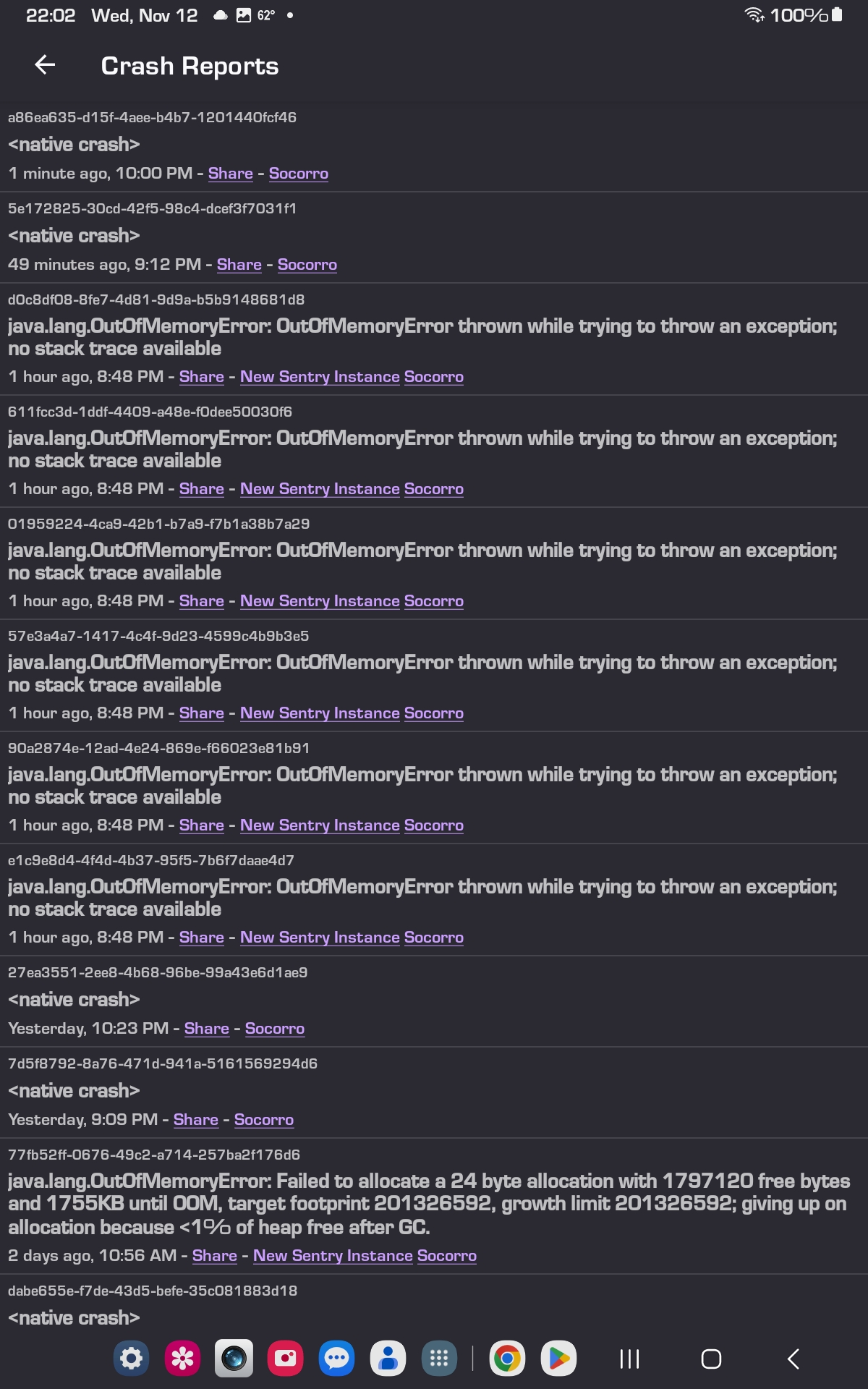

Additional ceash informati9n at: https://crash-stats.mozilla.org/report/index/6e9475fd-50b1-4b89-836c-382f40251113