


Windows 10 reached EOS (end of support) on October 14, 2025. If you are on Windows 10, see this article.

Vyhľadajte odpoveď

Vyhnite sa podvodom s podporou. Nikdy vás nebudeme žiadať, aby ste zavolali alebo poslali SMS na telefónne číslo alebo zdieľali osobné informácie. Nahláste prosím podozrivú aktivitu použitím voľby “Nahlásiť zneužitie”.

Ďalšie informácie

Menu bar changes in v140.0.1esr eclipse

  • 1 odpoveď
  • 0 má tento problém
  • 226 zobrazení
  • Posledná odpoveď od sfhowes
  • Vyriešené

In the new 140.0.1esr eclipse version the menu bar has lost Tools. When I right click and go to "Customize toolbar" there is not an option to add either 'Tools' or 'Message Filters', the later being what I would prefer to add to the tool bar (see attached image). I now have to click the hamburger icon -> select Tools -> Message Filters. If I could add 'Tools' or 'Message Filters' into the menu bar (for Mail messages since there are segregated menu bars now) it would be so much easier. I use the Message Filters function frequently so having to go through several steps to get to it now is very inconvenient in this new version.
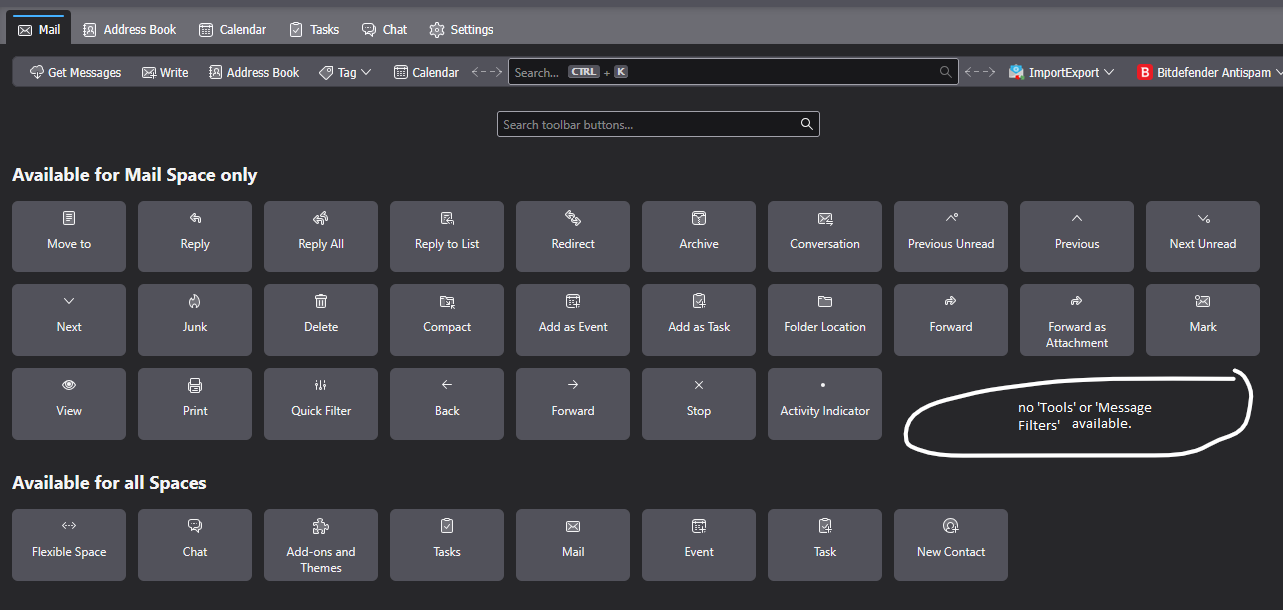
In the new 140.0.1esr eclipse version the menu bar has lost Tools. When I right click and go to "Customize toolbar" there is not an option to add either 'Tools' or 'Message Filters', the later being what I would prefer to add to the tool bar (see attached image). I now have to click the hamburger icon -> select Tools -> Message Filters. If I could add 'Tools' or 'Message Filters' into the menu bar (for Mail messages since there are segregated menu bars now) it would be so much easier. I use the Message Filters function frequently so having to go through several steps to get to it now is very inconvenient in this new version.
Priložené obrázky

Vybrané riešenie

The toolbar you're trying to customize is actually the Unified bar. If the Menu Bar with Tools is hidden, press Alt and make it permanently visible under View/Toolbars.

Čítať túto odpoveď v kontexte 👍 2

Všetky odpovede (1)

Vybrané riešenie

The toolbar you're trying to customize is actually the Unified bar. If the Menu Bar with Tools is hidden, press Alt and make it permanently visible under View/Toolbars.