


Event background colours

Hi everyone.
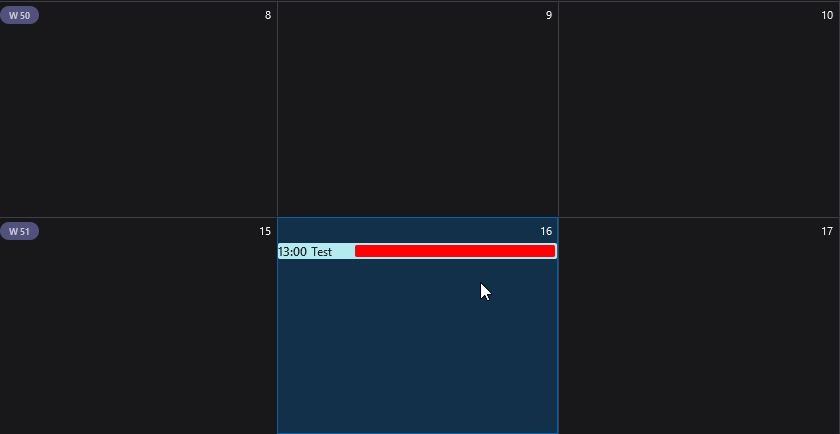
Hoping someone may be able to help. I see that other users are able to fully highlight the events in calendar. I seem to be only able to highlight 2/3's (see image)
Thanks in advance
Vybrané riešenie
Post an image of the code you currently have in the 'userChrome.css' file.
I'm using the following which works ok for week, multi-week and month even when I expand window to maximise. It will be similar to what you see on a 'day' setting, but that depends upon the width of window. For the window size I use, it never appears even in day setting. It depends upon the min-width - I've got 1000px.
/* CALENDAR  - set event colour instead of calendar colour */

.calendar-category-box{     margin:0 0 0 -200px !important;     min-width: 1000px !important;     }
.alarm-icons-box,.reminder-icon{     margin:0 0 0 0!important;     }
.event-name-label,.item-time-label,.alarm-icons-box,.reminder-icon{     z-index:100000!important;     }
.calendar-item-flex{     padding:0!important;     }
.calendar-month-day-box-list-item{     margin:0!important;     }
.calendar-color-box{     border:none!important;     }
.event-name-label{     white-space:break-spaces !important;     }
Čítať túto odpoveď v kontexte
👍 0
Všetky odpovede (4)
Vybrané riešenie
Post an image of the code you currently have in the 'userChrome.css' file.
I'm using the following which works ok for week, multi-week and month even when I expand window to maximise. It will be similar to what you see on a 'day' setting, but that depends upon the width of window. For the window size I use, it never appears even in day setting. It depends upon the min-width - I've got 1000px.
/* CALENDAR  - set event colour instead of calendar colour */

.calendar-category-box{     margin:0 0 0 -200px !important;     min-width: 1000px !important;     }
.alarm-icons-box,.reminder-icon{     margin:0 0 0 0!important;     }
.event-name-label,.item-time-label,.alarm-icons-box,.reminder-icon{     z-index:100000!important;     }
.calendar-item-flex{     padding:0!important;     }
.calendar-month-day-box-list-item{     margin:0!important;     }
.calendar-color-box{     border:none!important;     }
.event-name-label{     white-space:break-spaces !important;     }
Upravil(a) Toad-Hall dňa
Many thanks for getting back to me. I really appreciate it. Please see below what was in my .css file in Chrome. I note that the only difference is the min-width: 200px (yours 1000px)
/* Calendar - set event category colour instead of calendar colour */
.calendar-category-box{ margin:0 0 0 -200px !important; min-width: 200px !important; } .alarm-icons-box,.reminder-icon{ margin:0 0 0 0!important; } .event-name-label,.item-time-label,.alarm-icons-box,.reminder-icon{ z-index:100000!important; } .calendar-item-flex{ padding:0!important; } .calendar-month-day-box-list-item{ margin:0!important; } .calendar-color-box{ border:none!important; } .event-name-label{ white-space:break-spaces !important; }
So I have copied and pasted yours, and all works how I was wanting.
Many thanks for your help, it is very much appreciated.
Good to hear all is ok. Would you be so kind to select my initial comment as the Chosen Solution as it helps the database to improve search for anyone needing a similar solution. I think it also helps when using google. Many thanks.