


Need to change the selection & default button background color

The red background of selections and default buttons makes it almost impossible for me to read the black text. I'm using Thunderbird 1.28.1esr on a fully updated Windows 10 desktop machine. I tried deselecting the use of System colors with Thunderbird Settings/General/Fonts & Colors/Colors, with no effect. How can I change the background to my Windows system background of gray or any other background color that can Thunderbird selections readable?
Vybrané riešenie
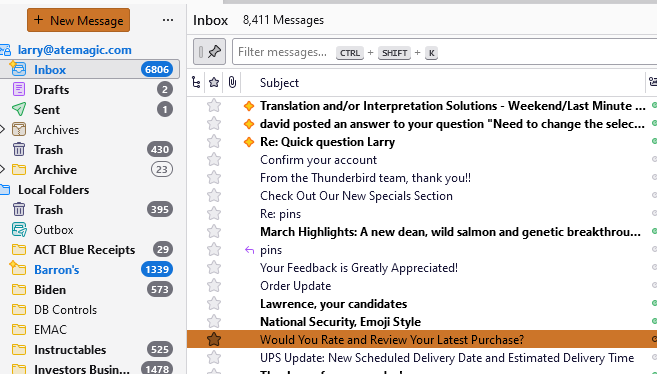
I never modified the default settings. Your question about my "theme" prompted me to look into themes. I was apparently using "System Theme - Auto", (first image)
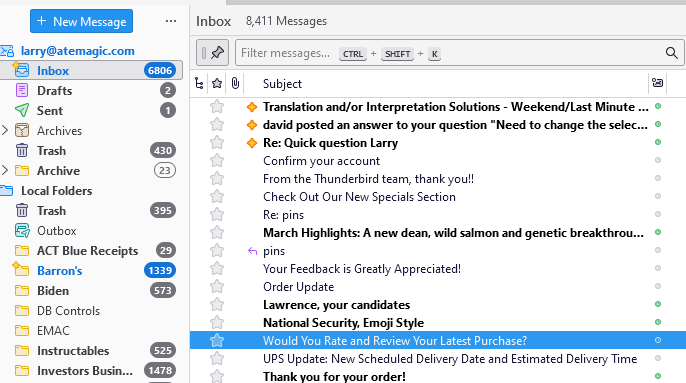
Once I enabled the "Light" theme, selections and default buttons changed to white text on a blue background. (second image).
Problem solved.
Steps: Settings/Add-ons and Themes (bottom left)/Light Theme - Enable
Thanks for pointing me in the right direction.
Čítať túto odpoveď v kontexte 👍 1Všetky odpovede (3)
I am not a color guru, but to get assistance, I suggest telling what theme you're using, and possibly include a screenshot of the problem area. Thank you.
Vybrané riešenie
I never modified the default settings. Your question about my "theme" prompted me to look into themes. I was apparently using "System Theme - Auto", (first image)
Once I enabled the "Light" theme, selections and default buttons changed to white text on a blue background. (second image).
Problem solved.
Steps: Settings/Add-ons and Themes (bottom left)/Light Theme - Enable
Thanks for pointing me in the right direction.
I was very glad to assist. You are most welcome. :)