


How can I hide "Firefox Suggestion" lists in the address bar without disabling auto completion?

Hi friends.
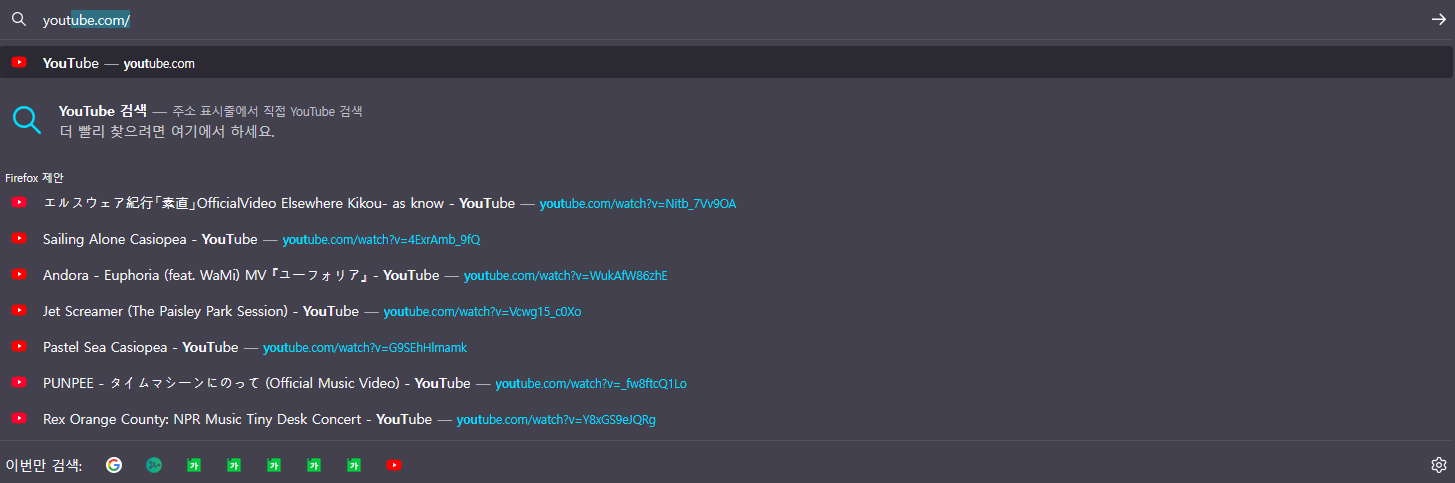
As shown in the image, if I enable "Address Bar - (suggest) Browsing history" option at about:preferences#search page, bunch of subordinate pages are displayed, which is barely useful, in my opinion.
I want to hide them, but I want to keep the auto completion functioning. For instance: I want my Firefox to complete https://youtube.com/ with only typing y, but don't want to see those 'Firefox Suggestion' pages.
Is it possible to set it this way? Or I can't just have it both ways? Please let me know.
(Thanks in advance, and responses in easy English will be much appreciated; I'm a beginner in English.)
Regards, 흡폐치
Vybrané riešenie
The location bar drop-down list can show history items, bookmarked pages, pages opened in tabs, top sites, and search suggestions.
You can set what suggestions show when you enter an URL in the location/address bar.
Settings -> Search -> Address Bar — Firefox Suggest:
Browsing history
Bookmarks
Clipboard
Open tabs
Shortcuts
Search engines
To hide the full drop down panel, you can set browser.urlbar.maxRichResults to 0 (zero) in about:config.
Čítať túto odpoveď v kontexte 👍 1Všetky odpovede (4)

I'm assuming that these are results from your browser history. You can turn off suggesting results from your history, but that will apply to every site - there is no way to turn them off per-site.
See here for more information about the settings: https://support.mozilla.org/kb/address-bar-autocomplete-firefox#w_how-can-i-control-what-results-the-address-bar-shows-me
Standard8 said
I'm assuming that these are results from your browser history. You can turn off suggesting results from your history, but that will apply to every site - there is no way to turn them off per-site. See here for more information about the settings: https://support.mozilla.org/kb/address-bar-autocomplete-firefox#w_how-can-i-control-what-results-the-address-bar-shows-me
First of all, thanks for answering! (1) Yes, it is my browser history and (2) No, I'm not talking about turning it off per site. I want that 'Firefox Suggesetion' list to be never displayed. However, if I turn off the option, auto completion in the address bar (which I want to keep viable) also won't work. I want to know how to just hide that 'list.'
Vybrané riešenie
The location bar drop-down list can show history items, bookmarked pages, pages opened in tabs, top sites, and search suggestions.
You can set what suggestions show when you enter an URL in the location/address bar.
Settings -> Search -> Address Bar — Firefox Suggest:
Browsing history
Bookmarks
Clipboard
Open tabs
Shortcuts
Search engines
To hide the full drop down panel, you can set browser.urlbar.maxRichResults to 0 (zero) in about:config.
cor-el said
To hide the full drop down panel, you can set browser.urlbar.maxRichResults to 0 (zero) in about:config.
I set browser.urlbar.maxRichResults to 1 and it worked fantastically! Thank you so much.