


New side bar

How can I get rid of the side bar that is reducing the size of my pages and is completely unnecessary?
Vybrané riešenie
Update for Firefox 136: The setting to choose between completely closing the sidebar (old style) and showing vertical button bar (new style) moved. See: Use the sidebar to access tools and vertical tabs.
Original Reply
It works for me. Are you still seeing the vertical button bar with the gear at the problem?
Upravil(a) jscher2000 - Support Volunteer dňa
Všetky odpovede (8)
Click Customize sidebar at the bottom of the sidebar, then select Show and hide sidebar. Now the sidebar button next to the address will disable the sidebar.

Thank you for your reply. I had already done what to described. The blank side bar is still reducing the width of my laptop screen by a quarter of the full viewable area. I do not want a side bar at all.
I am not happy with this update and will be looking at other browsers.
The blank side bar?
You can click the cog icon at the bottom of the sidebar to access the settings for the new sidebar panel and select what items you wish to see, you can scroll down to see more settings like vertical tabs. You can hide the sidebar by selecting "Show and hide sidebar" for the Sidebar toolbar button. With this choice selected, you can click the Sidebar button to open and close the sidebar. You may have to re-add to Sidebar button to the toolbar.
It's a two-step process:
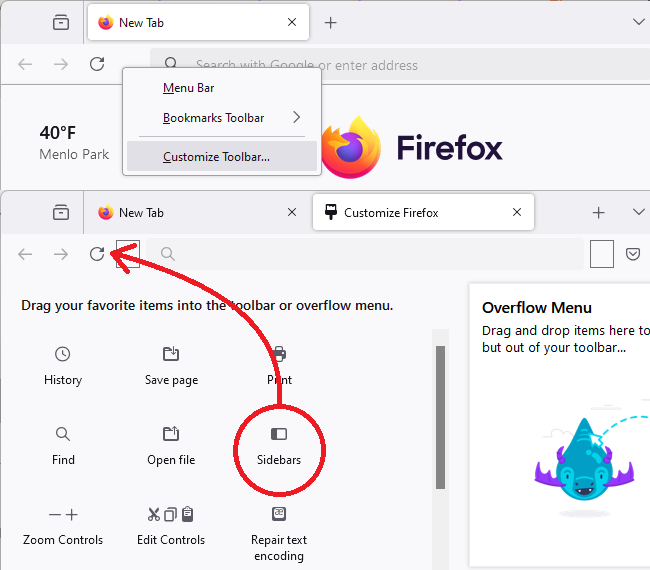
(1) Change the setting for what the Sidebars toolbar button does, and (2) Click the Sidebars toolbar button to hide the sidebar
That button should be near the back/forward/reload buttons. If yours is missing, you can add it using the Customize feature (Customize Firefox controls, buttons and toolbars). I'm attaching a picture for reference:
Success?
Thank you. You have been very kind and patient but it is the new design of the page I dislike and I don't think anything can get rid of the side bar, empty or not. It reduces the width of the screen. Best wishes to the support team.
Vybrané riešenie
Update for Firefox 136: The setting to choose between completely closing the sidebar (old style) and showing vertical button bar (new style) moved. See: Use the sidebar to access tools and vertical tabs.
Original Reply
It works for me. Are you still seeing the vertical button bar with the gear at the problem?
Upravil(a) jscher2000 - Support Volunteer dňa
The side panel has gone!! I think you must be magic. I tried all that a dozen times before with no luck. Thank you so much!