


Windows 10 reached EOS (end of support) on October 14, 2025. For more information, see this article.

Vyhľadajte odpoveď

Vyhnite sa podvodom s podporou. Nikdy vás nebudeme žiadať, aby ste zavolali alebo poslali SMS na telefónne číslo alebo zdieľali osobné informácie. Nahláste prosím podozrivú aktivitu použitím voľby “Nahlásiť zneužitie”.

Ďalšie informácie

Containers, VPN, How to set up

  • 7 odpovedí
  • 0 má tento problém
  • 36 zobrazení
  • Posledná odpoveď od TSnight

ďalšie možnosti

I am trying to set up a container and add some sites that I want to browse using my Mozilla VPN subscription. I am following the directions below but it is not clearly written. I have the VPN app installed and updated. Then in step 2 it shows a dropdown window that I can not find... Please help...

https://support.mozilla.org/en-US/kb/protect-your-container-tabs-mozilla-vpn?utm_source=-vpn-related#firefox-private-network-vpn::

I am trying to set up a container and add some sites that I want to browse using my Mozilla VPN subscription. I am following the directions below but it is not clearly written. I have the VPN app installed and updated. Then in step 2 it shows a dropdown window that I can not find... Please help... https://support.mozilla.org/en-US/kb/protect-your-container-tabs-mozilla-vpn?utm_source=-vpn-related#firefox-private-network-vpn::

Všetky odpovede (7)

ďalšie možnosti

Click the puzzle icon Extensions add-on tray icon on a toolbar, then click the Multi-Account Containers extension's icon.

ďalšie možnosti

Ok. I see that now and can open links in a container. I want them to open with my Mozilla VPN VPN... How do I do that... Possible?

ďalšie možnosti

It should be. Can't you see the Mozilla VPN section in Manage containers?

ďalšie možnosti

I cant get to "manage containers" per the original question, #2 in the link...

ďalšie možnosti

here is screen shot... I don't get the icon with plus... and when I click on he one I have it just lists containers.
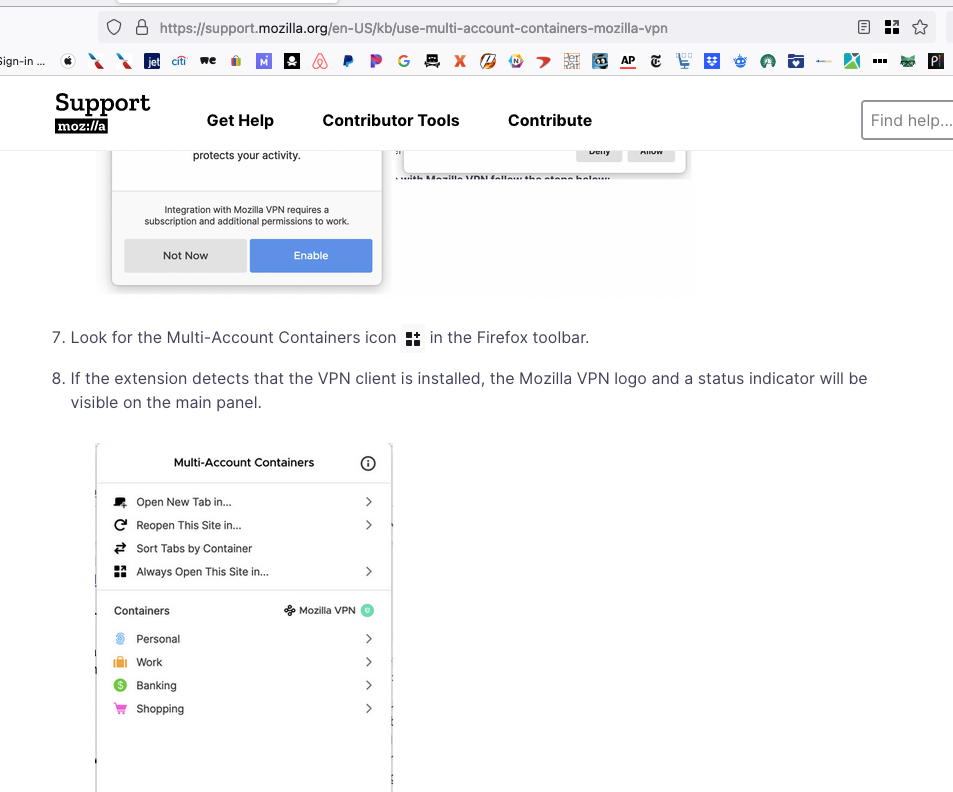
ďalšie možnosti

I don't have a VPN, but try to force update the extension. It should be version 8.1.2.

ďalšie možnosti

It is that version. And it's MAC so there's that... It just doen't work I am assuming...