


Firefox startup error

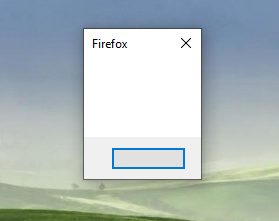
Hello, I'm trying to install Firefox (had it installed and running before). The installer works fine, both the downloader and the full installer, but when Firefox starts, all that I get is that empty dialog shown in the image. Tried uninstalling, restarting, deleting AppData folders, registry entries, etc. But no luck. Any suggestions? Thanks!
PS: Running Win 10 64-bit fully updated
Hello,
I'm trying to install Firefox (had it installed and running before). The installer works fine, both the downloader and the full installer, but when Firefox starts, all that I get is that empty dialog shown in the image.
Tried uninstalling, restarting, deleting AppData folders, registry entries, etc. But no luck.
Any suggestions?
Thanks!
PS: Running Win 10 64-bit fully updated
Vybrané riešenie
- Enter this link: https://support.microsoft.com/en-us/help/2977003/the-latest-supported-visual-c-downloads
- From the section Visual Studio 2015, 2017 and 2019 download the following executable file: vc_redist.x64.exe
- Install this file
- Restart the computer and run Firefox
Všetky odpovede (1)
Vybrané riešenie
- Enter this link: https://support.microsoft.com/en-us/help/2977003/the-latest-supported-visual-c-downloads
- From the section Visual Studio 2015, 2017 and 2019 download the following executable file: vc_redist.x64.exe
- Install this file
- Restart the computer and run Firefox