


Two inboxes

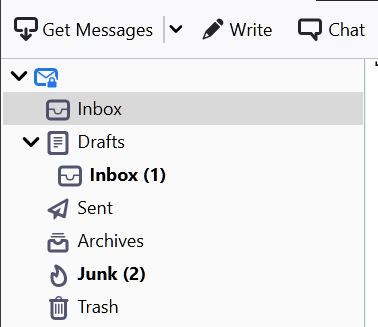
Somehow and through an inadvertent drag and drop, I got 2 inboxes. New mail is going to the inbox in Drafts. I cannot move it out of Drafts.
Všetky odpovede (1)
Vybrané riešenie
I presume this is a POP mail account, so tell me if different. Move all emails from the Drafts/Inbox into the proper 'Inbox' above. When empty, right click on Drafts/Inbox and select 'compact'.
Menu icon app > Help > Troubleshooting Information Under 'Application Basics' about 8th in list is 'Profile Folder' - click on 'Open Folder' A new window opens showing the contents of you 'Profile name' folder.
Exit Thunderbird now - this is important.
click on 'Mail' folder Click on pop mail account name folder to see contents. You should see a 'Drafts.sbd' folder Delete the 'Drafts.sbd' folder.
Start Thunderbird.