


Windows 10 reached EOS (end of support) on October 14, 2025. If you are on Windows 10, see this article.

Vyhľadajte odpoveď

Vyhnite sa podvodom s podporou. Nikdy vás nebudeme žiadať, aby ste zavolali alebo poslali SMS na telefónne číslo alebo zdieľali osobné informácie. Nahláste prosím podozrivú aktivitu použitím voľby “Nahlásiť zneužitie”.

Ďalšie informácie
Táto téma bola uzamknutá a archivovaná. Ak potrebujete pomôcť, založte prosím novú otázku.
Uzamknuté Archivované

will not boot up

SuMo Bot

When trying to open firefox the following message appears.

Firefox is already running, but not responding. The old Firefox process must be closed to open a new window. If I pic Close Firefox the error message goes away but comes back. I've tried uninstalling and reinstalling with and without resetting to default but no help. Same issue appears.
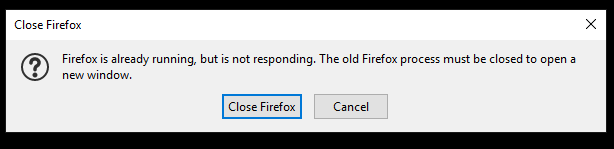
When trying to open firefox the following message appears. Firefox is already running, but not responding. The old Firefox process must be closed to open a new window. If I pic Close Firefox the error message goes away but comes back. I've tried uninstalling and reinstalling with and without resetting to default but no help. Same issue appears.

Všetky odpovede (1)

Try to delete parent.lock in the profile folder.

Location used for the main profile that keeps your personal data.

  • C:\Users\<user>\AppData\Roaming\Mozilla\Firefox\Profiles\<profile>

You can create a new profile as a quick test to see if your current profile is causing the problem.

See "Creating a profile":

If the new profile works then you can transfer files from a previously used profile to the new profile, but be cautious not to copy corrupted files to avoid carrying over problems.

This question has been locked because the original author has deleted their account. While you can no longer post new replies, the existing content remains available for reference.