


Incorrect rendering of a page on dlive.tv
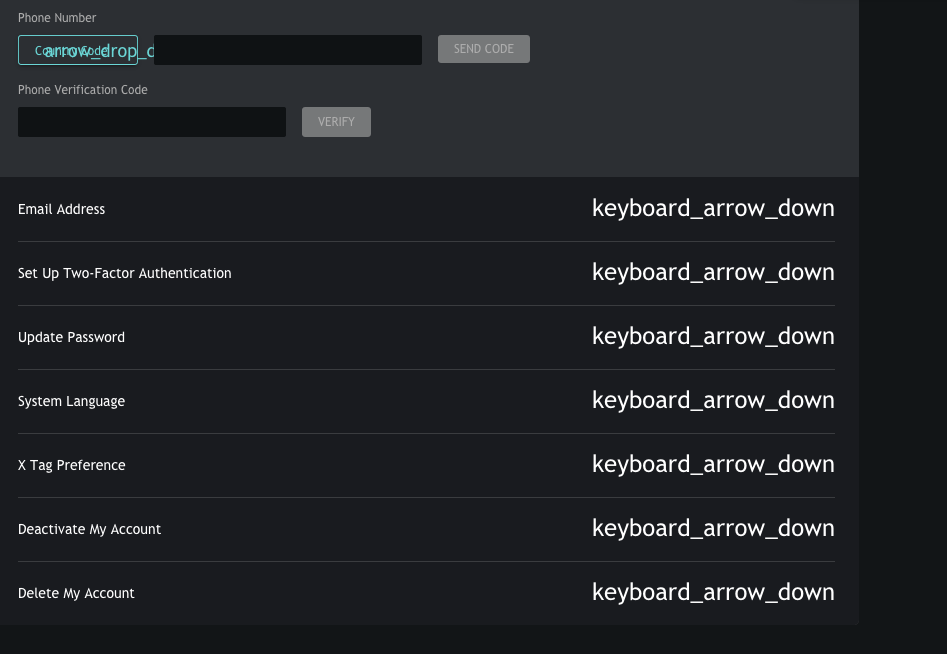
Elements' identifiers in place of disclosure triangles, other elements also displayed as identifiers and are mangled (overlapping). See the screenshot. URL is dlive.tv/s/settings
No issues in Safari 13.1 on High Sierra. The screenshot taken in Mavericks (FF 74.0.1) as Safari 9 doesn't load the site at all. Disabled all extensions, cleared cookies and cache - no dice.
Upravil(a) scrutinizer1 dňa
Všetky odpovede (3)
Vybrané riešenie
Go to Options -> Fonts&Colors and press the Advanced button.
After that, select Allow pages to choose their own fonts, instead of your selections above.
Ok, that solved the issue but not in a acceptable way: I want use a custom settings. I suggest Mozilla to address that.
Websites use special icon fonts that are downloaded from internet to show small images like in your screenshot. If you disable website fonts ("Allow pages to choose their own colors, instead of my selections above" is disabled) then you won't see these special fonts and you may instead see the 'alt' text or little boxes with the hex code.