


why is yahoo search no longer available?
firefox started chamging my search engine to BING and now YAHOO is no longer an option for search engines. I don't like BING or GOOGLE search engines, I like YAHOO! What is the big deal ?
Vybrané riešenie
hi, you can install the yahoo search provider from https://addons.mozilla.org/firefox/addon/yahoo-search-addon/ if you're inclined to do so.
Čítať túto odpoveď v kontexte 👍 2Všetky odpovede (16)
Vybrané riešenie
hi, you can install the yahoo search provider from https://addons.mozilla.org/firefox/addon/yahoo-search-addon/ if you're inclined to do so.
Thank you for reporting this. We've seen about a half dozen user reports of this in the past 24 hours and the cause is not yet known.
Are you using the U.S. English version of Firefox, or a different locale version?
In addition to Yahoo's add-on, I posted some other workarounds here if you are interested in alternatives: https://support.mozilla.org/questions/1208384#answer-1085698
The first thread (long!) for reference: https://support.mozilla.org/questions/1208139
By the way, after adding a Yahoo search plugin, if Firefox changes to Bing again, that could indicate a malware issue, so please follow-up if that returns.
Thank you! Why has this just started?
jscher2000 said
Are you using the U.S. English version of Firefox, or a different locale version?
In case it matters : I'm using the U.S. English version, but I am not
in the US .....
ziggywizard89 said
Thank you! Why has this just started?
If we knew that... we would not be tearing out so much hair.
Thank you for all the info! I've checked my computer with 3 different anti malware/virus programs and can't find anything wrong. I have yahoo back but everytime I close firefox I have to go into options and change the search engine back to yahoo. It seems like it is something inside of firefox itself but I don't really know.
Hi ziggywizard89, which method of restoring Yahoo did you use?
I posted a couple alternatives on my site if that one doesn't behave well. They have different names so should not be affected by changes affecting the built-in search plugin.

ziggywizard89 said
Thank you for all the info! I've checked my computer with 3 different anti malware/virus programs and can't find anything wrong. I have yahoo back but everytime I close firefox I have to go into options and change the search engine back to yahoo. It seems like it is something inside of firefox itself but I don't really know.
Are you still having problems keeping Yahoo Search installed after you close Firefox or have you solved the problem?
You can also add Yahoo Search to Firefox as follows:
- Visit the yahoo.com homepage.
- Click the magnifying glass
 in the Search bar on the toolbar.
- If you don't have a Search bar, see Add the Search bar to your Firefox toolbar.
- Click Add "Yahoo Search".
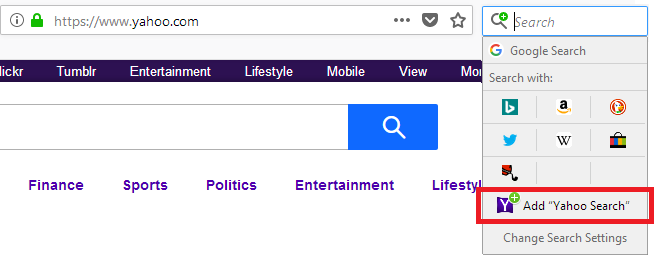
Yahoo Search will now be an available search option in Firefox.
If you want to use Yahoo Search by default, right-click the Yahoo icon that now appears as a Search with: option and click Set As Default Search Engine.
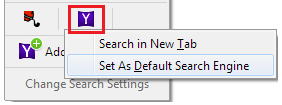
For more information, see Manage Firefox search settings and Add or remove a search engine in Firefox.
Let us know if this solves the problem or if you need more help.
Yahoo search is back as an option and I set it as default search but when I close firefox and reopen it I have to go to options and reselect yahoo as default search, I remove all other search engine options but again if I close and reopen firefox it is changed back to bing and bing is once again an option, so I reset to yahoo and remove bing as an option but it comes back every time,
Hi ziggywizard89, is it "Bing" or "Bing Search Engine"? The Lavasoft/AdAware program WebCompanion injects a script into the Firefox program folder that often will create a new search engine called "Bing Search Engine" and make it the default search engine at startup. To root that out:
Could you check for alien script files in your Firefox program folder? In particular, in these locations (varies for 32-bit / 64-bit):
- C:\Program Files\Mozilla Firefox\defaults\pref
- C:\Program Files (x86)\Mozilla Firefox\defaults\pref
Caution: Do not double-click script files! The default action for a script file it to execute as a Windows system script. (Typically this would just not work, but why risk it.)
Make sure Windows is showing hidden files: https://support.microsoft.com/en-us/help/14201/windows-show-hidden-files
A file named channel-prefs.js is normal. Any other file in this folder is suspicious -- for example, dsengine.js (added by Lavasoft/AdAware Web Companion). Remove any such files to a neutral location for further analysis at your leisure.
I found the, dsengine.js, file and moved it to my desktop. Should I delete it?
Getting it out of the programs folder seems to have fixed the problem, this time it did not change my default. Thank you very much!
ziggywizard89 said
I found the, dsengine.js, file and moved it to my desktop. Should I delete it?
You might as well. It has no other known usage than to take over your default search engine (d s engine) setting.
If you don't recall installing Web Companion, you might also want to remove that:
Open the Windows Control Panel, Uninstall a Program.
After the list loads, click the "Installed on" column heading to group the infections, I mean, additions, by date. This can help surface undisclosed bundle items that snuck in with some software you agreed to install. Be suspicious of everything you do not recognize/remember, as malware often uses important or innocent sounding names to discourage you from removing it.
Take out as much trash as possible here. If you're not sure, feel free to post program names or a screenshot of the list.