


How do I KEEP the checked box for "keep login passwords? It uncheckes the box everytime I leave Firefox!

My passwords are all "saved", but the box that says "Remember logins and passwords for websites" always gets unchecked. There also is a whole page where other folks have the same problem/QUESTION, but NO ANSWERS
Upravil(a) FrannyC dňa
Všetky odpovede (5)
FrannyC said
My passwords are all "saved", but the box that says "used them" always gets unchecked.
Hi, Maybe a dumb question, but where do you see a box that says "used them " ?
When you look at this screenshot - is that what you are referring to with the header of your question ?
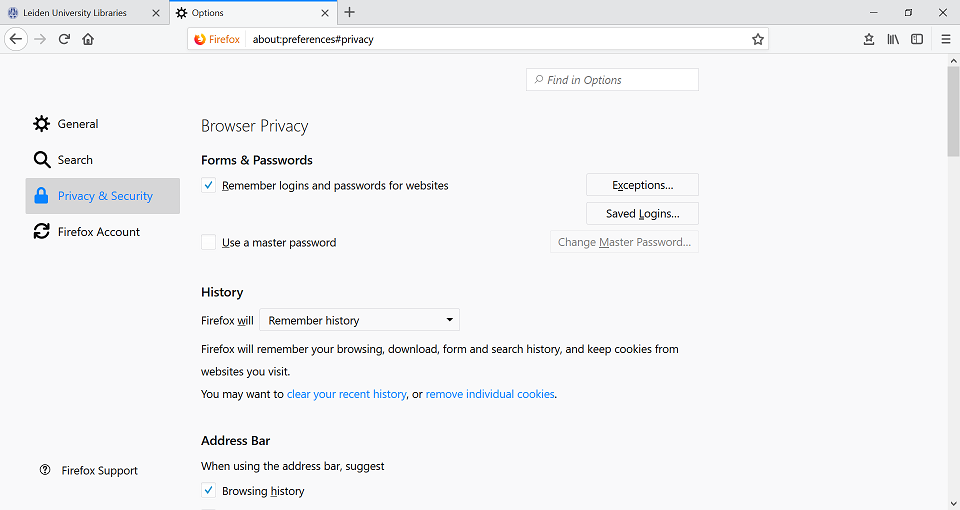
Remember logins and passwords for websites always gets unchecked. How do I correct this?
FrannyC said
Remember logins and passwords for websites always gets unchecked. How do I correct this?
Would you please make sure that you're not in permanent Private Browsing mode :
3-bar menu (or 'Tools') => Options => Privacy & Security => under 'History' => Firefox will : choose : 'Use custom settings for history' Uncheck : 'Always use private browsing mode'
Also see this article about Private Browsing

https://support.mozilla.org/en-US/kb/how-to-fix-preferences-wont-save
Note: Some software, like Advanced SystemCare with Surfing Protection, can protect files in the Firefox profile folder against changes. If you have such software then check the settings or uninstall this software.
Are you using Roboform?
This is possibly a problem with the RoboForm Password Manager extension in case you use this Password Manager.
See:
The behavior described by you is by design in Chrome and Firefox.
A user can disable RoboForm extension to enable the built-in password manager in the browser.
The user is intended to use either at a time, not both.