


Firefox crashes when I exit the program.

When I exit Firefox I get a windows error report that says Firefox has stopped working. I click on the "check online for a solution and close the program" option and the error report goes away. About 10 seconds later another of the same error report comes up and I clear it the same way. This happens about 50% of the time when I close Firefox. Any idea why it would do this?
Všetky odpovede (3)
We're sorry to hear that Firefox is crashing. In order to assist you better, please follow the steps below to provide us crash IDs to help us learn more about your crash.
The crash report is several pages of data. We need the report numbers to see the whole report.
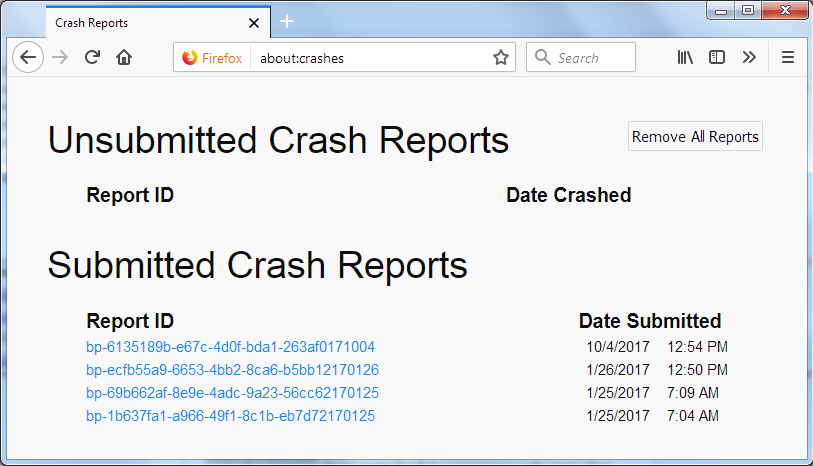
- Enter about:crashes in the Firefox address bar and press Enter. A Submitted Crash Reports list will appear, similar to the one shown below.
- Copy the 5 most recent Report IDs that start with bp- and then go back to your forum question and paste those IDs into the "Post a Reply" box.
Note: If a recent Report ID does not start with bp- click on it to submit the report.
(Please don't take a screenshot of your crashes, just copy and paste the IDs. The below image is just an example of what your Firefox screen should look like.)
Thank you for your help!
More information and further troubleshooting steps can be found in the Troubleshoot Firefox crashes (closing or quitting unexpectedly) article.
As requested, I have copied the crash information I found following your instructions
bp-95c8d58a-890e-4c16-b608-9a0cb0171218 12/18/2017 1:56 PM bp-6898ef30-6cae-4479-b9ac-2142b0171218 12/18/2017 1:55 PM bp-b5574b48-5cff-4a92-9b4d-f152c0171218 12/18/2017 1:47 PM bp-5a5159d5-7c26-4572-a63a-c076d0171218 12/18/2017 1:46 PM bp-a87a65e3-0441-463c-9bbf-eddbe0171218
12/18/2017 1:43 PM
No information in the report is useful.
Suggest : uninstall Firefox. Then Delete the Mozilla Firefox Folders in C:\Program Files and C:\Program Files(x86) Then restart system. Then run Windows Disk Cleanup. (Note: This should be Pinned and run Weekly, If never done below expect 10's of gig's) Then run it again and click the button that says Cleanup System Files. Note: your Firefox Profile is saved. But you should make a back up before you do : https://support.mozilla.org/en-US/kb/back-and-restore-information-firefox-profiles
https://support.mozilla.org/en-US/kb/export-firefox-bookmarks-to-backup-or-transfer
Reinstall with Current Release Firefox 57.0.2 with a Full Version Installer https://www.mozilla.org/firefox/all/
Check : go to the Firefox 3 Bar Menu --> Options --> Privacy & Security panel and under Permissions tick the setting to Prevent Accessibility Services from accessing your browser.
If issues : Go the 3 Bar Menu then Options --> General --> Performance and untick everything. change the recommended size lower then see how it runs. Note: 1 = No Multiprocessor = slow again. Try 2 Restart Firefox after making these changes please.
Please let us know if this solved your issue or if need further assistance.