


Windows 10 reached EOS (end of support) on October 14, 2025. If you are on Windows 10, see this article.

Vyhľadajte odpoveď

Vyhnite sa podvodom s podporou. Nikdy vás nebudeme žiadať, aby ste zavolali alebo poslali SMS na telefónne číslo alebo zdieľali osobné informácie. Nahláste prosím podozrivú aktivitu použitím voľby “Nahlásiť zneužitie”.

Ďalšie informácie

Why does Mozilla flag Google Calendar notifications as possibly spam

  • 1 odpoveď
  • 1 má tento problém
  • 118 zobrazení
  • Posledná odpoveď od user01229325
  • Archivované

Every time my Google Calendar sends me a notification message about an upcoming calendar entry, Thunderbird warns me the message may be scam. I see no way to disable this. The Google Calendar email address is in my Personal address book. The Options button has two possible choices: "Ignore warning for this message" and "Edit scam detection options". Or I could just click the X to close the warning bar.

If I choose to ignore the warning, I have to do this for every Google Calendar notification I get. The "Edit" option brings me to the options window, Security tab; this has only one option to uncheck the "Tell me if the message I'm reading is a suspected email scam". I see no way to have Thunderbird treat Google Calendar notifications as safe yet continue to warn me about other messages. There should be a way to whitelist email addresses.
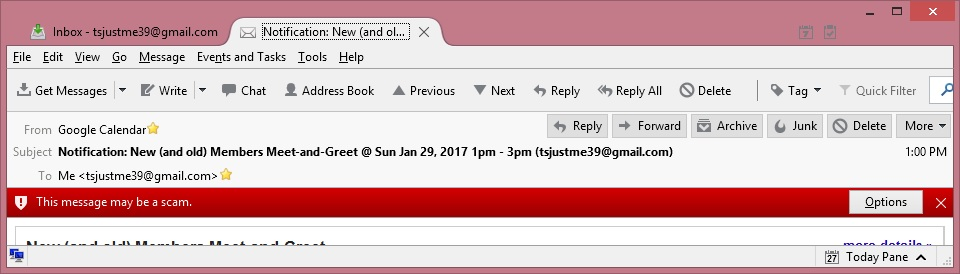
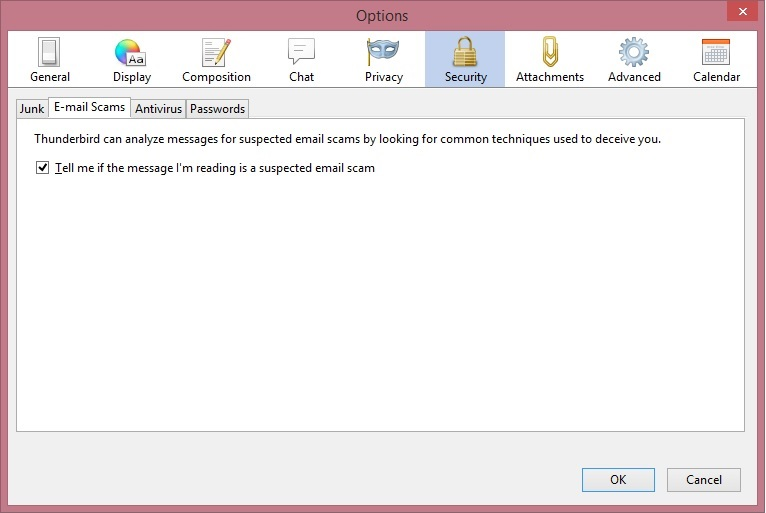
Every time my Google Calendar sends me a notification message about an upcoming calendar entry, Thunderbird warns me the message may be scam. I see no way to disable this. The Google Calendar email address is in my Personal address book. The Options button has two possible choices: "Ignore warning for this message" and "Edit scam detection options". Or I could just click the X to close the warning bar. If I choose to ignore the warning, I have to do this for every Google Calendar notification I get. The "Edit" option brings me to the options window, Security tab; this has only one option to uncheck the "Tell me if the message I'm reading is a suspected email scam". I see no way to have Thunderbird treat Google Calendar notifications as safe yet continue to warn me about other messages. There should be a way to whitelist email addresses.
Priložené obrázky

Všetky odpovede (1)

Thunderbird scam detection has two settings. On and off. There is no learning or whitelist function. Your choice is live with it or turn it off.