

Wątek został zarchiwizowany.
Jeśli potrzebujesz pomocy, zadaj nowe pytanie.

Zarchiwizowany
How can I merge or combine two email address lists in my address book?

When I transferred my address book from one computer to a second computer which already had an address book, the address lists did not combine so I now have duplicate lists. I would like to combine all these list into one list. How can I do this?
When I transferred my address book from one computer to a second computer which already had an address book, the address lists did not combine so I now have duplicate lists. I would like to combine all these list into one list. How can I do this?
Wszystkie odpowiedzi (3)
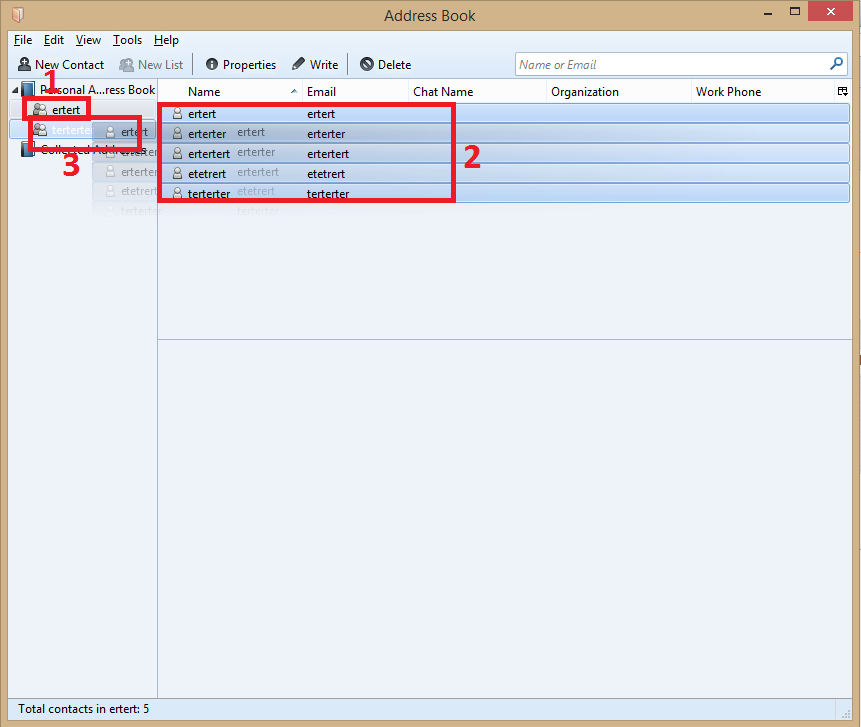
Go to Address Book.

1. Expand the lists, enter in the list.
2. Select all contact or which you want to import.
3. Drag and drop in the other list
Zmodyfikowany przez Diego Victor w dniu

This only works one entry at a time. Very tedious & time consuming. You can "select all" but "paste" is greyed out when you go to the target address book.
Paste is not mentioned once in the instructions. You select all and then click and drag them to the new book folder and drop them there.