Wątek został zarchiwizowany.
Jeśli potrzebujesz pomocy, zadaj nowe pytanie.

Zarchiwizowany
I cannot find an option to delete a page from Super Start - if I hover over page and right click my last of the 3 on drop down is OPTIONS, not delete

I do not see this:
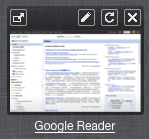
Please hover the mouse (cursor) over the snapshot, and you'll find there are 4 icons on the top. The icons are there for : open in newtab, edit, refresh and remove.
I do not see this:
Please hover the mouse (cursor) over the snapshot, and you'll find there are 4 icons on the top. The icons are there for : open in newtab, edit, refresh and remove.
Wszystkie odpowiedzi (1)
Hi, Sorry for the misleading, however, the icons are not shown in the context menu. It is on the top of the snapshot. Move your mouse (cursor) over the snapshot, then there will be a toolbar displayed on the top of the snapshot. There're 4 icons there.
See the attachment.
Hope that helps, thank you!