


THUNDERBIRD . Fonts

Please / Thanks -
How does one add additional fonts to Thunderbird for use in composing email messages?
Appreciate.
OTHER: Someone needs to revise and update this form! "Thunderbird version" (below) now prohibits inputting the complete length of Thunderbird's version; limits to "18 characters"; version is now 20 characters. Website input forms that have unrealistic character limitations really irritate me.
Wszystkie odpowiedzi (6)
Add additional fonts to your OS and thunderbird will use them. If you post a screenshot of whatever irritates you, I'm sure someone will respond. Thank you

In a Write window menu bar: Format > Font That will give you all fonts installed on your computer.
FONTS: Thank you.
DAVID: (OTHER: Someone needs to revise and update this form! "Thunderbird version" (below) now prohibits inputting the complete length of Thunderbird's version; limits to "18 characters"; version is now 20 characters. Website input forms that have unrealistic character limitations really irritate me.)
Umm, if you're not familiar with Thunderbird's website and can't understand a clearly written description I have no help to offer.
My challenge is that I do not know what you mean by thunderbird's version, limits to 18 characters.' Would you please restate differently? What 'thunderbird's version'? What '18 characters'?
1. How did my post get to you? 2. Via the website form 3. Look at the website form 4. Try filling it out 5. Your question will be answered
Hikermann said
1. How did my post get to you?
In a website forum that has clearly defined topics. The design or otherwise is not a valid topic.
2. Via the website form 3. Look at the website form 4. Try filling it out 5. Your question will be answered
Except no one here has asked a question on this forum for years. Just to be clear this is a Thunderbird peer support forum. ie other Thunderbird users. The topic of this forum is Thunderbird. Not this websites forms. You are off topic. See https://support.mozilla.org/en-US/kb/mozilla-support-rules-guidelines
Now just to try an understand I commenced to ask the community a question. I was presented with this which I assume it what you are talking about.

The image contains clear examples of what Thunderbird version looks like. I have a number of Thunderbird versions installed on my computer. One reports 140.11.0esr another reports 153.0a1 neither of those is more that 10 characters. If I use the information in the Help> About rather than the troubleshooting information to get a version I get 140.11.0esr (64-bit) and 153.0a1 (2026-05-30) (64-bit) respectively. You are not asked for the build date which the latter includes, only the version. which should fit into 18 characters for about another century at least, and 18 digit number being in the Quintillion range.
But to return this topic to being on task. Your choices of fonts are great. What your reader sees however will generally not be what you set unless you pick a font that is not widely installed on Windows Linux, MACOS and Android devices. The short answer is do not set a font. They are much more work than they are worth. But if you are committed to picking your own font I strongly suggest you become familiar with web safe fonts See https://www.litmus.com/blog/the-ultimate-guide-to-web-fonts for a nice general discussion. The use of @fontface is a technical topic and unless you are intending to write your own cascading style sheets for your email is not an extension to explore.
This is another topic on web safe fonts which includes examples. https://www.w3schools.com/cssref/css_websafe_fonts.php This is really aimed at the folk coding websites, but email is the same HTML as websites and it might explain my suggestion to just stick to the commonly installed fonts.
You might note that Thunderbird does not display some installed fonts in it's composition window that are shown elsewhere on your system. That is because they are not suitable for use with HTML and Unicode. The missing fonts are usually legacy ASCII and ANSI fonts that date from a time when a font had only 255 possible codes to allocate to a glyph. (8bits) Unicode can have up to 32bits per character, so a font may have up to a million individual glyphs
In addition to the information from christ1 here https://support.mozilla.org/en-US/questions/1584553#answer-1822077 you can simply use the drop down in the composition window as shown below.
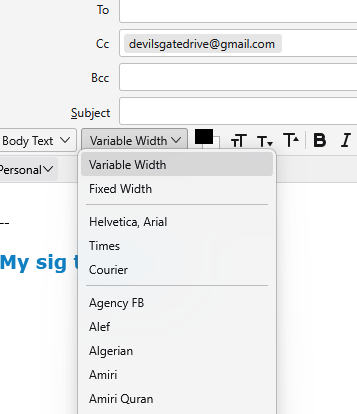
But I would recommend leaving it with Variable width and let the recipients device determine it's best fit variable width font for the display. Otherwise what you set risks being displayed a good old fashioned courier predating the IBM golf-ball typewriter if the recipient has not got it installed.
.