


Windows 10 reached EOS (end of support) on October 14, 2025. If you are on Windows 10, see this article.

Przeszukaj pomoc

Unikaj oszustw związanych z pomocą.Nigdy nie będziemy prosić Cię o dzwonienie na numer telefonu, wysyłanie SMS-ów ani o udostępnianie danych osobowych. Zgłoś podejrzaną aktywność, korzystając z opcji „Zgłoś nadużycie”.

Więcej informacji
Open

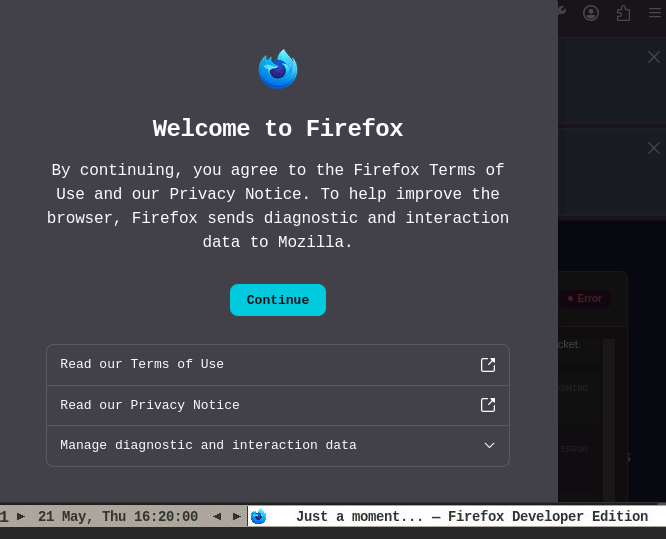
i build an automation tool by using your firefox dev addition but recently i am seeing this agree to terms popup i wanna know how can i stop that or agree to that with fags like start firefox with fags which disable or auto agree to that

Vibeshiftbots

Hello,

I am building a browser automation tool using Firefox Developer Edition. Recently, I started running into an issue where an "Agree to Terms" (or Privacy/Welcome) popup appears when the browser launches.

Because this is an automated environment, this popup blocks my scripts from running properly because human interaction is required to click past it.

My Setup:

Browser: Firefox Developer Edition (latest version)

Use case: Automated testing/scripting

What I am trying to achieve: I need to know how to stop this popup from appearing entirely, or how to automatically agree to it. Are there specific command-line flags (similar to Chrome's startup flags) or about:config profile preferences I can inject when launching the browser to bypass this?

I have attached a screenshot of the exact popup I am seeing.

Any advice on the exact flags or preferences needed to silence this for automation would be greatly appreciated. Thank you!
Hello, I am building a browser automation tool using Firefox Developer Edition. Recently, I started running into an issue where an "Agree to Terms" (or Privacy/Welcome) popup appears when the browser launches. Because this is an automated environment, this popup blocks my scripts from running properly because human interaction is required to click past it. My Setup: Browser: Firefox Developer Edition (latest version) Use case: Automated testing/scripting What I am trying to achieve: I need to know how to stop this popup from appearing entirely, or how to automatically agree to it. Are there specific command-line flags (similar to Chrome's startup flags) or about:config profile preferences I can inject when launching the browser to bypass this? I have attached a screenshot of the exact popup I am seeing. Any advice on the exact flags or preferences needed to silence this for automation would be greatly appreciated. Thank you!
Załączone zrzuty ekranu

Wszystkie odpowiedzi (1)

You have to set up the SkipTermsOfUse policy.

Zadaj pytanie

Aby odpowiadać na posty, musisz zalogować się na swoje konto. Zadaj pytanie, jeśli nie masz jeszcze konta.