


Opening screen has changed - I haven't changed my settings

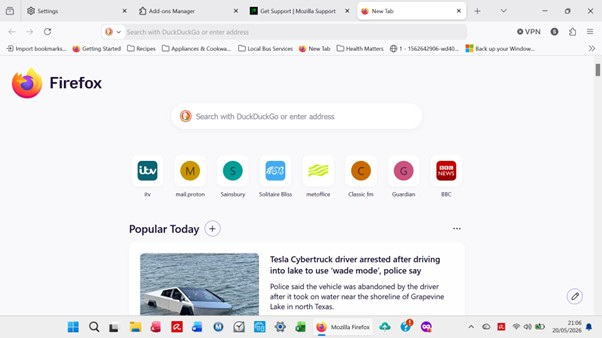
When I open firefox everything is in the middle of the screen instead of spread across the screen - this started today and is the same if I click new tab - it has the same layout. As far as I am aware I haven't changed anything in settings so either something changed with a firefox update or possibly with a windows update. Any suggestions would be very welcome as it is extremely irritating having to continually scroll down to see things
Wszystkie odpowiedzi (2)

shirley.daffurn1, yes, there is a new New Tab page. See here: https://connect.mozilla.org/t5/discussions/firefox-151-introduces-a-fresh-new-look-for-home-amp-new-tab/td-p/125715
P.S. You might be able to (temporarily) revert back to the previous New Tab page. Saw elsewhere the suggestion of going to about:config, searching for "browser.newtabpage.activity-stream.nova.enabled" and setting it to false.
But the developers are listening to feedback at the link that I posted, so it might be worth posting yours there if you wanted to.
Zmodyfikowany przez TechHorse w dniu