


Red text fraud warnings inserted in emails

Just recently, some of the emails I receive are full of messages in red next to almost every line of the email saying that things like "Likely fraud detected" or "Do not trust this website." There is no indication as to what program is creating all these warnings. I have tried to turn off anything I can find in Thunderbird's security settings to no avail. The main source of emails with these warnings is "Beermenus.com" which I have been receiving for quite awhile before this started. Any ideas on what to do
Wszystkie odpowiedzi (3)

Can you show us a screen shot of the warnings? That might help identify the source of the warnings.
Thunderbird does have a feature that is supposed to warn you of suspicious messages and links. That setting is found in <Settings | Privacy & Security | Security | Scam Detection>. Is that option enabled for you?
Here's an article that talks about the feature and how it works. It refers to an older version of Thunderbird and things look a little different now, but they work basically the same.
https://support.mozilla.org/en-US/kb/thunderbirds-scam-detection.
If this is not what you're seeing, I would suspect your anti-virus program.
The scam detection is not enabled in Thunderbird.
Here is a screenshot:
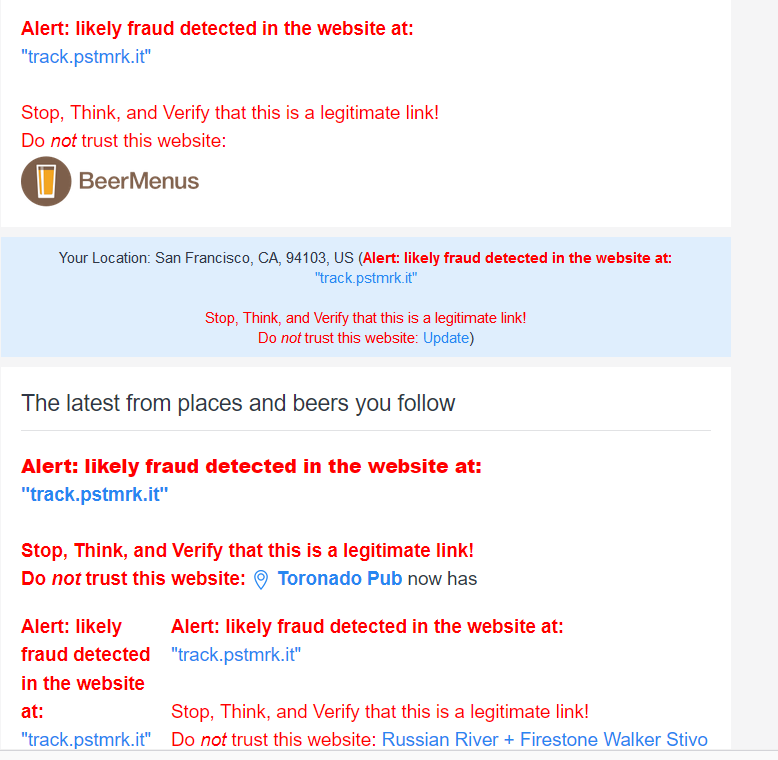
I'm certain that that's not a Thunderbird-generated warning. I have never seen anything that looks like that, and just the appearance and wording do not look or sound like Thunderbird. So, the question is, whose is it?
The first thing I'd question is your anti-virus program, assuming you use one. What is it? Does it have some spam/scam detection/warning features that you can turn off or indicate that these messages are trusted (if you do trust them - they look a suspicious to me.)
Who is your email provider? Is yours a POP3 or IMAP account? If POP3 and you're set up to leave messages on the server, or if IMAP, use your email providers web mail interface to see of the warning is present on the server's copy. That would indicate that the warning is placed there by them. Perhaps they have a scam warning feature that you can turn off or control its settings?
The more I look at that warning, the less I trust beermenus. They are either surreptitiously tracking you or it's not really them and they are being spoofed. The "track.pstmrk.it" site appears to be a tracking site in Italy. And what do that Russian River and Firestone Walker sites have to do with beer menus? I would be inclined to block them entirely unless I really had to know what beers were on the menu.