Otwórz
Turning off the Firefox Profiles message

I have been using the old firefox profiles system for ages. However, whenever I open my browser (in one of about 5 profiles), I always get this pop-up saying "Say hello to Firefox profiles". It is incredibly annoying and turning me off Firefox completely! Can somebody tell me how to turn this message off? I assume it's in the settings somewhere.
I have been using the old firefox profiles system for ages.
However, whenever I open my browser (in one of about 5 profiles), I always get this pop-up saying "Say hello to Firefox profiles". It is incredibly annoying and turning me off Firefox completely!
Can somebody tell me how to turn this message off? I assume it's in the settings somewhere.
Wszystkie odpowiedzi (2)

From https://www.reddit.com/r/firefox/comments/1rzesbn/im_begging_someone_to_please_help_me_disable_this/
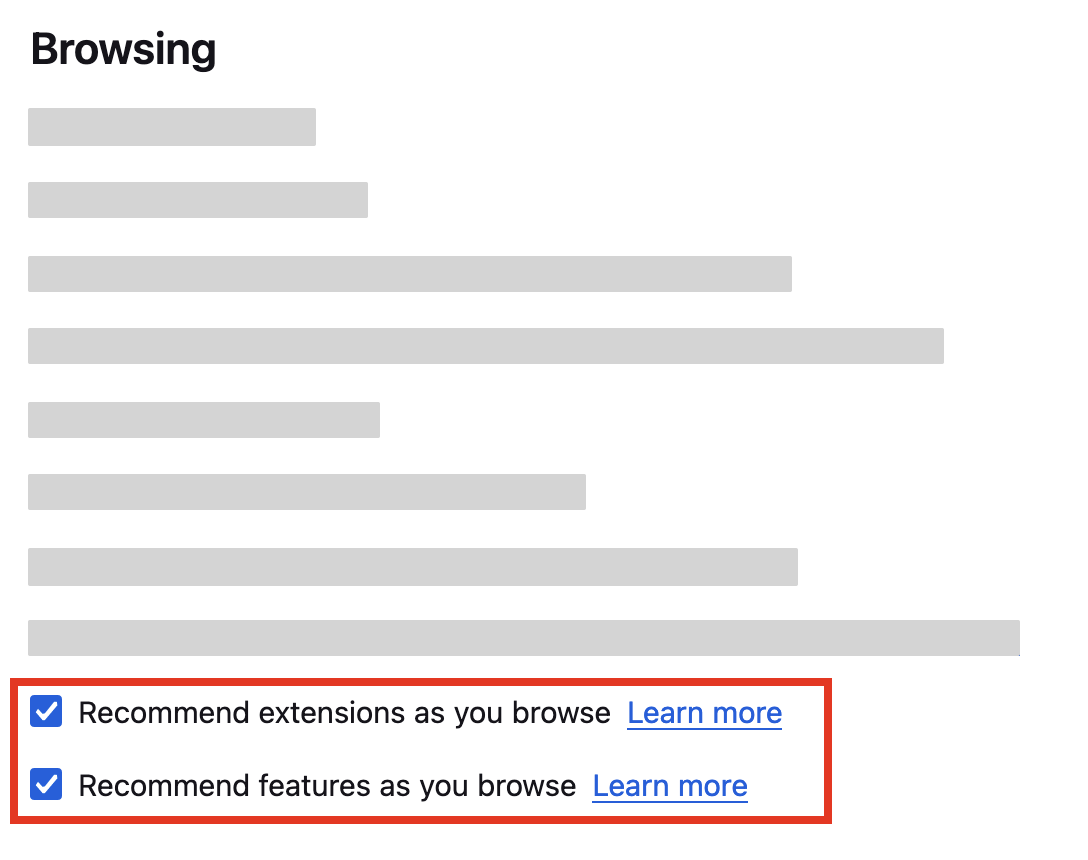
about:preferences#general, uncheck "recommend features as you browse" and optionally extensions
You can also open Firefox settings from the Firefox menu  . Click Settings in the menu and UNcheck "Recommend features as you browse" in the General panel, under Browsing.
Related KB article: Recommendations from Firefox
Opt out of all recommendations from Firefox settings