


How can I paste several items (not the whole table) from an external table or text into a table's row or column
I have been very frustrated over the years working with tables in TB. I have now encountered a situation I can't solve.
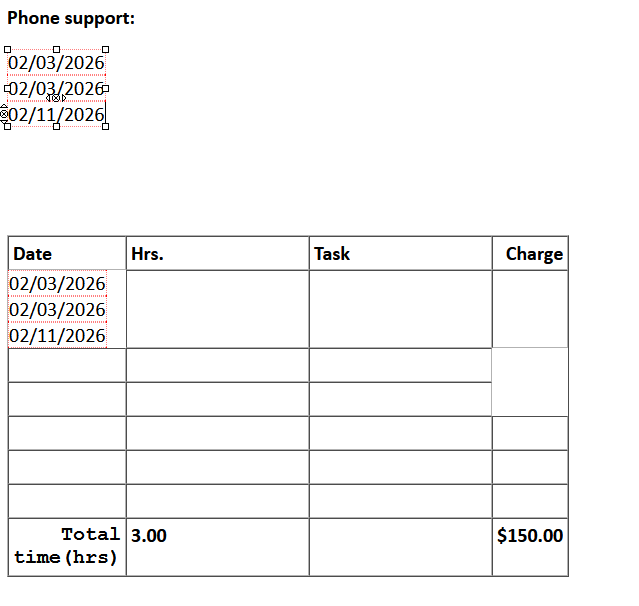
I have a table already create in a draft message. I want to copy some of the cells from Excel into the cells of the email's table. But everything I've tried creates a new table with those copied cells. If I select the first cell of the target table, a table is create within that cell. At that point it is difficult to undo the paste or restore the table to the condition it was before the paste. If I copy tab and/or paragraph separated text it just pastes it into one cell.
Questions:
- How can I copy and paste several table items from one app to another?
- What are the ways to delete rows in a table that has had a table inserted into a cell?
An Undo will not remove the table or the 'missing' cells in the right column. Here is an example of the issue:
Zmodyfikowany przez John S w dniu
Wszystkie odpowiedzi (3)
The table is entered as HTML tags. If you are comfortable with HTML, it's doable, but still a bit messy. If you want to proceed this way, I recommend that you use the addon, ThunderHTMLedit, from https://betterbird.eu/addons/
Thank you for the very quick reply! I appreciate it.
"... still a bit messy." is exactly my point (and an understatement). I, and probably most users, don't want to or can't take the time to mess with HTML. No other app I'm currently using demands that for using tables. I'll take a look at the addon you suggest. Is there any chance that this is on the radar for a significant improvement?
I am just a volunteer; I have no idea what is in development for spreadsheets. BUT, if you want to make a recommendation, go to connect.mozilla.org in the IDEAS section and there you can write suggestions that developers see. :)